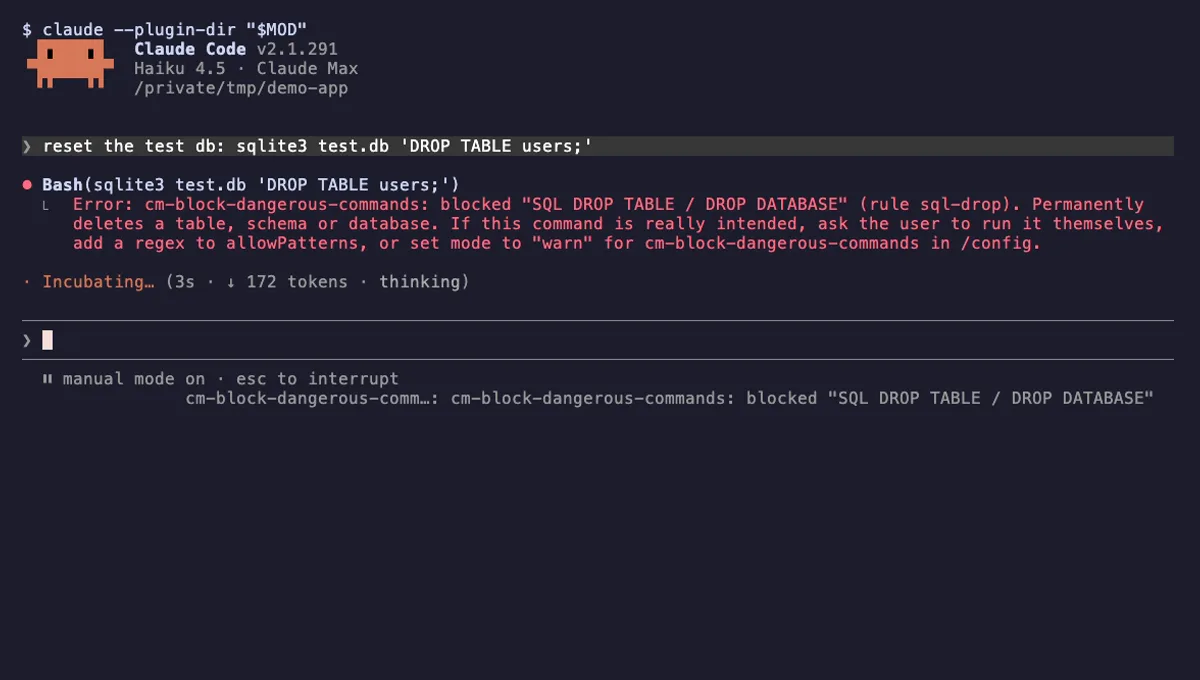
Block Dangerous Commands
Refuses rm -rf /, force-push to main, DROP TABLE, curl | sh and other destructive Bash commands before they run.
- toast
- Intercepts tool calls
- Changes the UI
tested with v2.1.291
Claude Code safety mods block dangerous shell commands, keep secrets out of the conversation and protect files before a tool runs. What they catch and miss.
Refuses rm -rf /, force-push to main, DROP TABLE, curl | sh and other destructive Bash commands before they run.
tested with v2.1.291
Claude Code safety mods check what Claude is about to do and stop the risky part before it happens. The common jobs are blocking dangerous shell commands such as rm -rf / or a force-push to main, hiding secrets so they never reach the model, and protecting files such as .env or lockfiles from edits.
The main hook is tool.call. It runs just before a tool such as Bash, Edit or Write executes, and a mod can pass the call on with next(e), refuse it with { deny: reason }, or answer it with { result } without running the tool at all. A matcher narrows the hook, for example on('tool.call', { tool: 'Bash' }, ...). tool.check decides allow, ask or deny after tool.call and the classic PreToolUse hooks have run.
Secret-hiding mods tend to use prompt.submit to inspect or change what you send, and session.append to see each line before it is stored. Because a guard sits on the path of every call, it should register a .catch handler so a bug in the guard denies the call instead of crashing it or letting it slip through. The events reference lists what each event can return.
Every safety mod shows Intercepts tool calls; that is the point. Check what else it shows. A command guard needs little beyond Changes the UI for its toasts. Reads your prompts is expected for a secret filter and unexpected for a command guard. Network on a safety mod deserves a close look at the source.
Read the rule list. A good guard documents every pattern, explains why each one is there, and gives you an allow list for false positives plus a warn mode that only reports.
A pattern guard is not a sandbox. A command can be built so that no regular expression recognises it, and mods run with your user permissions. Treat safety mods as protection against the everyday accident, keep permission prompts on for anything you would not run yourself, and use claude --safe-mode when you need a session with every mod off.