
Context Meter
Context-window fill, 5-hour and 7-day plan usage and session cost in the status line, plus a warning near the limit.
- status
- toast
- Changes the UI
tested with v2.1.291
Claude Code status line mods put live facts such as branch, context fill, cost or a counter in the status line or a band above the prompt, so you never ask.
Context-window fill, 5-hour and 7-day plan usage and session cost in the status line, plus a warning near the limit.
tested with v2.1.291
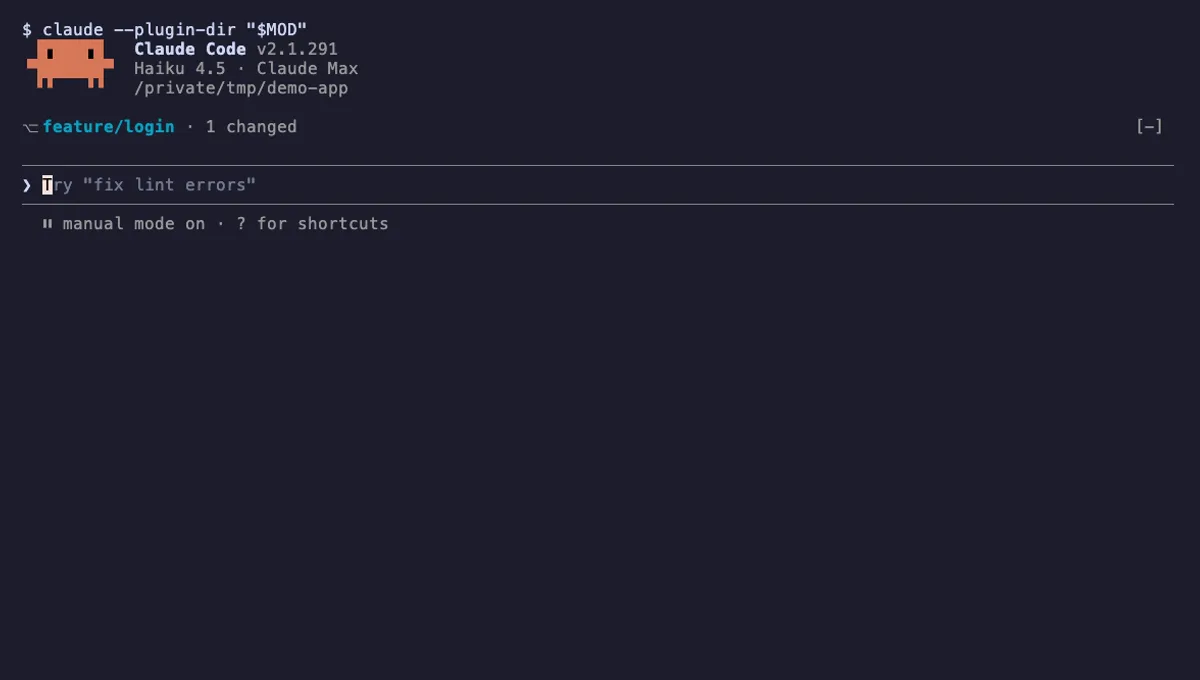
Shows your git branch, changed-file count and ahead/behind status in a one-line band above the Claude Code prompt.
tested with v2.1.291

Counts Claude's tool calls per turn and session, shows the count by the spinner, and adds /tally for a breakdown.
tested with v2.1.291
Claude Code status line mods show a small piece of live state while you work: the current git branch, how full the context window is, how much plan usage is left, the session cost, or how many tools Claude has called this turn. You read it at a glance instead of typing a command and waiting for an answer.
There are two surfaces. The first is the status line itself, which a mod writes to with $.ui.status('...'). It takes a plain string and is the cheapest way to show a number. The second is a one-line band above the input box, which a mod draws by handling the ui.render event for the AbovePrompt render site and returning Box and Text elements from $.ui.resolve(e). A band can use colour, bold and truncation, so it suits richer lines such as ⎇ main · 3 changed · ↑1 ↓0.
Refresh points are usually session.start for the first reading, turn.complete after Claude answers, session.compact after a compaction, and $.clock.every(ms) as a slow fallback. A mod that reads $.session.usage() without a breakdown costs nothing, because it reads figures Claude Code already has. The full list of events and render sites is in the mods reference.
Look at the permission badges. A pure indicator should show Changes the UI and little else. Runs commands is normal for a git indicator, which has to run git status, but read the "How it works" section to confirm the exact program and arguments. A status line mod that also shows Network or Reads your prompts needs a clear reason.
Next, look at the refresh interval in the "Customize it" table. On a large repository a short timer means git status runs often, which you can notice on a slow disk. Finally, check the tested version on the mod page; mods need Claude Code 2.1.287 or later in the terminal.
Yes. A typical setup is a branch band above the prompt plus a context and cost meter in the status line. Turn off the parts you do not use through each mod's settings in /config, and disable a whole mod from the Installed tab of /plugin if the line gets noisy.