Deck Claude Code HUD: plan bars, usage limits and a pet above your prompt
A HUD above the Claude Code prompt: plan bars, subagent strips, context, usage-limit countdowns and a pet.
Permissions
- NetworkCan make HTTP requests or talk to MCP servers ($.http.fetch / $.mcp.*).
- Intercepts tool callsSees every tool call Claude makes (tool.call / tool.check) and could block or change it.
- Reads your promptsCan see what you type and the conversation transcript (prompt.* / session.append / session.messages).
- Changes the UIDraws into the Claude Code interface: bands, panes, status text, toasts (ui.render / $.ui.*).
- Adds commands/toolsRegisters new slash commands or tools that you or Claude can invoke ($.command.register / $.tool.register).
- Stores dataKeeps data between sessions in the plugin's private store ($.store.*).
- Plays soundCan play audio or speak text ($.audio.*).
- tested with
- v2.1.310
- last tested
- requires
- Claude Code ≥ 2.1.287
- surfaces
- above-prompt, pane
- source
- nvr0x5 (MIT)
Install inside Claude Code:
/plugin install deck --marketplace nvr0x5/claude-deckWhat does this mod do?
Deck is a community mod by nvr0x5 (nvr0x5), published as claude-deck. It is a Claude Code HUD: a collapsible band above the prompt that shows what Claude is doing, how full the context is, and where your usage limits stand. It runs in the terminal and in the Desktop app's Code tab.
According to the author's README, the band can show these rows:
- Plan bar: steps, the current step and stages, taken from Claude's todo list, the task tools, or a plan you approve in plan mode.
- Activity bar: what Claude is doing right now, such as
Editing auth.ts, for turns without a todo list. - Agent strips: each subagent's current tool, model and elapsed time, under the bar that started it.
- Context and 5h / 7d limits: percent used, a live countdown to each reset, and a burn rate.
- Spend (opt-in): what this session cost, summed into today and this month.
- Model route: shows what the separate jev-model-router mod decided, if you run it.
- Clock, weather and folder in the header, and a small pet that walks along the band and raises a
!when something needs you.
/deck toggles collapsed and expanded. There are six bar styles and three collapsed looks (chips, one text line, rings).
Install
The install block above adds the author's own marketplace and installs the plugin from it. Then run /deck demo to see a sample plan, sample limits and a sample route until real readings arrive. To try it from a clone without installing, use claude --plugin-dir ./claude-deck.
$ install deck
Requires Claude Code ≥ 2.1.287
Installs from the author's own marketplace: nvr0x5/claude-deck
1.One line, inside Claude Code
/plugin install deck --marketplace nvr0x5/claude-deckPaste into a running session (v2.1.275+). Claude Code asks to add the marketplace first.
2.From your shell
claude plugin marketplace add nvr0x5/claude-deck claude plugin install deck@deckThen run /reload-plugins in any session that is already open.
3.Try it without installing
git clone https://github.com/nvr0x5/claude-deck claude --plugin-dir ./claude-deckLoads the mod for one session only. Nothing is added to your settings.
How it works
The plugin is one hooks module, hooks/register.js, with pure drawing helpers in theme.js, pet.js, styles-terminal.js and styles-desktop.js. A 150 ms $.clock.every tick redraws the band, steps the pet and polls subagents. Usage is re-read every 400 ticks (about a minute). Tool calls are only observed. This is the tool.call hook:
on('tool.call', async ($, e, next) => {
  const key = e.agentId ?? 'main'
  // ...bookkeeping for the activity bar, todo list and agent state...
  let ran
  try {
    ran = await next(e)
  } finally {
    if (e.tool_use_id) inFlight.delete(e.tool_use_id)
    // ...
  }
  // ...read the result to update task and plan bars...
  return ran
})
When tool.check returns an ask verdict, Deck waits 600 ms, then marks the bar amber ("needs you") and, if auto-expand is on, opens the band. A reply that ends in ? does the same. Sounds are five small WAV files bundled in sounds/.
Customize it
All settings are slash commands, saved in the plugin's store:
/deck styleopens a picker with live previews;/deck style <name>setssegments,line,solid,dots,pixelorspark(each app keeps its own choice)./deck <section> on|offforplans,agents,context,limits,route,pet,clock,weather,folder, orall./deck collapsed chips|text|rings,/deck size compact|roomy,/deck auto on|off,/deck sound on|off,/deck cost on|off./deck city <name>sets the weather city and turns weather on;/deck panelopens Deck in a pane;/deck statusprints what the band shows.
Permissions & safety
We read every file the plugin loads: plugin.json, marketplace.json, hooks/hooks.json, register.js (2,045 lines) and the four helper modules it imports, plus SECURITY.md, the README and the LICENSE. There are no scripts, no package.json, no binaries other than the WAV files and image assets, and no minified or encoded code. We found:
- Network:
$.http.fetchis called twice, atregister.js:1082andregister.js:1713, both to Open-Meteo (api.open-meteo.com,geocoding-api.open-meteo.com). They run only after you set a city with/deck city, and send that city name or its coordinates. Weather is off by default. - Processes and file writes: none. There is no
$.processand no$.fs. State goes to$.store(prefs, usage history, spend totals).$.env.getreads onlyHOME, to show~in the folder label. - Daemons and secrets: no background service outside Claude Code, no tokens or credential files, no telemetry.
- Model influence: it injects nothing into prompts or tool results. It reads the typed prompt only to title a bar.
- Gating hooks: the validator flags 11 hooks without
.catch. They observe and callnext(e); none blocks or rewrites a prompt or tool call. The exception isui.statusandui.log: while quiet mode is on (default) and the route row is shown, Deck swallowsjev ·status lines and moves[jev-model-router]log lines to the debug log. Only another mod's output is affected. - External requirements: none required. The model route row needs the separate jev-model-router mod. The pet needs an image-capable terminal.
- License: MIT, with a LICENSE file. Desktop drawing techniques are credited to an MIT-licensed mod, per the header in
register.js.
claude plugin validate passed with no errors and one non-blocking warning (no plugin icon). Running claude plugin test on Claude Code 2.1.310 gave 40 passes and 2 failures: "an approved plan becomes a bar with stages" and "task tools: ids and statuses come from the results". In both, the plan or task bar did not appear in /deck status. We did not find the cause, so plan-mode and TaskCreate/TaskUpdate bars may not draw correctly on this version. The todo-list bar, the activity bar, agent strips, limits and the style tests passed. We have not run the mod interactively.
- Network
- Can make HTTP requests or talk to MCP servers ($.http.fetch / $.mcp.*).
- Intercepts tool calls
- Sees every tool call Claude makes (tool.call / tool.check) and could block or change it.
- Reads your prompts
- Can see what you type and the conversation transcript (prompt.* / session.append / session.messages).
- Changes the UI
- Draws into the Claude Code interface: bands, panes, status text, toasts (ui.render / $.ui.*).
- Adds commands/tools
- Registers new slash commands or tools that you or Claude can invoke ($.command.register / $.tool.register).
- Stores data
- Keeps data between sessions in the plugin's private store ($.store.*).
- Plays sound
- Can play audio or speak text ($.audio.*).
Compatibility & troubleshooting
The README says Deck needs Claude Code 2.1.286 or later; we tested with 2.1.310. If the band is missing, run /deck status, check that /deck all on has not been switched off, and run /reload-plugins after installing into an open session. If a plan from plan mode or a TaskCreate list shows no bar, that matches the two failing tests above. A todo list written with TodoWrite and the activity bar are covered by passing tests. To drop the extras, /deck pet off and /deck clock off; to remove Deck, /plugin disable deck.
FAQ
- Does Deck change my prompts, requests or tool calls?
- No. Its tool.call and tool.check hooks record what happened and pass every call straight through with next(e). The one thing it rewrites is output of another mod, the jev-model-router status and log lines, and only while quiet mode is on and the route row is shown. /deck quiet off turns that off.
- Does Deck send my data anywhere?
- Only if you set a weather city. The two network calls in the code go to geocoding-api.open-meteo.com and api.open-meteo.com, with the city name or its coordinates. Weather is off by default and nothing else leaves the machine.
- Where do the usage limits and reset countdowns come from?
- From $.session.usage() and the session.measure event, which is what Claude Code itself reports for your plan. Deck keeps a short history of those readings in its own store to draw sparklines and a burn rate such as +12%/h.
- Why do I see no pet in my terminal?
- In the terminal the pet is a picture, so it needs a terminal that shows images. The author lists Ghostty, Kitty, WezTerm and iTerm2. Elsewhere it stays hidden. /deck pet off or /deck all off removes it everywhere.
- Does it work in the VS Code extension?
- Partly. The author says the extension's chat panel runs /deck commands but does not draw a mod's band. /deck panel opens Deck in a pane, or you can run claude in VS Code's terminal.
# Related mods
 Featured
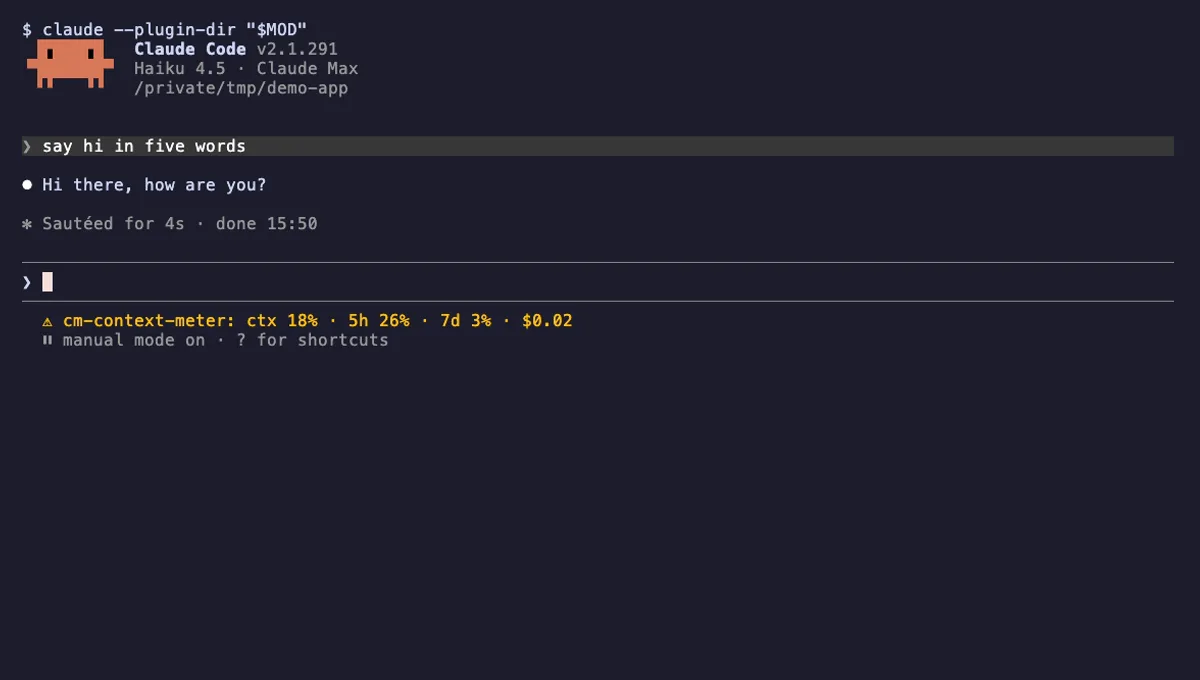
Context Meter
Context-window fill, 5-hour and 7-day plan usage and session cost in the status line, plus a warning near the limit.
- status
- toast
- Changes the UI
tested with v2.1.310
cctop Dashboard Pane
A btop-style dashboard docked beside the Claude Code transcript: context, cost, rate limits, tools, agents and a coach.
- pane
- status
- toast
- Reads files
- Writes files
- Runs commands
- Intercepts tool calls
- Changes the UI
- Adds commands/tools
- Stores data
tested with v2.1.291
 Featured
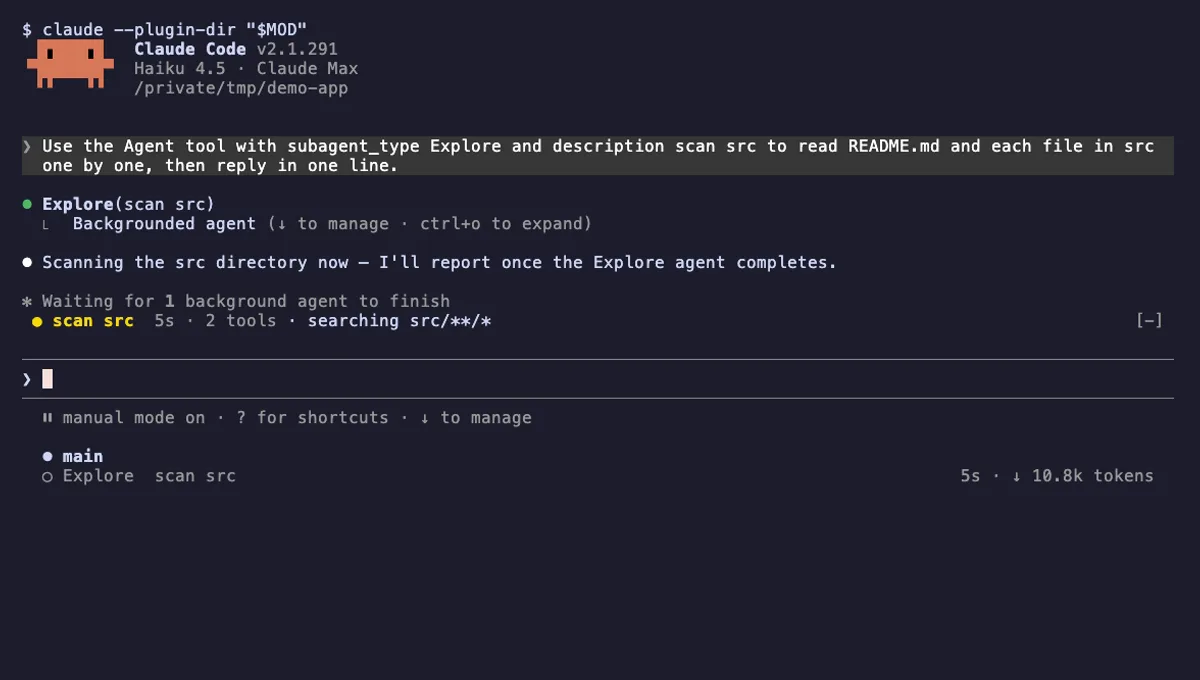
Agent Radar
One live line above the prompt per running subagent: time, tool count and what it is doing now, plus a /radar pane.
- above-prompt
- pane
- toast
- Intercepts tool calls
- Reads your prompts
- Changes the UI
- Adds commands/tools
tested with v2.1.291
More in Status line & prompt bar, Context, quota, cost.