glowup, a Claude Code theme mod with a side pane, activity band and pixel pet
A side pane for changes, subagents and context, an activity band, JSON packs and themes, and a pixel pet.
Permissions
- Reads filesCan read files and list directories on your machine ($.fs.read / list / stat / exists).
- Writes filesCan create or overwrite files on your machine ($.fs.write).
- Runs commandsCan run shell programs on your machine ($.process.run / spawn). Check the source for exactly which ones.
- NetworkCan make HTTP requests or talk to MCP servers ($.http.fetch / $.mcp.*).
- Calls the model (uses your quota)Can send its own requests to Claude, which count against your plan's usage ($.model.* / $.agent.spawn).
- Intercepts tool callsSees every tool call Claude makes (tool.call / tool.check) and could block or change it.
- Reads your promptsCan see what you type and the conversation transcript (prompt.* / session.append / session.messages).
- Changes the UIDraws into the Claude Code interface: bands, panes, status text, toasts (ui.render / $.ui.*).
- Adds commands/toolsRegisters new slash commands or tools that you or Claude can invoke ($.command.register / $.tool.register).
- Stores dataKeeps data between sessions in the plugin's private store ($.store.*).
- tested with
- v2.1.310
- last tested
- requires
- Claude Code ≥ 2.1.287
- surfaces
- pane, above-prompt, spinner, status, transcript
Install inside Claude Code:
/plugin install glowup --marketplace NovusEdge/glowupWhat does this mod do?
glowup is a community mod by Aliasgar Khimani (NovusEdge), published in his glowup repository. It is a Claude Code theme mod that goes well beyond colors: it adds a pane for changed files, subagents and context, a one-line activity band above the prompt, packs and themes written as JSON, a status line you can arrange, and a pixel pet named Clawd.
The pane has five tabs. Changes lists the files Claude edited or created, with added and removed line counts from git. Diff shows those changes as hunks. Agents lists subagents with elapsed time, tokens and the tool each is running. Plan & context shows Claude's task list and a context bar split by source, with the auto-compact point and the heaviest sources you could trim. Music shows the track playing in the Spotify desktop app. Below the tabs a status box shows what Claude is doing and a row of hearts for the usage you have left.
When the pane is not docked, the band above the prompt shows a short summary while Claude works. The pane docks beside the transcript in fullscreen on a wide terminal. A pack sets colors, row style, border and spinner under one name. Four ship with the mod: classic, crt, cozy and arcade.
Install
Use any of the methods in the install block; they install straight from the author's own marketplace. The author's README also offers a curl | sh installer; we did not use or review it, and you do not need it. glowup needs Claude Code 2.1.289 or later. After installing, run /glowup for the short list of commands.
$ install glowup
Requires Claude Code ≥ 2.1.287
Installs from the author's own marketplace: NovusEdge/glowup
1.One line, inside Claude Code
/plugin install glowup --marketplace NovusEdge/glowupPaste into a running session (v2.1.275+). Claude Code asks to add the marketplace first.
2.From your shell
claude plugin marketplace add NovusEdge/glowup claude plugin install glowup@glowupThen run /reload-plugins in any session that is already open.
3.Try it without installing
git clone https://github.com/NovusEdge/glowup claude --plugin-dir ./glowupLoads the mod for one session only. Nothing is added to your settings.
How it works
glowup is one hooks module, hooks/register.tsx, plus about seventy helper modules and four small client modules for the field, pet, seek bar and spinner. It wraps tool.call, agent.spawn and the turn events to feed a model of what Claude is doing, and it redraws the pane, band, spinner and transcript rows from that model. This is how it learns that a permission dialog is open, from register.tsx:
on('classic.PermissionRequest', async ($, e, next) => {
  if (off) return next(e)
  // A hook below may answer the request itself, and then no dialog opens.
  const r = await next(e)
  if (!r?.decision && modeAsksPerson(e.permission_mode)) {
    const id = dialogCall(flying, e.tool_name, e.tool_input)
    if (id) feed($, { type: 'needs-you', at: Date.now(), toolUseId: id, what: approvalLabel(e.tool_name, (e.tool_input ?? {}) as Record<string, unknown>) })
  }
  return r
})
The hook returns the result unchanged; it only records that you are being asked. The status line takeover works through a shell script that prints a line glowup writes for the session, and falls back to your original command when that file is missing or more than 10 minutes old.
Customize it
Settings appear in Claude Code's /plugin menu: theme, reduced motion, pack, spinner, pet, speech bubbles and the status line fields. The same choices are available as commands, such as /glowup pack arcade, /glowup theme, /glowup spinner, /glowup pet, /glowup color <role> <#hex> and /glowup statusline fields activity ctx / 5h week. /glowup config opens a settings screen in a new terminal window. The repository also ships a glowup-pack skill that lets Claude write a pack from a palette, an image or a description, saved under ~/.claude/glowup/packs.
Permissions & safety
We read the manifest, hooks/hooks.json, register.tsx and the helper modules for networking, processes, file writes and prompt text, the status line script, the bundled skill, package.json and the Go source of the installer. We did not read every helper module line by line, did not review the Go installer in full, and did not run the released installer binary or the curl | sh script. There are no install scripts and no minified code in the plugin. Here is what we found:
- Changes settings only after you agree. On first run,
$.ui.askasks whether glowup may draw your status line. Yes writes~/.claude/glowup/statusline.sh, stores your old status line in the plugin store and editssettings.json(hooks/statusline.ts:80-100). No leaves it alone, and/glowup statusline restoreundoes it. - Runs commands.
gitfor change counts,uname,date,rm,mv,curl,tarandshfor housekeeping and the installer download,osascriptfor Spotify on macOS and for opening a Terminal or iTerm window for/glowup config. - Network.
$.http.fetchis used for URLs you give it (packs, themes, pets, https only) and for the Spotify Web API (hooks/music/webapi.ts:4). The first/glowup configor Spotify login downloadsglowup-installerand itschecksums.txtfrom the author's GitHub releases and checks the SHA-256 (hooks/launch.ts:105-145). The checksum comes from the same release, so it detects a damaged download, not a hostile release. The Go source is in the repo underinstaller/. - Writes go under
~/.claude/glowup/(packs, themes, pets, status files, Spotify tokens with mode 0600 written by the helper) and the plugin store, plussettings.jsonas above./glowup export konsolewrites a Konsole color scheme. - Model use. With bubbles set to
haiku, one short call per turn at most goes to Claude Haiku. The prompt holds glowup state only (mood, pose, a capped label, test counts, time of day), not your prompts or file contents (hooks/bubbles.ts:56-66). The default is template lines with no model call. - Prompts and tools.
prompt.submitdrops a pasted/glowup ...command and runs it itself. Other prompts pass through. The tool and permission hooks pass results through. NoadditionalContextand no hidden instructions were found. - No daemon outlives Claude Code, and no telemetry was found.
- External requirements. The Spotify tab needs the Spotify app. Spotify's queue, likes and devices need Premium and a free developer app of your own.
- License. MIT, with a LICENSE file.
claude plugin validate reported no errors and one directory warning (no icon). It lists nine hooks without a .catch, such as tool.call and prompt.submit. claude plugin test ran 1,218 tests: 1,207 passed and 11 failed. Six failures are permission-alert tests that time out because the test engine has no clock.every implementation, and the other five are single tests for a Clawd state, an engine-refusal list, a seek-bar surface, a Friday sign and a pet sprite size. They run against a test engine, not the shipped mod.
- Reads files
- Can read files and list directories on your machine ($.fs.read / list / stat / exists).
- Writes files
- Can create or overwrite files on your machine ($.fs.write).
- Runs commands
- Can run shell programs on your machine ($.process.run / spawn). Check the source for exactly which ones.
- Network
- Can make HTTP requests or talk to MCP servers ($.http.fetch / $.mcp.*).
- Calls the model (uses your quota)
- Can send its own requests to Claude, which count against your plan's usage ($.model.* / $.agent.spawn).
- Intercepts tool calls
- Sees every tool call Claude makes (tool.call / tool.check) and could block or change it.
- Reads your prompts
- Can see what you type and the conversation transcript (prompt.* / session.append / session.messages).
- Changes the UI
- Draws into the Claude Code interface: bands, panes, status text, toasts (ui.render / $.ui.*).
- Adds commands/tools
- Registers new slash commands or tools that you or Claude can invoke ($.command.register / $.tool.register).
- Stores data
- Keeps data between sessions in the plugin's private store ($.store.*).
Compatibility & troubleshooting
Tested with Claude Code 2.1.310. The author's README says 2.1.289 or later. If glowup does not show up:
- Run
/reload-pluginsafter installing into an open session. - If you see
Failed to load hooks ... expected record, received undefined, update Claude Code. - The pane docks only in fullscreen on a wide terminal (144 columns, or 110 once you have opened it yourself). Otherwise you get the band, and
/glowup paneopens a drawer above the prompt. - If both an installed copy and a clone are loaded, the clone wins and the installed copy turns itself off.
- A project or local
statusLinesetting overrides the one glowup writes, so glowup's line will not show there.
FAQ
- Does glowup change my Claude Code settings?
- Only if you say yes. On first run it asks once whether it may draw your whole status line. If you agree, it edits settings.json, saves your old status line command to restore, and writes a small shell script. Answer no and your settings file is left alone. /glowup statusline restore brings the old line back.
- Does glowup send data anywhere?
- Not by default. It makes no network calls of its own unless you use a feature that needs one. Installing a pack, theme or pet from an https:// URL fetches that URL. Connecting Spotify talks to Spotify. Setting bubbles to haiku asks Claude Haiku for a one-line speech bubble, which is a small paid call on your account. The first time you open /glowup config it also downloads the author's installer binary from GitHub releases.
- Do I need the Spotify desktop app?
- Only for the Music tab. The tab reads the Spotify app on your machine through osascript on macOS and busctl or playerctl on Linux, with no login. Windows is not supported for music. Without Spotify the rest of glowup works unchanged.
- How do I turn the animations off?
- Run /glowup motion reduced, or set the Reduced motion option in /plugin. That switches to the stock spinner, turns off the shimmer and hides Clawd. /glowup pet off hides the pet only.
- What is the difference between a pack and a theme?
- A theme is the palette part, meaning colors, a few glyphs, spinner words and heart characters. A pack sets a whole look, including transcript row style, border shape and spinner. Both are JSON files that can extend another one, so a custom one lists only what it changes.
# Related mods
 Featured
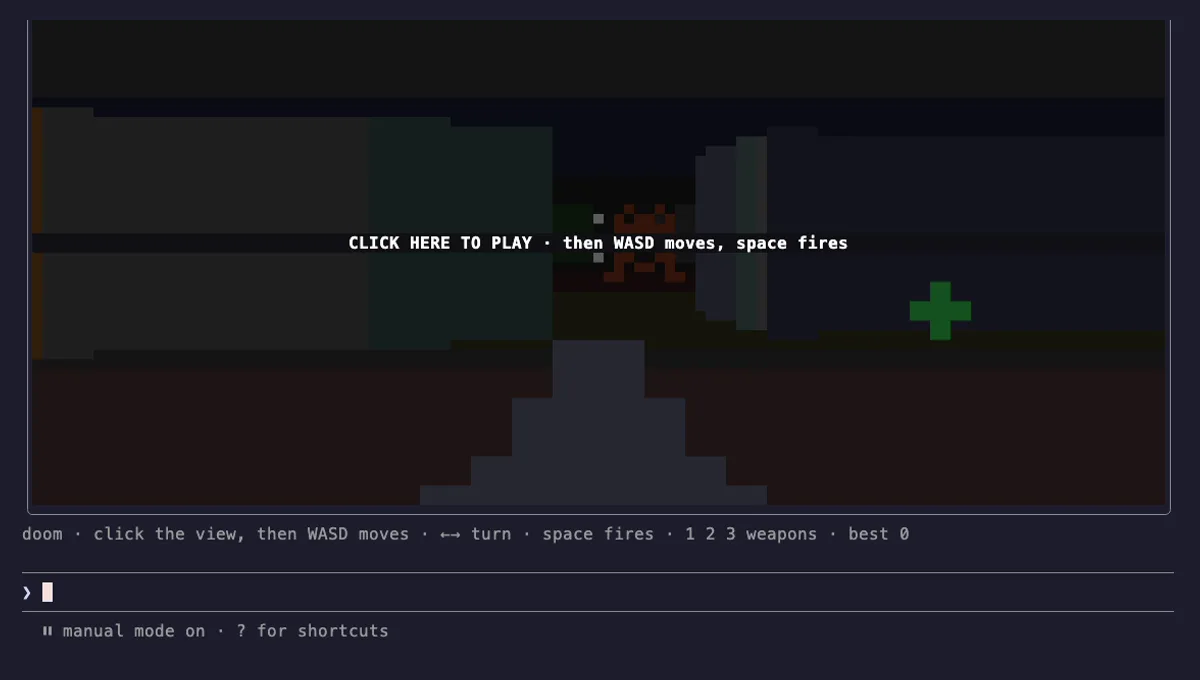
cc-arcade Games Above the Prompt
Snake, Tetris, Doom, 2048 and more games above the Claude Code prompt, plus a pet fed by Claude's work.
- above-prompt
- toast
- Intercepts tool calls
- Changes the UI
- Adds commands/tools
- Stores data
tested with v2.1.291
 Featured
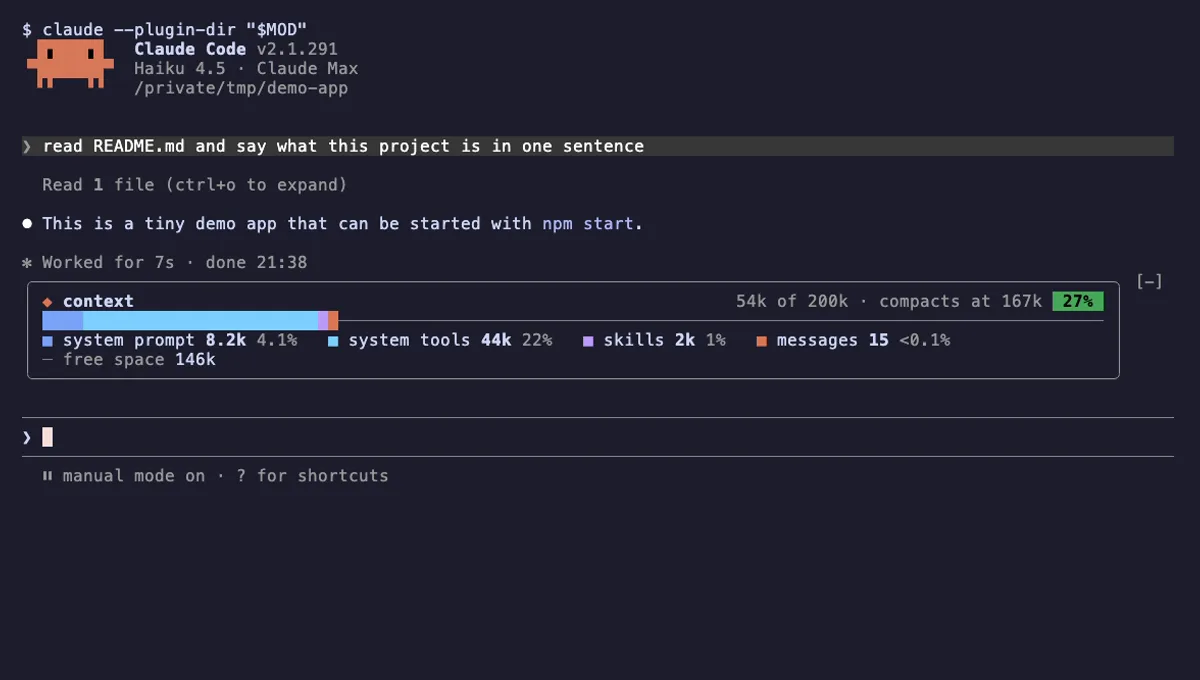
Context Bar
Your Claude Code context window as one stacked bar above the prompt, a color per category, with token counts.
- above-prompt
- Changes the UI
- Adds commands/tools
- Stores data
tested with v2.1.291
 Featured
Context Meter
Context-window fill, 5-hour and 7-day plan usage and session cost in the status line, plus a warning near the limit.
- status
- toast
- Changes the UI
tested with v2.1.310
More in Panes & dashboards, Status line & prompt bar, Timers, todos, standups.