Sub Meter Claude Code mod: Claude Code subscription usage in your footer
Your 5-hour and weekly subscription usage at the bottom right of Claude Code, with a bar and a reset countdown.
#7 in Best Claude Code ModsPermissions
- Changes the UIDraws into the Claude Code interface: bands, panes, status text, toasts (ui.render / $.ui.*).
- Stores dataKeeps data between sessions in the plugin's private store ($.store.*).
- tested with
- v2.1.307
- last tested
- requires
- Claude Code ≥ 2.1.287
- surfaces
- status
Install inside Claude Code:
/plugin install sub-meter --marketplace midudev/better-claudeWhat does this mod do?
Sub Meter is a community mod by Miguel Ángel Durán (midudev), one of the plugins in his better-claude collection. It shows your Claude Code subscription usage at the bottom right of the prompt footer, on the same row as the permission mode. For each window it draws a bar, the percentage used, and the time until that window resets:
⏵⏵ auto mode on 5h ━━━━━━──── 58% ↻ 2h 10mBy default the meter takes turns between the 5-hour window and the weekly one every 8 seconds. The bar turns yellow from 75% and red from 90%. A window that has passed its reset time is drawn as empty. Every open session shares the newest reading, so a window you are not using catches up within 8 seconds.
Where the footer is short, the meter shrinks instead of wrapping: first the bar goes, then the reset time, and in a very narrow terminal the meter itself. It is also built to sit beside the author's Narrator mod, shrinking before that mod's switch does.
Install
The install block above adds the author's marketplace and installs the plugin from it. Then restart Claude Code or run /reload-plugins. The meter appears after the first reading, which comes from $.session.usage() at session start or from the first response.
$ install sub-meter
Requires Claude Code ≥ 2.1.287
Installs from the author's own marketplace: midudev/better-claude
1.One line, inside Claude Code
/plugin install sub-meter --marketplace midudev/better-claudePaste into a running session (v2.1.275+). Claude Code asks to add the marketplace first.
2.From your shell
claude plugin marketplace add midudev/better-claude claude plugin install sub-meter@better-claudeThen run /reload-plugins in any session that is already open.
3.Try it without installing
git clone https://github.com/midudev/better-claude claude --plugin-dir ./better-claude/plugins/sub-meterLoads the mod for one session only. Nothing is added to your settings.
How it works
The plugin is one hooks module, hooks/register.tsx. Claude Code hands it the rate-limit windows through session.measure after each response, and it keeps the newest reading in $.store together with the time it was taken. This is from register.tsx:
async function remember ($: EngineInterface, found: Limit[]) {
  if (found.length === 0) return
  seenAt = await $.clock.now()
  await update($, limits, () => found)
  await $.store.set('limits', found)
  await $.store.set('at', seenAt) // after the limits, so a reader that sees the new time finds the new limits
}
A ui.render hook on the SessionMode component draws the meter and then whatever is beneath it (the mode labels, or another plugin's switch). A second ui.render hook on PromptHint rewrites the hint line without the two hidden parts and records its width, so the meter knows how much room it has. $.clock.every runs every 8 seconds to redraw the countdown, to pick up a newer reading from another session, and, in rotate mode, to switch windows.
Customize it
Four options appear in /config:
display:rotate(default),both(side by side, separated by|),session(only the 5-hour window) orweek(only the weekly one).rotateSeconds: how long each window shows inrotatemode. The default is 8.hideCycleHint: drop(shift+tab to cycle)after the permission mode. On by default.hideInterruptHint: dropesc to interruptwhile Claude works. On by default.
Permissions & safety
We read every file the plugin can execute or load: plugin.json, hooks/hooks.json, the one module hooks/register.tsx, the type declarations and the test file. The module imports only from claude-code. There is no package.json, no bundled or minified code and no binary. Here is what we found:
- Network: none. No
fetch, sockets or HTTP calls. - Processes: none. No
$.process.runor shell strings. - File writes: none of its own. It uses
$.store(the plugin's own store) and plugin state; nothing under~/.claude,settings.json, shell files or LaunchAgents. - Background work: only
$.clock.everytimers inside the session. Nothing keeps running after Claude Code exits. - Secrets and telemetry: it reads no environment variables, tokens or credential files, and has no telemetry.
- Prompt influence: it injects no text into prompts or tool results. It does change what the hint line displays (it removes two hints), which is described in the README and can be switched off.
- Gating hooks: none. It does not block or rewrite tool calls or prompts.
- License: MIT, with a LICENSE file in the repository root (Copyright 2026 Miguel Ángel Durán).
claude plugin validate reported no errors and no gating hooks. Its only finding is a non-blocking warning that the plugin has no icon, which does not affect use. The author's tests pass: 26 pass, 0 fail on Claude Code 2.1.307.
- Changes the UI
- Draws into the Claude Code interface: bands, panes, status text, toasts (ui.render / $.ui.*).
- Stores data
- Keeps data between sessions in the plugin's private store ($.store.*).
Compatibility & troubleshooting
We loaded and tested it on Claude Code 2.1.307. It needs a Claude subscription that reports rate limits.
- Nothing shows in the footer: you are probably on API-key billing, or no response has reported limits yet. Send a prompt and wait a few seconds.
- The countdown looks stale: the meter redraws every 8 seconds and shows the last reading Claude Code measured.
- The meter disappears in a narrow terminal: this is by design. Widen the window, or hide the hints (the default) to give it more room.
- Only one window shows: the subscription reported only one, or
displayis set tosessionorweek.
FAQ
- Which usage windows does Sub Meter show?
- The 5-hour window and the weekly window, the two that Claude Code reports. There is no monthly window. If only one of them is reported, every display mode shows that one.
- Does Sub Meter work with an API key instead of a subscription?
- No. Off a subscription there are no rate-limit readings, so the meter draws nothing and the footer stays as Claude Code draws it. The tests cover this case.
- Why did the "(shift+tab to cycle)" and "esc to interrupt" hints disappear?
- By default the mod drops both from the hint line to leave room for the meter. Set hideCycleHint and hideInterruptHint to false in /config to bring them back.
- Does Sub Meter see usage from claude.ai or the mobile app?
- Only after a Claude Code session measures it. The meter shows what Claude Code reports after each response, so usage elsewhere appears at the next response.
- Does Sub Meter send my usage anywhere?
- No. The module makes no network calls and runs no processes. The last reading is kept in the plugin's own store so new sessions can show it before their first response.
# Related mods
 Featured
Context Meter
Context-window fill, 5-hour and 7-day plan usage and session cost in the status line, plus a warning near the limit.
- status
- toast
- Changes the UI
tested with v2.1.310
 Featured
Context Bar
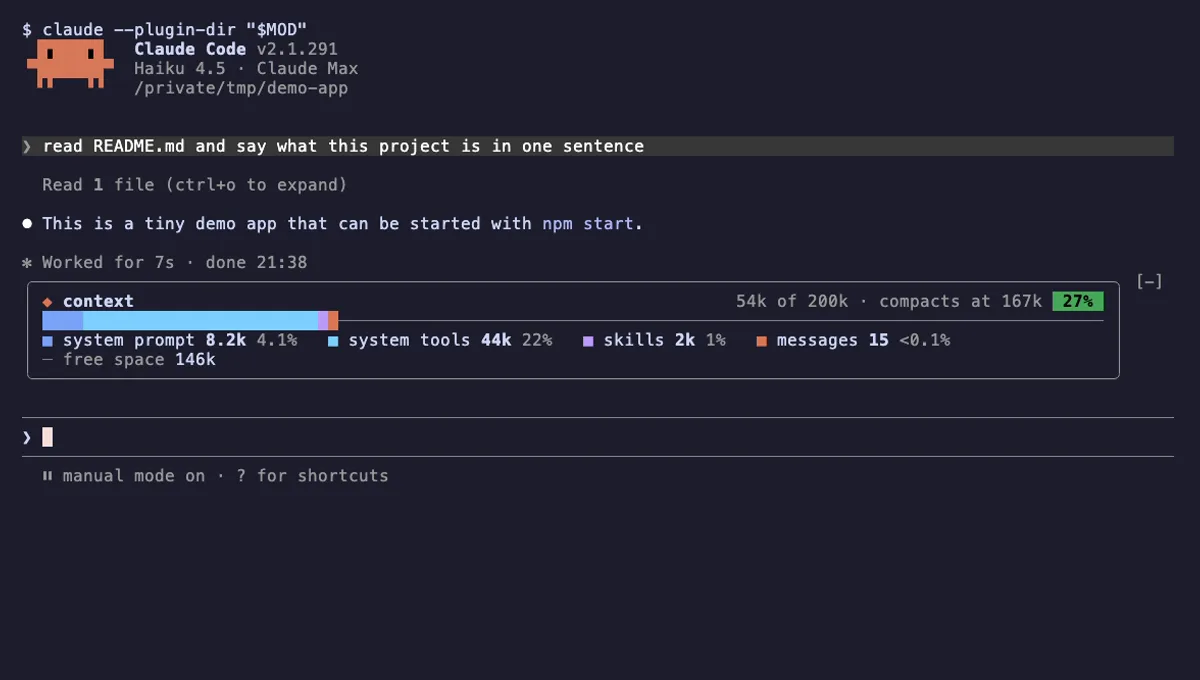
Your Claude Code context window as one stacked bar above the prompt, a color per category, with token counts.
- above-prompt
- Changes the UI
- Adds commands/tools
- Stores data
tested with v2.1.291
 Featured
Cache Clock
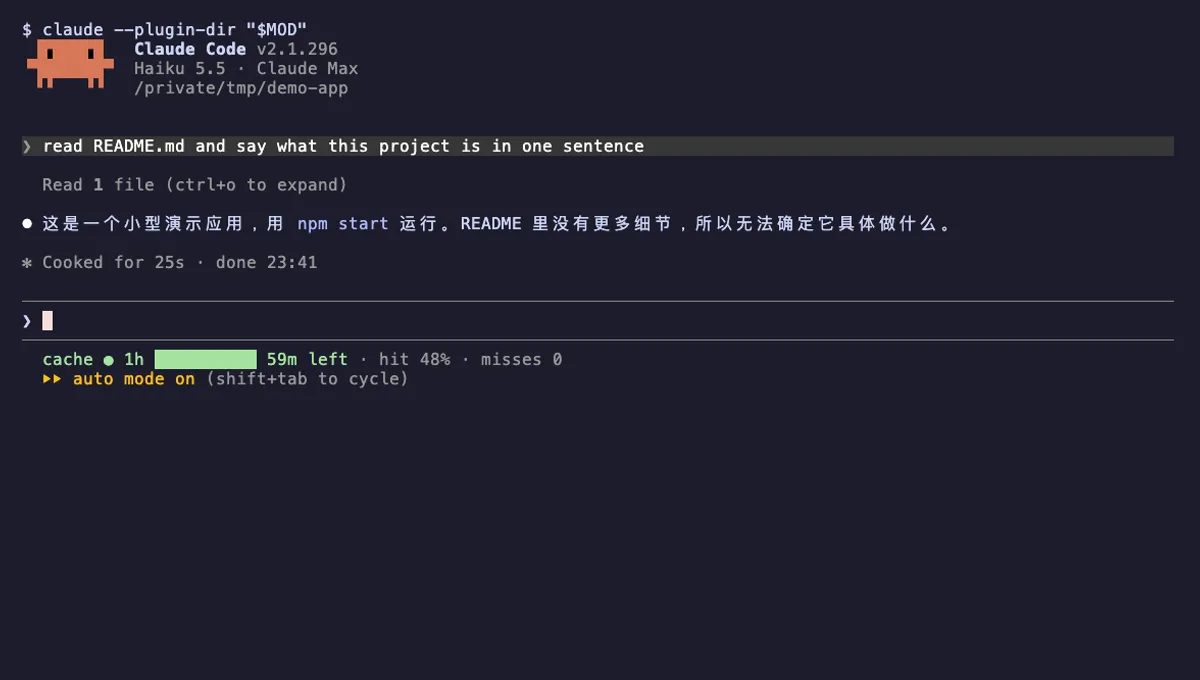
A prompt-cache line under your Claude Code status line: time left while warm, hit rate, and tokens re-cached once cold.
- status
- Reads files
- Writes files
- Runs commands
- Adds commands/tools
tested with v2.1.296
More in Context, quota, cost, Status line & prompt bar.