Token Meter Claude Code mod: see Claude Code token usage after every turn
Each turn's input, output and cache tokens plus a session total, in color at the end of the hint line under the prompt.
#19 in Best Claude Code ModsPermissions
- Changes the UIDraws into the Claude Code interface: bands, panes, status text, toasts (ui.render / $.ui.*).
- tested with
- v2.1.307
- last tested
- requires
- Claude Code ≥ 2.1.287
- surfaces
- above-prompt
Install inside Claude Code:
/plugin install token-meter --marketplace midudev/better-claudeWhat does this mod do?
Token Meter is a community mod by Miguel Ángel Durán (midudev), one of the plugins in his better-claude collection. It puts Claude Code token usage where you can see it without running a command: after each turn, the hint line under the prompt ends with that turn's tokens and the session's running total.
According to the author's README, the line looks like this:
⏵⏵ auto mode on · ↑ 1.2k ↓ 340 cache 4.1k · session ↑ 1.2k ↓ 340The up arrow is input tokens (blue), the down arrow is output tokens (green), and cache is the tokens read from or written to the prompt cache (Claude orange). The session total at the end is dim and counts input and output only. Numbers of 1000 or more are shortened to one decimal place, such as 4.1k. The totals start over when a session starts.
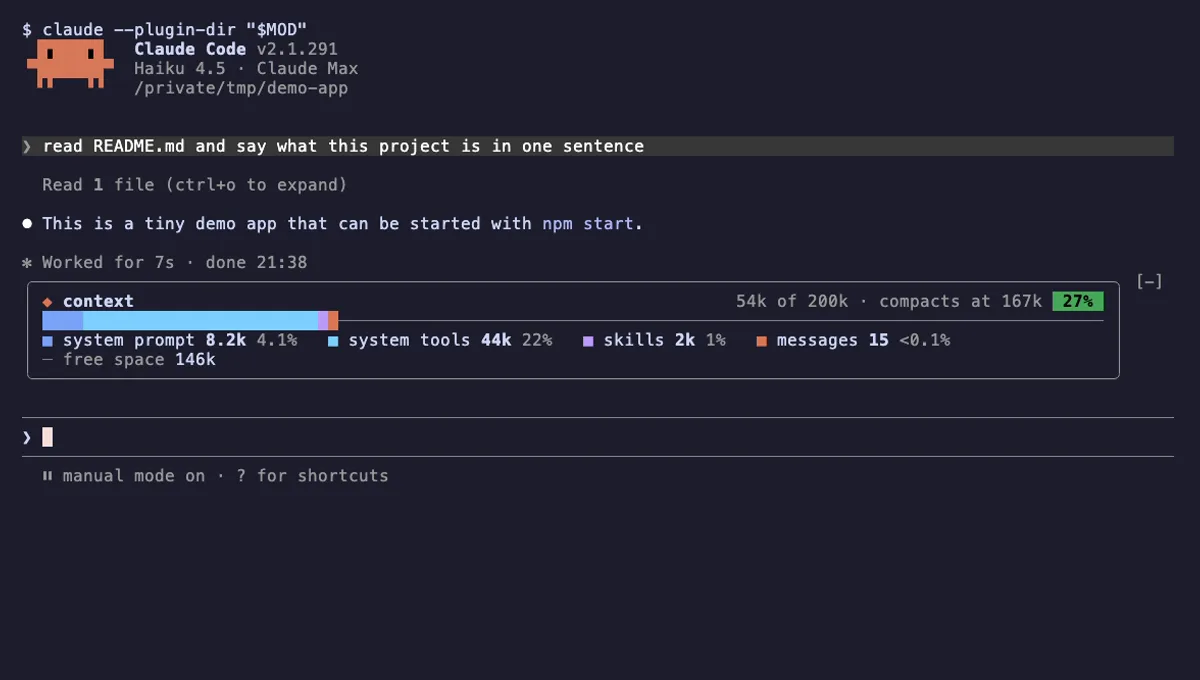
Token Meter is close to our own Context Meter and to Context Bar, but it measures something different. Those two show how full the context window is; Token Meter shows what each turn consumed and what the session has consumed so far.
Install
Use any of the methods in the install block; they install straight from the author's own marketplace, better-claude. The meter appears on the next session start, after the first turn that reports usage.
$ install token-meter
Requires Claude Code ≥ 2.1.287
Installs from the author's own marketplace: midudev/better-claude
1.One line, inside Claude Code
/plugin install token-meter --marketplace midudev/better-claudePaste into a running session (v2.1.275+). Claude Code asks to add the marketplace first.
2.From your shell
claude plugin marketplace add midudev/better-claude claude plugin install token-meter@better-claudeThen run /reload-plugins in any session that is already open.
3.Try it without installing
git clone https://github.com/midudev/better-claude claude --plugin-dir ./better-claude/plugins/token-meterLoads the mod for one session only. Nothing is added to your settings.
How it works
The plugin is one hooks module, hooks/register.tsx, listed in hooks/hooks.json. It keeps two values in $.state: the last turn's tokens and the session total. This is the turn.complete handler from hooks/register.tsx:
on('turn.complete', async ($, e, next) => {
  const usage = e.usage
  if (usage) {
    const last: Tokens = {
      input: usage.input_tokens,
      output: usage.output_tokens,
      cached: usage.cache_read_input_tokens + usage.cache_creation_input_tokens
    }
    await update($, turn, () => last)
    await update($, session, total => ({
      input: total.input + last.input,
      output: total.output + last.output,
      cached: total.cached + last.cached
    }))
  }
  return next(e)
})
A second hook wraps the PromptHint render site. It reads both values, returns the engine's own hint line (await next(e)) in a row, and appends the arrows, the numbers and the session total. If no turn has reported usage yet, it returns the hint line unchanged. A session.start hook resets both values.
Customize it
There are no options in /config and no commands. To change the colors, the separators or the number format, edit hooks/register.tsx in a local copy of the plugin and load it with claude --plugin-dir. The colors are theme names (suggestion, success, claude), so they follow your Claude Code theme, and short() at the top of the file controls how large numbers are written.
Permissions & safety
We read every file the plugin can execute before running it: .claude-plugin/plugin.json, hooks/hooks.json, hooks/register.tsx and the type declaration types/index.d.ts, plus the README and the repository's LICENSE, package.json and marketplace.json. There is no bundled or minified code, install script, binary or dependency.
- Network, processes, files, environment: none. The module imports only types and helpers from
claude-codeand calls just$.state.get,$.state.setand$.ui.resolve. A search forfetch,process,eval, dynamicimport()and file or environment access found nothing. - Daemons and telemetry: none.
- Prompt influence: the mod does not touch prompts or tool results. It only draws text in the hint line. No hidden or zero-width characters were found.
- Gating: no hooks that block or rewrite tool calls;
claude plugin validatelists no gating hooks. - State: the two values live in the plugin's own
$.stateand are not written to disk by the plugin. - License: MIT, with a LICENSE file.
claude plugin validate reported no errors and no manifest warnings. Its only finding was a non-blocking "No icon" notice for the plugin directory listing. The author's 4 tests passed on Claude Code 2.1.307.
- Changes the UI
- Draws into the Claude Code interface: bands, panes, status text, toasts (ui.render / $.ui.*).
Compatibility & troubleshooting
Checked with Claude Code 2.1.307 on macOS (validate and tests). The mod uses the PromptHint render site, so it needs a Claude Code build with function hooks. If the meter does not show up:
- Send one prompt and wait for the turn to finish; nothing is drawn before the first turn reports usage.
- Run
/reload-pluginsor restart Claude Code after installing into an open session. - Check that the plugin is enabled with
/plugin. - If a turn ends without a usage object, the meter keeps the previous numbers.
- Another mod that replaces the hint line instead of wrapping it can hide the meter.
FAQ
- Does Token Meter spend tokens or call the API?
- No. It reads the usage numbers that Claude Code already attaches to the turn.complete event and adds them up. The plugin code makes no network requests, runs no commands and reads no files.
- What do the arrows and the cache figure mean?
- The up arrow (blue) is the turn's input tokens, the down arrow (green) is its output tokens, and "cache" (Claude orange) is the sum of tokens read from and written to the prompt cache. After a dim dot, the session total shows input and output only.
- When does the meter appear?
- After the first turn that reports usage. Until then the hint line is left exactly as Claude Code draws it. A new session resets the figures to zero.
- Does it replace the hint line or its pills?
- No. The hook renders the engine's own hint line first with next(e) and appends the meter after it, so the pills stay live and other plugins that wrap the same line still apply.
- Does it show cost or plan limits?
- No, only token counts. For cost and plan usage windows, see Context Meter (cm-context-meter), which shows the context percentage, 5-hour and 7-day usage and session cost in the status line.
# Related mods
 Featured
Context Meter
Context-window fill, 5-hour and 7-day plan usage and session cost in the status line, plus a warning near the limit.
- status
- toast
- Changes the UI
tested with v2.1.310
 Featured
Context Bar
Your Claude Code context window as one stacked bar above the prompt, a color per category, with token counts.
- above-prompt
- Changes the UI
- Adds commands/tools
- Stores data
tested with v2.1.291
More in Context, quota, cost, Status line & prompt bar.