Context Meter, a Claude Code mod that shows your Claude Code context percentage above the prompt
The context window fill as one gray, yellow or red percentage at the right end of the band above the prompt.
Permissions
- Changes the UIDraws into the Claude Code interface: bands, panes, status text, toasts (ui.render / $.ui.*).
- tested with
- v2.1.310
- last tested
- requires
- Claude Code ≥ 2.1.287
- surfaces
- above-prompt
Install inside Claude Code:
/plugin install context-meter --marketplace midudev/better-claudeWhat does this mod do?
Context Meter is a community mod by Miguel Ángel Durán (midudev), one plugin of his better-claude collection. It shows your Claude Code context percentage in one small label, context 58%, at the right end of the band right above the prompt. You no longer type /context to decide whether it is time to compact.
The label is dim gray under 50%, yellow from 50% (a good moment for /compact) and red from 75% (compact now or start a new session). Both thresholds are settings. Before the first response of a session, and right after a compaction or a rewind, Claude Code has no reading. The mod then counts the window once, as /context does, and shows it with a ~ until the next response brings the real figure. The footer is left alone.
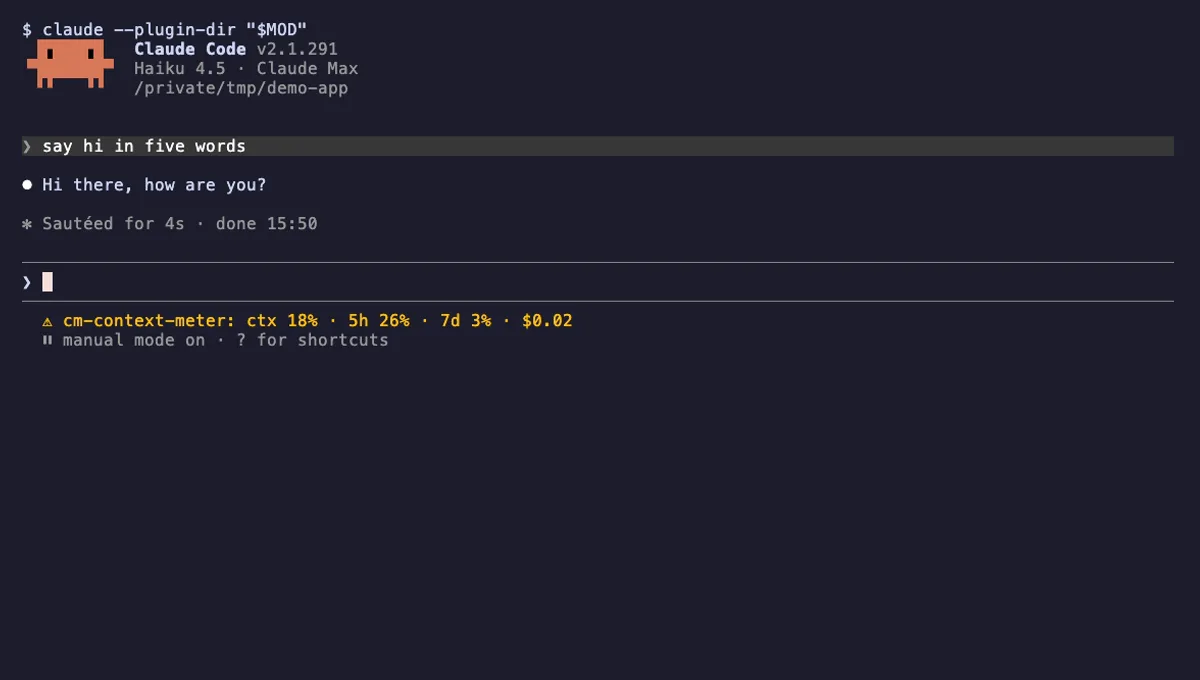
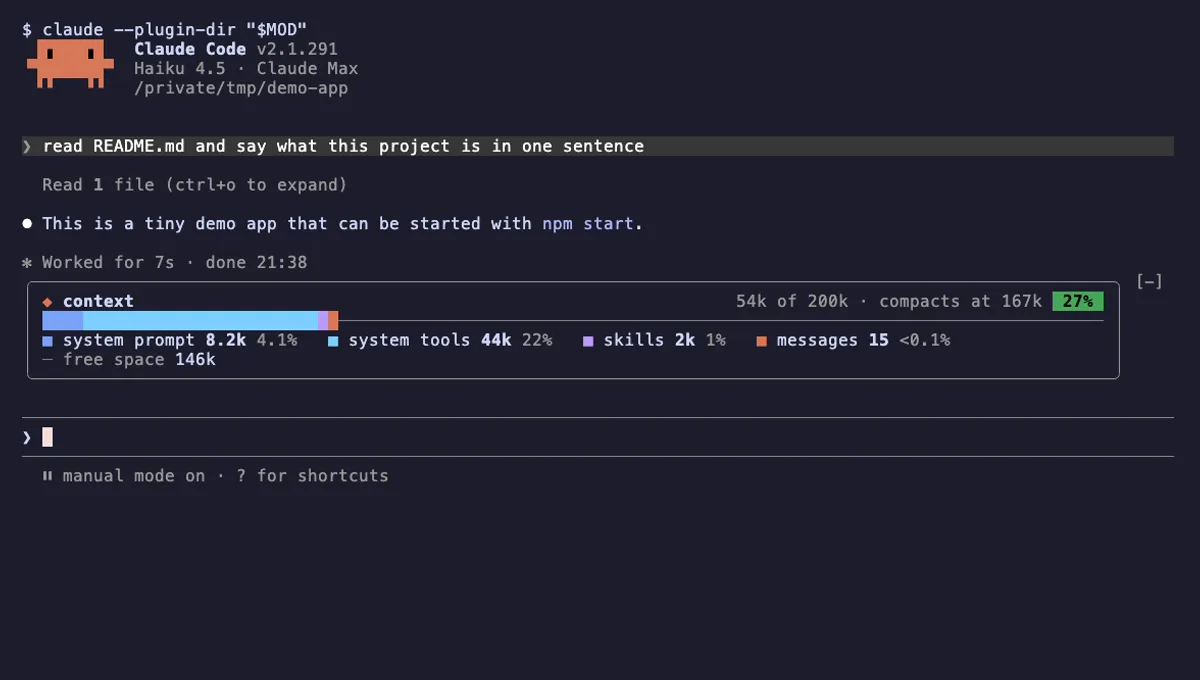
Context Meter is not our own Context Meter, which is a status-line string with plan usage and cost, and it is simpler than Context Bar, which breaks the window down by category. Here you get one number and a color.
Install
Use any of the methods in the install block; they install straight from the author's own marketplace, midudev/better-claude. The meter appears on the next session start.
$ install context-meter-midudev
Requires Claude Code ≥ 2.1.287
Installs from the author's own marketplace: midudev/better-claude
1.One line, inside Claude Code
/plugin install context-meter --marketplace midudev/better-claudePaste into a running session (v2.1.275+). Claude Code asks to add the marketplace first.
2.From your shell
claude plugin marketplace add midudev/better-claude claude plugin install context-meter@better-claudeThen run /reload-plugins in any session that is already open.
3.Try it without installing
git clone https://github.com/midudev/better-claude claude --plugin-dir ./better-claude/plugins/context-meterLoads the mod for one session only. Nothing is added to your settings.
How it works
The plugin is one hooks module, hooks/register.tsx. The latest fill lives in a host-held $.state atom. session.start reads $.session.usage() and starts a 2 second timer, session.measure hands over the new percentage after each response that moved the context, and session.end cancels the timer. This is the part that takes the engine's figure or falls back to the estimate:
async function sync ($: EngineInterface, context: SessionContextUsage, canCount: boolean) {
  if (context.percent !== undefined) return show($, { value: context.percent, isEstimate: false })
  if (lastFill?.isEstimate || !canCount || isCounting) return

  isCounting = true
  try {
    const { breakdown } = (await $.session.usage({ breakdown: 'full' })).context
    await show($, breakdown ? { value: breakdown.percentage, isEstimate: true } : null)
  } finally {
    isCounting = false
  }
}
A ui.render hook on AbovePrompt draws the label with the Box and Text components Claude Code provides. Whatever the engine or another plugin draws there stays above it, and the meter steps aside while a survey is open. The write is skipped when the value and the estimate flag are unchanged, so nothing redraws for nothing.
Customize it
Two settings in /config, both numbers from 1 to 100: warnAt (yellow from, default 50) and dangerAt (red from, default 75). The module reads them when it registers, so after changing them run /reload-plugins or start a new session. The SYNC_MS constant at the top of register.tsx sets the 2 second re-read if you want to edit the source.
Permissions & safety
We read every file the plugin can execute before running it: .claude-plugin/plugin.json, hooks/hooks.json, hooks/register.tsx, the type declarations and the test file, plus the repository's marketplace.json, package.json and LICENSE. There is no install script, bundled or minified code, binary or file outside the plugin directory that it loads. Here is what we found:
- Network, processes, files, environment: none. The module does not use
fetch,$.process.run,$.fsor$.env, and does not touchsettings.json, shell files or~/.claude. - Background work: a
$.clock.everytimer every 2 seconds that calls$.session.usage(); it is cancelled onsession.end. No daemon outlives Claude Code. - Data it keeps: one number in
$.state. It has no telemetry and sends nothing. - Model influence and gating: it injects no text into prompts or tool results and registers no gating hooks. It only adds the label above the prompt.
- Cost of counting: when the engine has no figure it calls
$.session.usage({ breakdown: 'full' }), the local count/contextmakes. - License: MIT, with a LICENSE file naming Miguel Ángel Durán (midudev).
claude plugin validate reported no errors and no plugin warnings. It reported one directory note, that there is no icon, which does not affect use. The author's 11 tests passed on Claude Code 2.1.310.
- Changes the UI
- Draws into the Claude Code interface: bands, panes, status text, toasts (ui.render / $.ui.*).
Compatibility & troubleshooting
Checked with Claude Code 2.1.310 on macOS (validate and tests). If the label does not show up:
claude --versionis 2.1.287 or later, the site's minimum for mods.- Run
/reload-pluginsor restart the session after installing from the shell. - No survey is open above the prompt; the meter returns when it closes.
- The first reading can take a moment in a fresh session. A
~means it is an estimate and will be replaced by the real figure after the first response. - If a color threshold seems wrong, check
warnAtanddangerAtin/config.
FAQ
- Does Context Meter spend tokens or call the API?
- No. It reads the figure Claude Code already reports, and when there is none it asks for the same local count that /context makes. The code makes no network requests and does not call the model.
- What does the ~ before the percentage mean?
- It marks an estimate. Before the first response of a session, and after a compaction or a rewind, Claude Code has no reading yet, so the mod counts the window once as /context does and shows it as context ~16% until the next response brings the real figure.
- Can I change when it turns yellow or red?
- Yes. The plugin declares two settings, warnAt (default 50) and dangerAt (default 75), each between 1 and 100. They appear in /config, and the colors switch when the percentage reaches them.
- How is it different from our Context Meter (cm-context-meter)?
- This one is a single dim or colored percentage above the prompt with two thresholds. cm-context-meter is a status-line string that also shows 5-hour and 7-day plan usage, session cost and a warning toast.
- Why does the number sometimes not move right away?
- It follows the engine's figure after each response, and re-reads it every 2 seconds to catch resumes and rewinds. Equal values are not redrawn, so the meter changes only when the figure does.
# Related mods
 Featured
Context Meter
Context-window fill, 5-hour and 7-day plan usage and session cost in the status line, plus a warning near the limit.
- status
- toast
- Changes the UI
tested with v2.1.310
 Featured
Context Bar
Your Claude Code context window as one stacked bar above the prompt, a color per category, with token counts.
- above-prompt
- Changes the UI
- Adds commands/tools
- Stores data
tested with v2.1.291
More in Context, quota, cost, Status line & prompt bar.