Token Weather Claude Code mod: a Claude Code context window forecast
A weather forecast for your Claude Code context window above the prompt, with recent turns and a prompt-cache countdown.
#11 in Best Claude Code ModsPermissions
- Reads filesCan read files and list directories on your machine ($.fs.read / list / stat / exists).
- Runs commandsCan run shell programs on your machine ($.process.run / spawn). Check the source for exactly which ones.
- Changes the UIDraws into the Claude Code interface: bands, panes, status text, toasts (ui.render / $.ui.*).
- Stores dataKeeps data between sessions in the plugin's private store ($.store.*).
- tested with
- v2.1.307
- last tested
- requires
- Claude Code ≥ 2.1.287
- surfaces
- above-prompt
- source
- Hamza Zafar (hamzafer) (MIT)
Install inside Claude Code:
/plugin install token-weather --marketplace hamzafer/claude-code-modsWhat does this mod do?
Token Weather is a community mod by Hamza Zafar (hamzafer), part of his claude-code-mods collection. It gives you a Claude Code context window forecast on one line above the prompt: a weather word and icon for how full the window is, the percentage, the token count against the window size, a sparkline of the last turns, and a countdown for how long the prompt cache stays warm.
The forecast goes from ☀ Clear (under 25%) through ☁ Cloudy, ☂ Showers and ☇ Storm to ↯ Compact soon at 90% and above. Next to it, last turns draws up to 12 readings as bars ▁▂▃▄▅▆▇█, scaled to the largest of them, followed by how much the last turn added or removed, such as ▲ +39.4k last turn. On a wide enough line, ❄ cache 4:12 counts down to the moment the prompt cache expires, turns yellow in its last minute and reads ❄ cache cold afterwards.
Token Weather overlaps with our Context Bar, Context Meter and Cache Clock. Context Bar breaks the window down by category; Context Meter puts the percentage and plan usage in the status line; Cache Clock shows cache details under the status line. Token Weather gives a one-line verdict and the trend. The author's marketplace lists it as version 0.2.2.
Demo
The recording starts Claude Code with the mod loaded in the small demo project. Before any prompt, the line above the input reads ☀ Clear 0% of context 0 / 1M. We then ask Claude to read README.md and say what the project is in one sentence. While the first request runs, a ❄ cache 5:00 countdown appears. When the turn ends, the line shows ☀ Clear 4% of context 39.4k / 1M, a sparkline, ▲ +39.4k last turn, and ❄ cache 60:00, because the response wrote a one-hour cache.
Install
Use any of the methods in the install block; they install straight from the author's own marketplace. The line appears when the next session starts. The plugin has one option, the prompt cache lifetime.
$ install token-weather
Requires Claude Code ≥ 2.1.287
Installs from the author's own marketplace: hamzafer/claude-code-mods
1.One line, inside Claude Code
/plugin install token-weather --marketplace hamzafer/claude-code-modsPaste into a running session (v2.1.275+). Claude Code asks to add the marketplace first.
2.From your shell
claude plugin marketplace add hamzafer/claude-code-mods claude plugin install token-weather@claude-code-modsThen run /reload-plugins in any session that is already open.
3.Try it without installing
git clone https://github.com/hamzafer/claude-code-mods claude --plugin-dir ./claude-code-mods/mods/token-weatherLoads the mod for one session only. Nothing is added to your settings.
How it works
The mod keeps its readings in host-held $.state atoms, so they survive a hot reload. A reading is taken at session start and after each main-agent turn, using the context figures from $.session.usage. The cache clock restarts after every main-thread model request, including tool-loop requests inside a turn. This is the turn.step handler from hooks/register.tsx:
on('turn.step', async function* ($, e, next) {
  const result = yield* next(e)
  if (!e.agentId && result.stopReason !== null) {
    const now = await $.clock.now()
    await update($, lastRequestAt, () => now)
    restart($, now, now, await ttlMsFor($, override))
  }
  return result
})
In auto mode, after each turn it reads the last megabyte of the session transcript (<config dir>/projects/<project>/<session id>.jsonl) and checks cache_creation in the latest main-thread response for 1-hour or 5-minute tokens. It remembers the result in the plugin store for the next session. A timer redraws the line when the countdown text changes: every 30 seconds with more than ten minutes left, every 15 seconds below that, and every second in the last two minutes.
Customize it
The one option is cacheTtl in the plugin settings: auto (default), 5m or 1h. A fixed value overrides detection. The forecast bands, the 12-reading history and the 60-second warning are constants at the top of register.tsx. The mod also reads an optional band-order file, <config dir>/claude-code-mods/bands.json, which sets the order when several band mods from the same author draw above the prompt.
Permissions & safety
We read every file the plugin can execute before running it: .claude-plugin/plugin.json, hooks/hooks.json, hooks/register.tsx, hooks/bands.ts, the type declarations and the three test files. There is no package.json, install script, binary or bundled code, and the text it draws is built from numbers; it does not inject anything into the model's prompt. The repository carries an MIT LICENSE.
What it does, in full:
- Network: none.
- Processes: one,
tail -c 1048576 <transcript path>, only when the transcript is larger than 1 MB. Otherwise the file is read directly. - Files read: your own session transcript (to detect the cache lifetime), the optional
bands.jsonunder the Claude config directory, and Claude Code settings through$.settings.read(to see whether the Cache Clock status line is set). It reads the environment variablesHOMEandCLAUDE_CONFIG_DIRto find them. - Files written: none directly. It saves the detected cache lifetime (
5mor1h) with$.store, the plugin's own store. - Background work: a redraw timer inside Claude Code, which stops when the session ends. No daemon.
- Gating: none. It does not block or rewrite tool calls or prompts.
claude plugin validate reported no errors and no warnings from the plugin itself (the directory checker notes a missing icon). The author's 24 tests passed on Claude Code 2.1.307.
- Reads files
- Can read files and list directories on your machine ($.fs.read / list / stat / exists).
- Runs commands
- Can run shell programs on your machine ($.process.run / spawn). Check the source for exactly which ones.
- Changes the UI
- Draws into the Claude Code interface: bands, panes, status text, toasts (ui.render / $.ui.*).
- Stores data
- Keeps data between sessions in the plugin's private store ($.store.*).
Compatibility & troubleshooting
Checked with Claude Code 2.1.307 on macOS (validate, tests and the recording). If the line does not show up:
- You started a new session after installing; the mod loads at session start.
- A survey is not open above the input. The line steps aside for surveys and returns afterwards.
- The window is at least 60 columns wide. Narrower terminals show only the forecast word, the percentage and the token count.
- If the countdown is wrong, set
cacheTtlto5mor1hinstead ofauto. A very long project path or a project moved during the session can keep the transcript from being found; the last detected value then stays. - The countdown is hidden after
/clearor a resume until the next request.
FAQ
- Does Token Weather call the API or spend tokens?
- No network calls and no model calls. It reads the context figures Claude Code already has through $.session.usage. The only process it starts is `tail`, on your own session transcript, to detect the cache lifetime.
- What do Clear, Cloudy, Showers, Storm and Compact soon mean?
- They are context fill bands, all measured against the window size Claude Code reports. Clear is under 25%, Cloudy under 50%, Showers under 75%, Storm under 90%, and Compact soon is 90% or more.
- How does it know whether the prompt cache lasts 5 minutes or 1 hour?
- In the default `auto` mode it reads the end of the session transcript after each main-thread turn and looks at whether the last response wrote 5-minute or 1-hour cache tokens. Until it sees one, it assumes 5 minutes. You can force `5m` or `1h` in the plugin options.
- Why is the cache countdown missing on my screen?
- It needs a body width of at least 60 columns and room on the line, and it only appears after the first request of the session. It also hides itself when the Cache Clock status line is installed, since that shows the exact countdown.
- How is it different from Context Bar?
- Context Bar splits the window into colored categories with a legend. Token Weather is one line with a verdict, the percentage, a sparkline of the last 12 turns, and the cache countdown. They can sit together above the prompt.
# Related mods
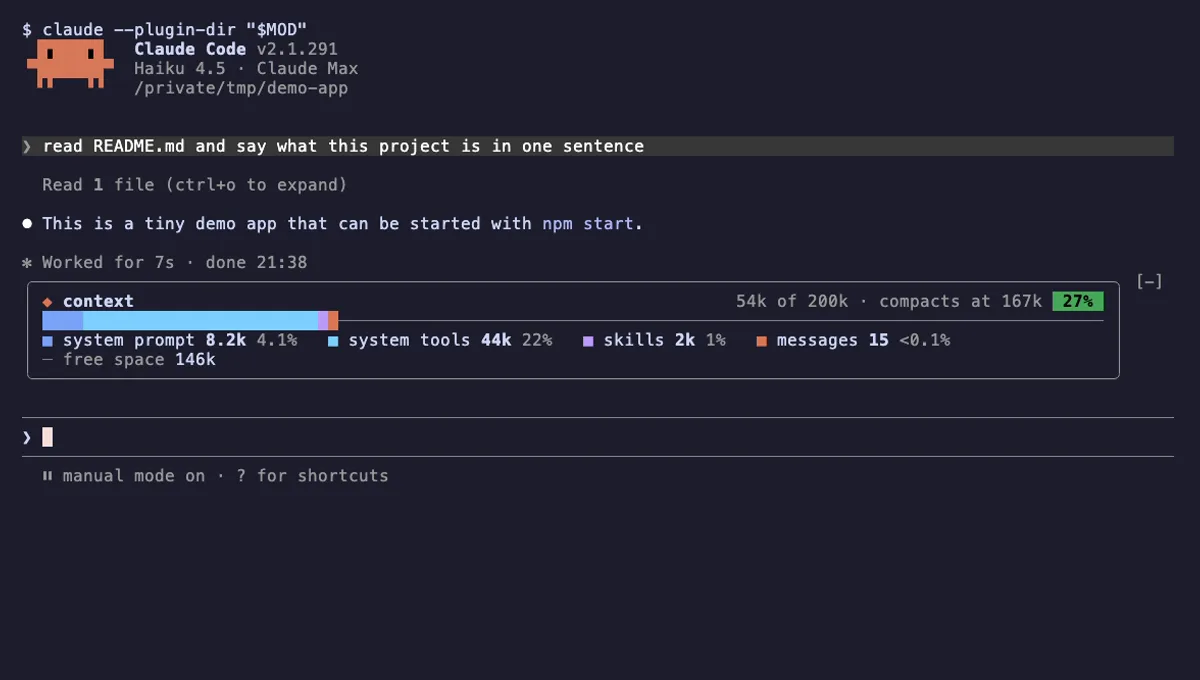 Featured
Context Bar
Your Claude Code context window as one stacked bar above the prompt, a color per category, with token counts.
- above-prompt
- Changes the UI
- Adds commands/tools
- Stores data
tested with v2.1.291
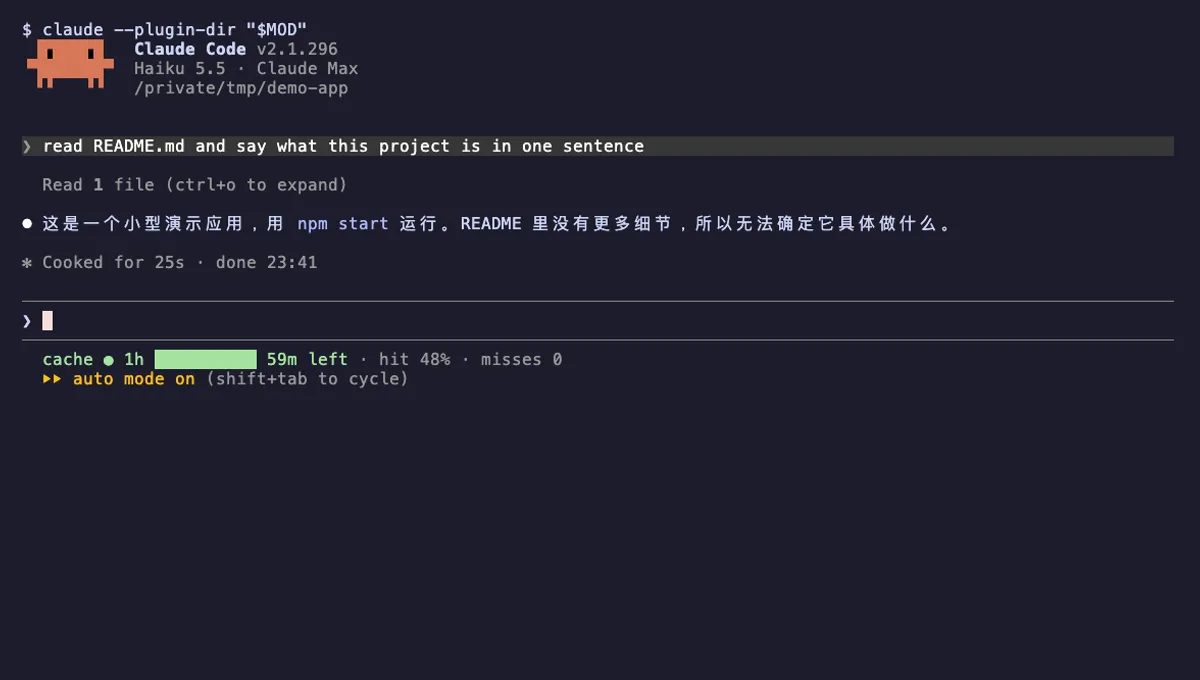 Featured
Cache Clock
A prompt-cache line under your Claude Code status line: time left while warm, hit rate, and tokens re-cached once cold.
- status
- Reads files
- Writes files
- Runs commands
- Adds commands/tools
tested with v2.1.296
 Featured
Context Meter
Context-window fill, 5-hour and 7-day plan usage and session cost in the status line, plus a warning near the limit.
- status
- toast
- Changes the UI
tested with v2.1.310
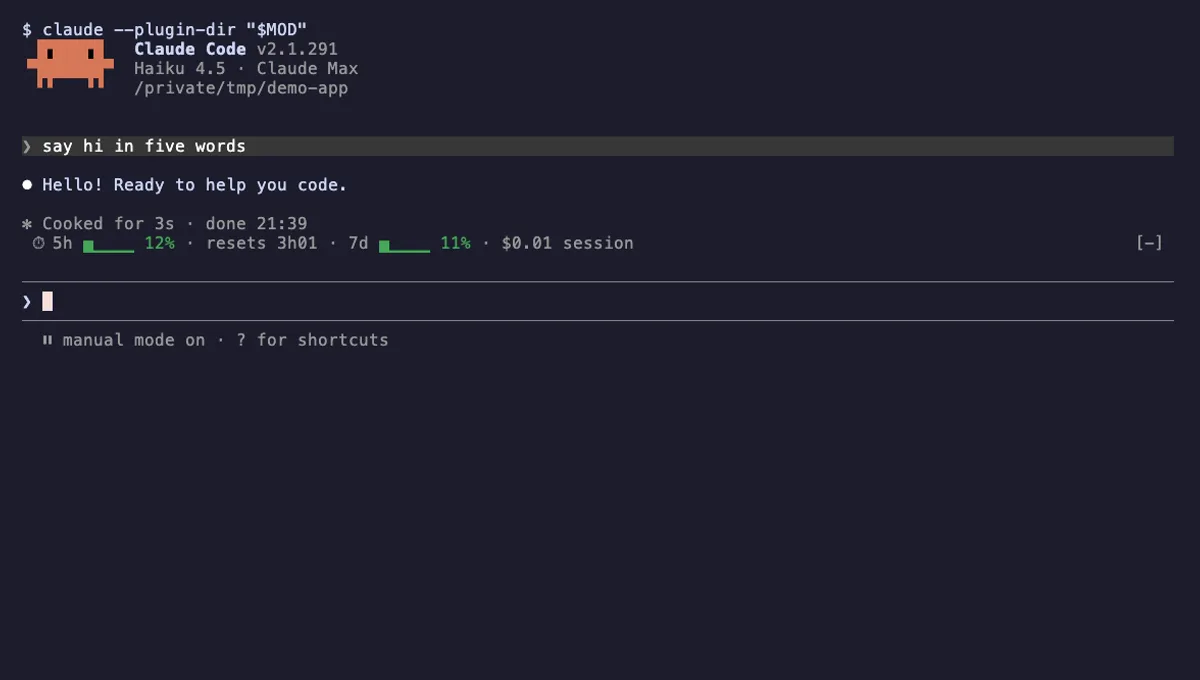 Featured
Usage Meter
Your plan's 5-hour and 7-day usage as small bars above the Claude Code prompt, with reset countdown and session cost.
- above-prompt
- toast
- Changes the UI
tested with v2.1.291
More in Context, quota, cost, Status line & prompt bar.