Agent Profiler Claude Code mod: a Claude Code profiler for session time
Where Claude Code session time goes: model wait, tools, subagents, live in the status line, with OTLP trace export.
Permissions
- Writes filesCan create or overwrite files on your machine ($.fs.write).
- NetworkCan make HTTP requests or talk to MCP servers ($.http.fetch / $.mcp.*).
- Intercepts tool callsSees every tool call Claude makes (tool.call / tool.check) and could block or change it.
- Changes the UIDraws into the Claude Code interface: bands, panes, status text, toasts (ui.render / $.ui.*).
- Adds commands/toolsRegisters new slash commands or tools that you or Claude can invoke ($.command.register / $.tool.register).
- tested with
- v2.1.303
- last tested
- requires
- Claude Code ≥ 2.1.287
- surfaces
- status, pane, toast
- source
- YeonwooSung (Apache-2.0)
Install inside Claude Code:
/plugin install agent-profiler --marketplace YeonwooSung/my-claude-code-modsWhat does this mod do?
Agent Profiler is a Claude Code profiler written by YeonwooSung, part of the my-claude-code-mods collection. It answers one question: when a session feels slow, where did the time go? It splits the time of each turn into waiting for the model, running tools, blocking subagents and engine overhead, and shows the result in three places.
- A status line that updates while Claude works, for example
model 100% · tools 0% · ▶ model claude-haiku-5-5 12.5s. /profile, a text report of the whole session, or/profile turnfor the last turn. It lists time categories, time to first token, token counts, slow tools, repeated file reads, subagents and a short list of findings./profile-pane, a live pane with in-flight requests and tools./profile-exportwrites the session as OTLP JSON.
The mod is careful about what it claims. It never reports "inference time". Each figure carries a grade: measured (handed over by Claude Code, such as tool duration), observed (timed by the mod at event boundaries), reported (API token usage) or inferred (a remainder). The author's README needs Claude Code 2.1.287 or later.
Demo
The recording starts Claude Code with the mod loaded in the small demo project and asks Claude to read README.md and describe the project in one sentence. While the turn runs, the status line above the footer counts up live: first model 92% · tools 0%, then model 100% with the running request, ▶ model claude-haiku-5-5, and its elapsed seconds. When the turn ends the clip runs /profile. The report shows 29.0 s of model response wait, 5 ms of tools, time to first token, 82.3k input tokens, the one Read call and the finding that waiting for the model was 100% of agent time.
Install
Use any of the methods in the install block; they install straight from the author's own marketplace, which lists many plugins, so pick agent-profiler. The status line and the commands appear on the next session start.
$ install agent-profiler
Requires Claude Code ≥ 2.1.287
Installs from the author's own marketplace: YeonwooSung/my-claude-code-mods
1.One line, inside Claude Code
/plugin install agent-profiler --marketplace YeonwooSung/my-claude-code-modsPaste into a running session (v2.1.275+). Claude Code asks to add the marketplace first.
2.From your shell
claude plugin marketplace add YeonwooSung/my-claude-code-mods claude plugin install agent-profiler@my-claude-code-modsThen run /reload-plugins in any session that is already open.
3.Try it without installing
git clone https://github.com/YeonwooSung/my-claude-code-mods claude --plugin-dir ./my-claude-code-mods/agent-profilerLoads the mod for one session only. Nothing is added to your settings.
How it works
The module hooks/register.tsx keeps a Profiler object in memory and feeds it from event boundaries: turn.start and turn.complete, each model call through turn.step, each tool through tool.call, plus Claude Code's own tool duration from classic.PostToolUse. The tool.call hook only observes. It waits for the tool with await next(e) and returns the answer unchanged, from hooks/register.tsx:
on('tool.call', async ($, e, next) => {
  anonymous += 1
  const id = e.tool_use_id ?? `anonymous-${anonymous}`
  const tool = String(e.tool)
  safe(() => profiler.toolStart(Date.now(), { id, tool, agentId: e.agentId, input: summarizeInput(tool, e as unknown as Record<string, unknown>) }))
  paint($)
  try {
    const answer = await next(e)
    safe(() => profiler.toolEnd(Date.now(), id, toolOutcome(answer)))
    return answer
  } // ...
}).catch(($, e, next) => next(e))
Every bookkeeping step goes through safe(), so an error in the profiler is dropped instead of breaking the session. The status line is repainted at most twice a second. After each turn the mod writes the newly finished spans to <outputDir>/<sessionId>/<loadId>-<seq>.otlp.json, and at session end it writes the rest plus a session root span. Span names follow the GenAI conventions (chat <model>, execute_tool <tool>, invoke_agent <type>). Span and trace ids are deterministic, so sending a session twice gives the same spans. Memory is capped at 20,000 requests and tool calls; the oldest finished turns are dropped past that.
Customize it
Three options live in the /plugin settings menu or in pluginConfigs:
| Option | Default | Meaning |
|---|---|---|
otlpEndpoint |
empty | Base URL of an OTLP/HTTP collector such as http://localhost:4318. Empty means files only. |
outputDir |
~/.claude/agent-profiler |
Where trace files go, one folder per session. |
exportCommandText |
false |
Include turn prompts, Bash command lines and search patterns in exports, with obvious secrets redacted. |
To view a trace in Jaeger, run the repo's examples/jaeger/docker-compose.yml, set otlpEndpoint to http://localhost:4318 and open http://localhost:16686. Grafana Tempo takes the same OTLP/HTTP endpoint.
Permissions & safety
We read every file the plugin can execute before running it: .claude-plugin/plugin.json, hooks/hooks.json, hooks/register.tsx and the Jaeger compose file in full. Of the eleven modules in hooks/core/ we read export.ts, otlp.ts, redact.ts and the input summarizer in profiler.ts in full and searched all of them for network, process, file, eval, import() and environment calls (the only hits are in register.tsx). The test files were listed, not read. There is no package.json, install script, binary, bundled or minified code, eval or dynamic import(). The hooks/ source has no zero-width or hidden characters; the only non-ASCII characters are visible status and report glyphs such as █, ░, · and ⏱. The mod does not inject text into prompts or tool results.
Notable findings:
- Writes files, on by default. It calls
$.fs.writeafter every turn and at session end, into~/.claude/agent-profiler/<sessionId>/unless you setoutputDir. That is the plugin's own folder, notsettings.jsonor a shell file, but it is written without a prompt. The files hold timings, token counts, model names, tool names,Read/Edit/Writefile paths and a category for each Bash command (such as test or build). File paths are always exported. Prompts, Bash commands and search patterns are exported only withexportCommandText. - Network only if you opt in.
$.http.fetchis called only whenotlpEndpointis non-empty, and only POSTs the same trace JSON to<endpoint>/v1/traces. The host is whatever you type. If you point it at a remote collector, file paths and, withexportCommandText, redacted commands leave your machine. The README warns that redaction is best-effort. - Reads one environment variable,
HOME, to expand~inoutputDir. - Intercepts tool calls without changing them.
tool.callandtool.checkare observed and passed through, and both have a.catchguard. Nothing is denied or rewritten.claude plugin validatealso listsclassic.*hooks as gating hooks without.catch; they are observers that returnnext(e). Per validate, theclassic.*hooks do not run when an organization manages Claude Code, so the report may be incomplete there. - No processes, no daemons, no model calls. It runs no commands and keeps no background service. The only timers are in-session clocks.
- Optional external service. Jaeger or Tempo is only needed to browse traces. The compose file pulls
jaegertracing/all-in-one:latestand is never run by the mod. - License. Apache-2.0 (the repo-level
LICENSE).
claude plugin validate reported no errors and no warnings, only the notes above. The author's 67 tests in 11 files all passed with claude plugin test on Claude Code 2.1.303.
- Writes files
- Can create or overwrite files on your machine ($.fs.write).
- Network
- Can make HTTP requests or talk to MCP servers ($.http.fetch / $.mcp.*).
- Intercepts tool calls
- Sees every tool call Claude makes (tool.call / tool.check) and could block or change it.
- Changes the UI
- Draws into the Claude Code interface: bands, panes, status text, toasts (ui.render / $.ui.*).
- Adds commands/tools
- Registers new slash commands or tools that you or Claude can invoke ($.command.register / $.tool.register).
Compatibility & troubleshooting
Checked with Claude Code 2.1.303 on macOS: validate, the author's tests and the demo recording. The README says its own end-to-end probe ran on 2.1.280 and the event shapes follow the 2.1.292 type declarations. The pane and the status line draw in the terminal and the desktop Code tab, but not in the VS Code chat panel or claude -p; /profile text works everywhere.
- No status line or commands. Check
claude --versionis 2.1.287 or later, and run/reload-pluginsafter installing into a running session. - No trace files. Nothing is written until the session id is known. A failed write shows once as a toast; check that
outputDiris writable. - Numbers reset after a hot reload. In-memory state starts over, but batches already written stay on disk under the old load id.
- Files changed through Bash. The repeated-read detector cannot see them.
- Time inside the model server (queueing, prefill, decoding) cannot be split by any client-side tool; TTFT lumps it together.
FAQ
- Does Agent Profiler send my data anywhere?
- Not by default. It writes trace files to a folder on your machine. It only makes a network request if you set the otlpEndpoint option, and then it POSTs each trace batch to that URL plus /v1/traces. Nothing is sent to the author.
- Where are the trace files written?
- To ~/.claude/agent-profiler/<sessionId>/ unless you set outputDir. A file is written after every completed turn and again when the session ends. They contain timings, token counts, tool names and file paths.
- Are my prompts and Bash commands exported?
- Not unless you turn on exportCommandText. With it off, prompts, Bash command lines and search patterns stay out of the files and POSTs, and only a command category such as test or build is kept. With it on they are exported after best-effort secret redaction.
- Does it measure how long the model computes?
- No, and the README says so. It measures how long the client waited, for example time to first token, which lumps network, queueing and prefill together. Every figure is tagged observed, measured, reported or inferred.
- Do I need Jaeger or any other service?
- No. /profile and the status line work on their own. Jaeger or Grafana Tempo is only needed if you want to browse the exported OTLP traces in a UI. The repo ships a small Jaeger docker-compose file for that.
# Related mods
 Featured
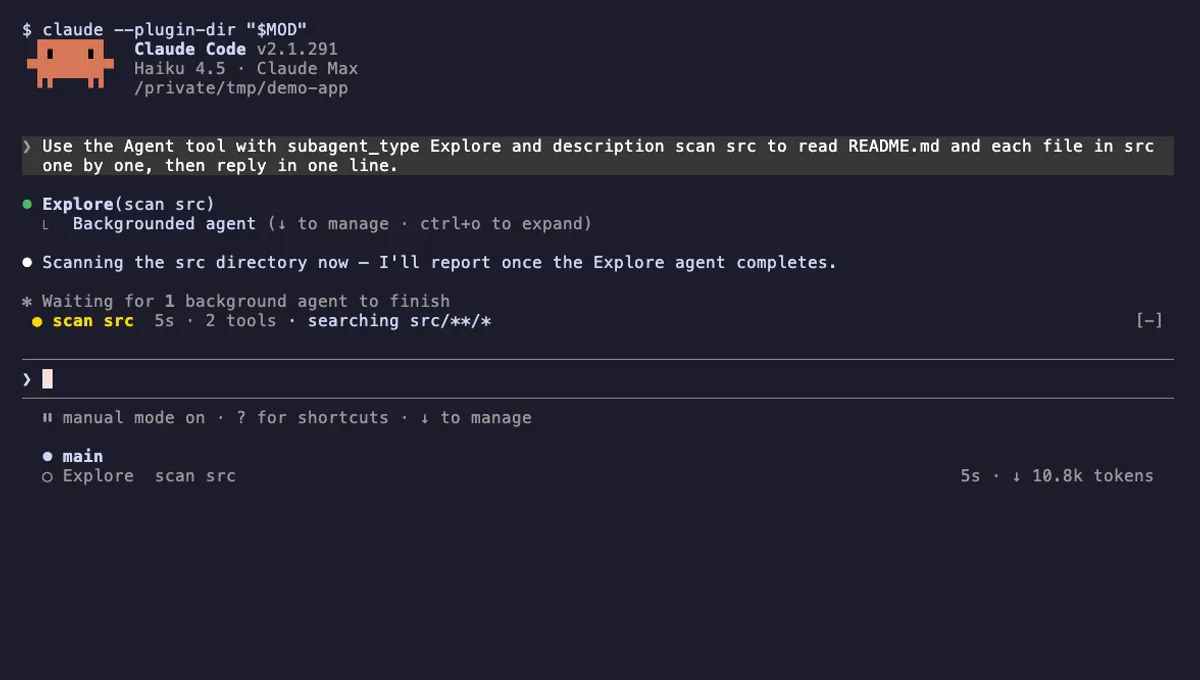
Agent Radar
One live line above the prompt per running subagent: time, tool count and what it is doing now, plus a /radar pane.
- above-prompt
- pane
- toast
- Intercepts tool calls
- Reads your prompts
- Changes the UI
- Adds commands/tools
tested with v2.1.291
 Featured
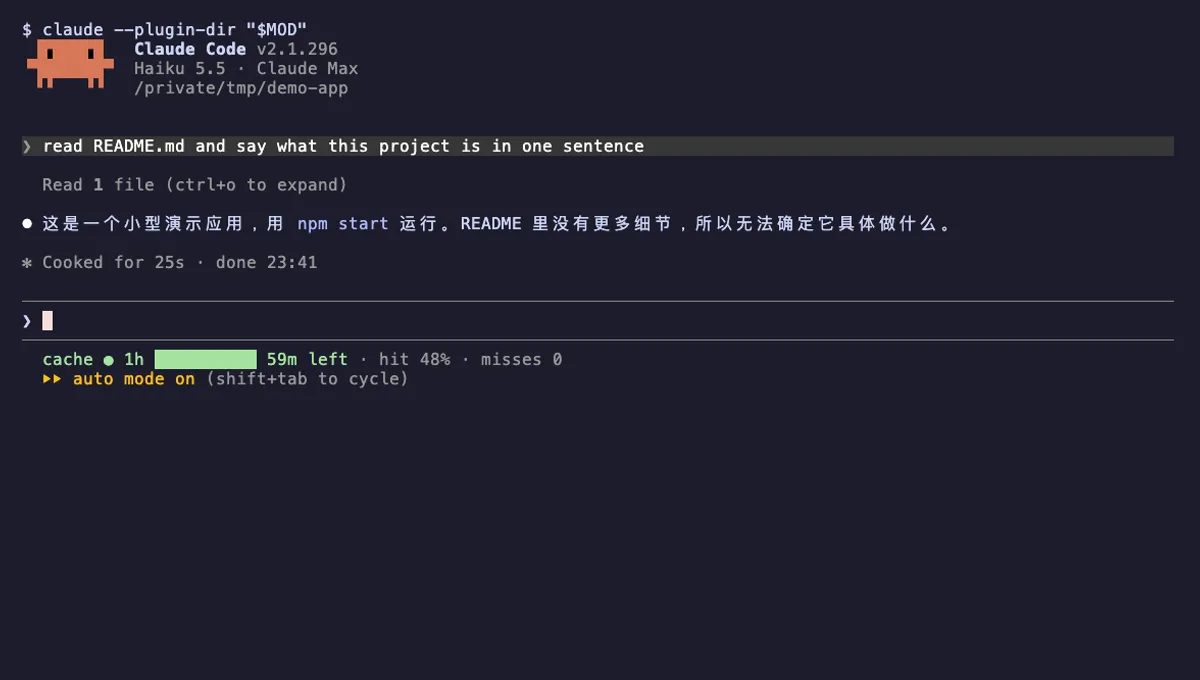
Cache Clock
A prompt-cache line under your Claude Code status line: time left while warm, hit rate, and tokens re-cached once cold.
- status
- Reads files
- Writes files
- Runs commands
- Adds commands/tools
tested with v2.1.296
 Featured
Tool Call Counter
Counts Claude's tool calls per turn and session, shows the count by the spinner, and adds /tally for a breakdown.
- spinner
- transcript
- status
- Intercepts tool calls
- Changes the UI
- Adds commands/tools
tested with v2.1.310
More in Timers, todos, standups, Status line & prompt bar, Panes & dashboards.