Model Effort Band Claude Code mod: see your Claude Code effort level
A colored band above the Claude Code prompt with the selected model and the last observed effort level.
#17 in Best Claude Code ModsPermissions
- Changes the UIDraws into the Claude Code interface: bands, panes, status text, toasts (ui.render / $.ui.*).
- tested with
- v2.1.307
- last tested
- requires
- Claude Code ≥ 2.1.287
- surfaces
- above-prompt
- source
- YeonwooSung (Apache-2.0)
Install inside Claude Code:
/plugin install model-effort-band --marketplace YeonwooSung/my-claude-code-modsWhat does this mod do?
Model Effort Band is a community mod by YeonwooSung (YeonwooSung), part of his my-claude-code-mods collection. It puts one band directly above the Claude Code prompt that answers two questions at a glance: which model is selected, and which Claude Code effort level the last main request used.
The band has a rounded border in a color per model family: green for Haiku, blue for Sonnet and purple for Opus, with a neutral grey for models it does not recognize. The model name is on the left, taken from the model ID, so claude-opus-4-6 reads Opus 4.6 while the bare alias opus reads Opus without an invented version. Next to it comes effort, then a five-cell gauge and a caption, such as ▰▰▰▱▱ high · 깊게, and the family name as a badge on the right. low, medium, high, xhigh and max fill one to five cells. The captions are Korean words (빠르게, 보통, 깊게, 더 깊게, 최대로) and are not translated or configurable.
Effort is the part to understand. The mod does not read your settings. It records the effort carried by a main-conversation turn.step, keeps it while tools run and while Claude Code is idle, and shows unknown whenever it cannot be sure the value applies to the selected model.
Install
Use any of the methods in the install block; they install from the author's own marketplace. The band appears the next time the prompt is drawn. There are no commands to run.
$ install model-effort-band
Requires Claude Code ≥ 2.1.287
Installs from the author's own marketplace: YeonwooSung/my-claude-code-mods
1.One line, inside Claude Code
/plugin install model-effort-band --marketplace YeonwooSung/my-claude-code-modsPaste into a running session (v2.1.275+). Claude Code asks to add the marketplace first.
2.From your shell
claude plugin marketplace add YeonwooSung/my-claude-code-mods claude plugin install model-effort-band@my-claude-code-modsThen run /reload-plugins in any session that is already open.
3.Try it without installing
git clone https://github.com/YeonwooSung/my-claude-code-mods claude --plugin-dir ./my-claude-code-mods/model-effort-bandLoads the mod for one session only. Nothing is added to your settings.
How it works
The plugin is one hooks module, hooks/register.tsx, plus a pure helper file, hooks/core/band.ts. The module keeps a small BandState in memory. This is the step hook, from hooks/register.tsx:
on('turn.step', async function* ($, e, next) {
  if (e.agentId === undefined) { state.observeStep(e); repaint($) }
  return yield* next(e)
})
observeStep ignores subagent steps. A step that omits effort keeps the last value only when the model is the same; a different model clears it. On every paint, the ui.render hook for the AbovePrompt site asks $.session.model() for the selected model and compares it with the model of the last observed request. If they differ, effort is unknown. The session.start, session.end, classic.PostModelSwitch, config.set and command.run hooks (for /model, /effort and /config) reset the state after passing the call through unchanged.
The band picks one of four layouts from the space it is given: full at 60 columns or more, compact (no gauge, caption or badge) from 30 to 59, a single unbordered line below 30 columns or with fewer than three rows, and hidden when no space is reported. Other mods' content above the prompt is kept in front of the band, and the band returns early when a survey is showing.
Customize it
There are no options in /config and no commands. To change the look, edit the code: the THEMES table in hooks/core/band.ts holds the badge, color and background for each family, and effortView in the same file holds the gauges, the Korean captions and the effort colors. Load your edited copy with claude --plugin-dir ./model-effort-band.
Permissions & safety
We read every file the plugin can execute before running it: .claude-plugin/plugin.json, hooks/hooks.json, hooks/register.tsx, hooks/core/band.ts, and both test files. There is no package.json, install script, binary, bundled or minified code, or dynamic import. The module imports only its own helper and type declarations.
- Network, processes, files, secrets: none. The only engine calls are
$.session.model,$.ui.invalidateand$.ui.resolve. It reads no environment variables, writes nothing and starts no timers or background services. It has no telemetry. - Gating hooks:
config.set,command.runandclassic.PostModelSwitchwrap the call. Each one runsnext(e)first, returns its result unchanged and only then clears the mod's in-memory state. It never denies or rewrites a setting or a command.claude plugin validatenotes that these three hooks have no.catch; the code is short and wraps nothing that can fail exceptinvalidate, which is inside atry. - Model influence: the mod injects nothing into prompts or tool results. Model names read from the engine have escape sequences, control characters and bidirectional overrides stripped, and are cut to 80 characters before display.
- Observed, not verified: the effort shown is the value at this mod's position in the hook chain. A mod loaded later can still rewrite the request, and the band would not see that.
- License: Apache-2.0, with a
LICENSEfile at the repository root.
claude plugin validate reported no errors or warnings for the plugin itself. Its directory check added one non-blocking finding, that the plugin has no icon. The author's 59 tests passed with claude plugin test on Claude Code 2.1.307. The author's README says the render trees were tested on Terminal and Desktop, but live terminal pixels were not checked.
- Changes the UI
- Draws into the Claude Code interface: bands, panes, status text, toasts (ui.render / $.ui.*).
Compatibility & troubleshooting
Tested on Claude Code 2.1.307. The author's README names 2.1.292 as the version it was built against and needs mods enabled (default from 2.1.287). The band draws in the terminal and the Desktop app; VS Code chat and headless mode have no visual band. If it does not appear:
- Check that a survey is not open above the prompt. The band steps aside until it closes.
- Make the terminal at least 30 columns wide with three free rows; narrower or shorter, it shrinks to one line, and with no space it disappears.
- If effort says
unknown, send a prompt. It is alsounknownafter/model,/effort,/configand any config change, and whenever the request used a different model than the one selected, for example through a fallback. - After installing from the shell into an open session, run
/reload-plugins.
FAQ
- Does the band show the effort setting from my config?
- No. It never reads settings or guesses a default. Effort comes only from a main-conversation request that the mod itself observed through the turn.step hook, so it shows "unknown" until your first request in a session.
- Why does the band say "effort unknown"?
- The mod clears what it has seen at session start and end, after a model switch, after any successful config change, and after /model, /effort or /config, even if you cancel the picker. It also shows unknown when the model on the request differs from the selected model. Send a prompt and the value is filled in again.
- Do subagents change the effort shown?
- No. Steps that carry an agentId are ignored, so a subagent running at a different effort cannot overwrite the value from your main conversation.
- Does it call the network or write files?
- Neither. The code uses three engine calls, $.session.model, $.ui.invalidate and $.ui.resolve. It has no shell, file, network, timer or storage calls.
- How do I hide the band?
- There is no command or setting for it. Disable the plugin from /plugin and reload. The band also steps aside by itself when a survey is open above the prompt.
# Related mods
 Featured
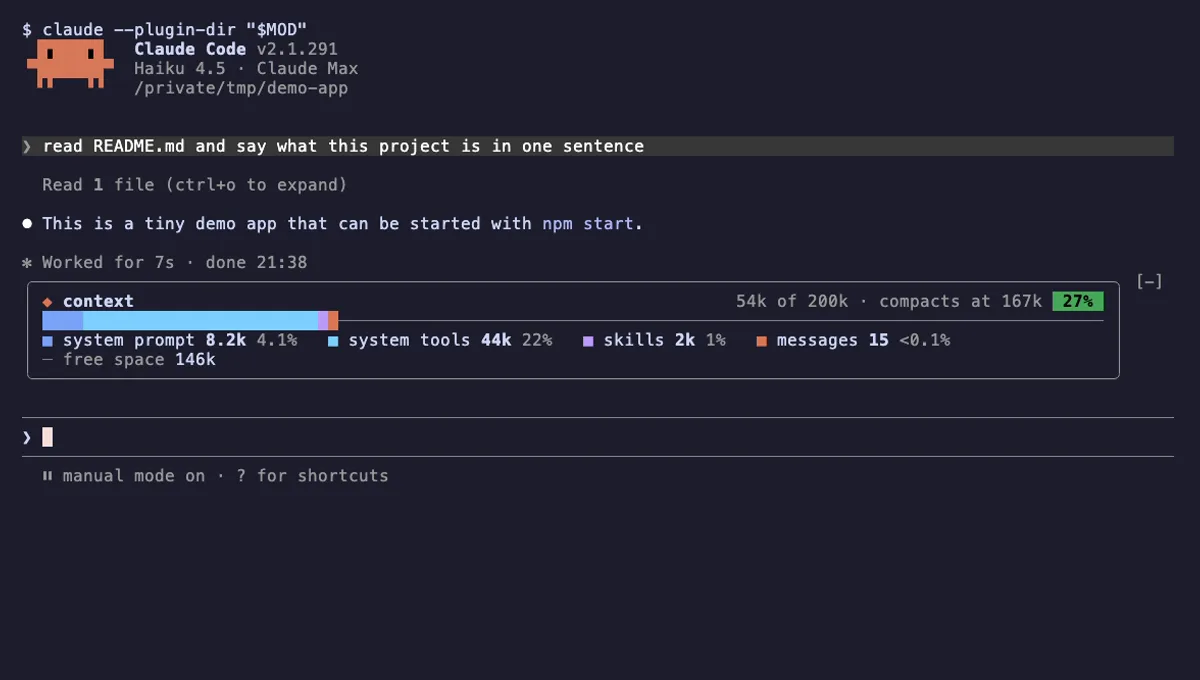
Context Bar
Your Claude Code context window as one stacked bar above the prompt, a color per category, with token counts.
- above-prompt
- Changes the UI
- Adds commands/tools
- Stores data
tested with v2.1.291
 Featured
Context Meter
Context-window fill, 5-hour and 7-day plan usage and session cost in the status line, plus a warning near the limit.
- status
- toast
- Changes the UI
tested with v2.1.310
More in Status line & prompt bar.