Browser Lanes Claude Code mod: share one Claude Code Playwright browser
A band above the prompt showing whether your session has a Playwright browser, who is driving it, and who waits.
Permissions
- Reads filesCan read files and list directories on your machine ($.fs.read / list / stat / exists).
- Runs commandsCan run shell programs on your machine ($.process.run / spawn). Check the source for exactly which ones.
- Intercepts tool callsSees every tool call Claude makes (tool.call / tool.check) and could block or change it.
- Changes the UIDraws into the Claude Code interface: bands, panes, status text, toasts (ui.render / $.ui.*).
- Adds commands/toolsRegisters new slash commands or tools that you or Claude can invoke ($.command.register / $.tool.register).
- Stores dataKeeps data between sessions in the plugin's private store ($.store.*).
- tested with
- v2.1.307
- last tested
- requires
- Claude Code ≥ 2.1.287
- surfaces
- above-prompt, toast
- source
- Hamza Zafar (hamzafer) (MIT)
Install inside Claude Code:
/plugin install browser-lanes --marketplace hamzafer/claude-code-modsWhat does this mod do?
Browser Lanes is a community mod by Hamza Zafar (hamzafer), part of his claude-code-mods collection. It is for people who give Claude Code a Playwright browser through the Playwright MCP server, and who run several sessions or subagents at once. The Claude Code Playwright browser is a single Chrome with a single profile, and two things trying to drive it at the same time is where the "Browser is already in use" error comes from.
The mod adds a line above the prompt: ◎ browser: followed by the state of this session. It reads attached · this session's Chrome, ready · browser not open yet, or, in red, NOT attached · another Claude (pid …) holds the shared profile. When something is using the browser, the line adds driving: <name> and, if others are queued, 2 waiting (main, login-test). If the session has no Playwright server, nothing is drawn.
Three other behaviors come with it, according to the author's code comments:
- Within one session, the main agent and each subagent take turns. A second driver's browser call waits until the first has closed the browser, finished its turn, or been idle for 90 seconds.
- Screenshots are named by who took them, such as
main-01.pngorlogin-test-03.png, and a filename you asked for gets the driver's name in front. - If another Claude session used the browser in the last 90 seconds, you get a toast.
/browser explains the current state, and /browser clean lists the Playwright browsers that belong to other Claude sessions and lets you close them.
Install
Use any of the methods in the install block; they install straight from the author's own marketplace. You also need the Playwright MCP server set up in Claude Code, since the mod only watches and coordinates it. Restart Claude Code or run /reload-plugins after installing.
$ install browser-lanes
Requires Claude Code ≥ 2.1.287
Installs from the author's own marketplace: hamzafer/claude-code-mods
1.One line, inside Claude Code
/plugin install browser-lanes --marketplace hamzafer/claude-code-modsPaste into a running session (v2.1.275+). Claude Code asks to add the marketplace first.
2.From your shell
claude plugin marketplace add hamzafer/claude-code-mods claude plugin install browser-lanes@claude-code-modsThen run /reload-plugins in any session that is already open.
3.Try it without installing
git clone https://github.com/hamzafer/claude-code-mods claude --plugin-dir ./claude-code-mods/mods/browser-lanesLoads the mod for one session only. Nothing is added to your settings.
How it works
The mod is one hooks module, hooks/register.tsx, plus a process-list parser in hooks/attach.ts. It hooks tool.call and acts only on tools whose name matches mcp__*playwright*__browser_. Everything else passes straight through. For those tools it reads who holds the lane, waits if someone else does, records itself as the holder, optionally renames the screenshot file, and then calls the real tool.
To work out whose Chrome is whose, it runs ps -axo pid=,ppid=,command= and walks parent processes: Claude, then npm exec @playwright/mcp, then playwright-mcp, then Chrome with --user-data-dir=. When it has to close a browser, it checks again that the pid is still a Playwright Chrome before sending kill:
async function closeChrome($: EngineInterface, pid: number) {
  const now = await $.process.run(['ps', '-p', String(pid), '-o', 'command='], { timeoutMs: 2_000 }).catch(() => null)
  if (!now || now.exitCode !== 0 || !/--user-data-dir=/.test(now.stdout) || /Helper/.test(now.stdout)) return false
  const r = await $.process.run(['kill', String(pid)], { timeoutMs: 2_000 }).catch(() => null)
  return r?.exitCode === 0
}
If a browser call fails with "already in use", the mod asks whether to close the blocking browser and, on yes, retries once. The holder, the waiting list and the attachment live in host-held state so they survive a reload. A small record of the last driver (session id, name, time) goes in the plugin's store, which is how one session notices another.
Customize it
There are no options in /config. The mod follows the band order file that the author's claude-code-mods checklist writes, at <config dir>/claude-code-mods/bands.json, so you can decide whether this band sits above or below other band mods. It reads that file once per session, so restart to apply a change. The 90-second idle limit and the 5-minute wait limit are constants at the top of register.tsx. To stop the queueing and screenshot renaming entirely, run Playwright with --isolated and disable the plugin with /plugin disable browser-lanes.
Permissions & safety
We read every file the plugin can execute before running it: hooks/hooks.json, register.tsx, attach.ts, bands.ts, the type declarations and the tests. There is no package.json, install script, bundled code or binary. The repository has a root LICENSE (MIT, Hamza Zafar). Here is what we found:
- Network: none.
- Runs commands (
$.process.run):sh -c 'echo $PPID'to find the Claude process,ps -axo pid=,ppid=,command=,lsof -a -p <pid> -d cwd -Fnfor other Claude processes with a Playwright Chrome,ps -p <pid> -o command=,sleep(0.5 s while waiting, 1.5 s before a retry), andkill <pid>. Each call is an argv array, not a shell string, apart from the fixedsh -cone. The process list stays on your machine. - Closes processes:
killis sent to a Chrome whose command line still contains--user-data-dir=and is not a Helper. For other sessions' browsers it happens only after you choose in a prompt (/browser clean, or after an "already in use" error). It does close this session's own Chrome when the session ends, without asking. Claude sessions themselves are never killed. - Blocks tool calls: the
tool.callhook can make a Playwright call wait, and after 5 minutes it refuses the call with a message. It also changes thefilenameof screenshots. These match the README. Validate notes that thetool.callandagent.spawnhooks have no.catch. - Files: it only reads, namely
<config dir>/claude-code-mods/bands.jsonthrough$.fs.read. It writes nothing outside the plugin's store and host state. It reads theCLAUDE_CONFIG_DIRandHOMEenvironment variables. - No daemons, secrets or telemetry, and no text is injected into prompts or tool results. The only message aimed at the model is the refusal after a 5-minute wait.
- Requirements: the Playwright MCP server and Chrome or Chromium. On macOS or Linux,
ps,lsofandkillmust be available.
claude plugin validate reported no errors or warnings for the plugin; its directory check only noted that no icon is provided. The author's 11 tests all passed on Claude Code 2.1.307.
- Reads files
- Can read files and list directories on your machine ($.fs.read / list / stat / exists).
- Runs commands
- Can run shell programs on your machine ($.process.run / spawn). Check the source for exactly which ones.
- Intercepts tool calls
- Sees every tool call Claude makes (tool.call / tool.check) and could block or change it.
- Changes the UI
- Draws into the Claude Code interface: bands, panes, status text, toasts (ui.render / $.ui.*).
- Adds commands/tools
- Registers new slash commands or tools that you or Claude can invoke ($.command.register / $.tool.register).
- Stores data
- Keeps data between sessions in the plugin's private store ($.store.*).
Compatibility & troubleshooting
Checked with Claude Code 2.1.307 on macOS (validate and tests). We did not drive a real Playwright browser, so the process matching is verified only by the author's tests. If the band does not show:
- No band means the session has no Playwright server. Run
/browser; it should printno Playwright server in this session. - The mod recognizes servers by
playwright-mcpormcp-server-playwrightin the process command. A differently named server will not be found. - The band hides while a survey is open above the prompt.
- If
/browseris refused because Claude Code already has a command of that name, the mod still runs but the command is missing.
For the red "NOT attached" state, run Playwright with --isolated, or use /browser clean.
FAQ
- Does Browser Lanes send anything over the network?
- No. The code has no network calls. It reads the local process list with ps and lsof, and everything it learns stays in Claude Code's state and the plugin's own store.
- Why do I get "Browser is already in use" with the Claude Code Playwright browser?
- Without --isolated, Playwright MCP uses one Chrome profile per folder, so a second Claude session in the same folder cannot open a browser. Browser Lanes detects this, shows a red band, and offers to close the other browser. Starting Playwright with --isolated gives every session its own profile and fixes it for good.
- Will it close a browser without asking?
- Browsers that belong to other Claude sessions are closed only after you pick an option in a prompt. The one exception is this session's own Chrome, which is closed when the session ends.
- What happens when a subagent and the main agent both want the browser?
- The second one waits. A driver lets go when it calls the browser close tool, when its turn finishes, or after 90 seconds without a browser call. After 5 minutes of waiting, the call is refused with a message saying who holds the browser.
- Does it work on Windows?
- Probably not. It finds browsers by running sh, ps, lsof and kill, so it is written for macOS and Linux. We only tested it on macOS.
# Related mods
 Featured
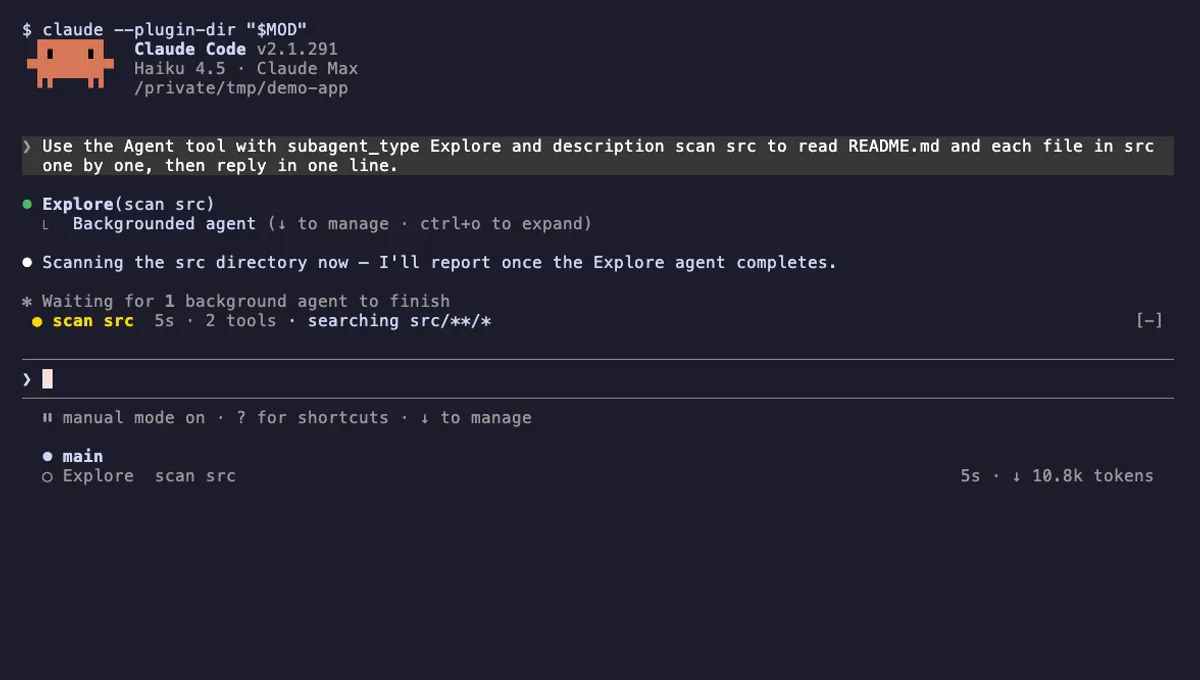
Agent Radar
One live line above the prompt per running subagent: time, tool count and what it is doing now, plus a /radar pane.
- above-prompt
- pane
- toast
- Intercepts tool calls
- Reads your prompts
- Changes the UI
- Adds commands/tools
tested with v2.1.291
 Featured
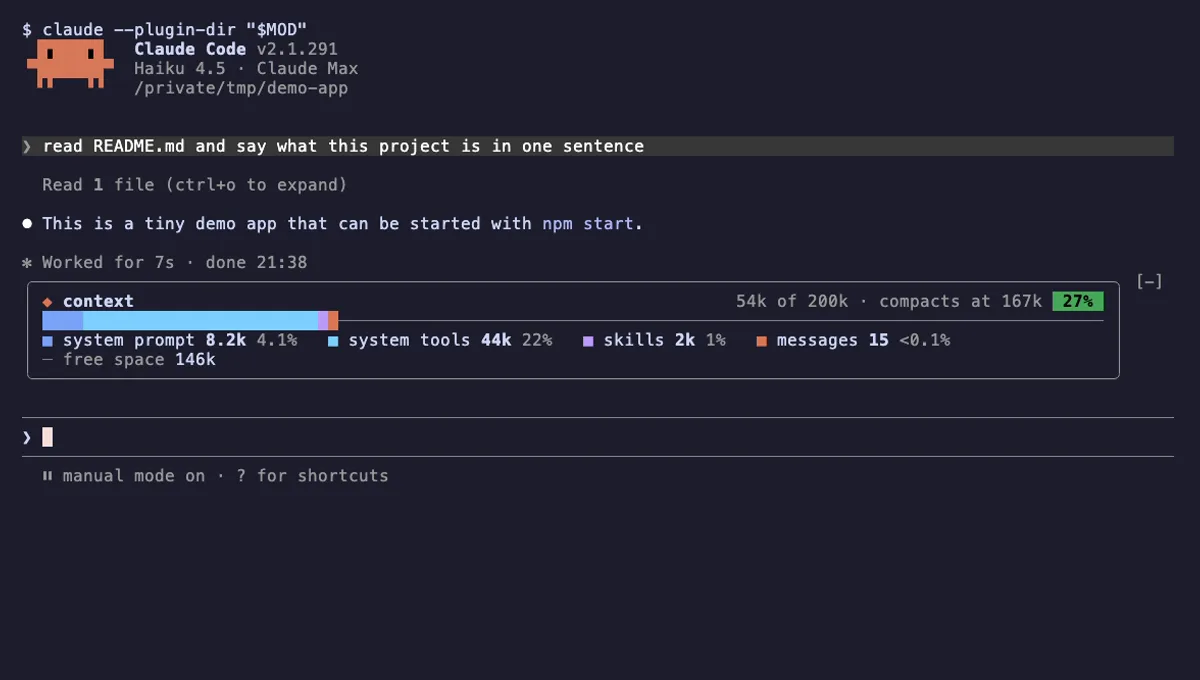
Context Bar
Your Claude Code context window as one stacked bar above the prompt, a color per category, with token counts.
- above-prompt
- Changes the UI
- Adds commands/tools
- Stores data
tested with v2.1.291