Glance Claude Code mod: your Claude Code calendar, PRs and Slack on a line
One line above the prompt with what needs you: your next meeting, PRs, Linear issues and Slack DMs.
Permissions
- Runs commandsCan run shell programs on your machine ($.process.run / spawn). Check the source for exactly which ones.
- NetworkCan make HTTP requests or talk to MCP servers ($.http.fetch / $.mcp.*).
- Changes the UIDraws into the Claude Code interface: bands, panes, status text, toasts (ui.render / $.ui.*).
- Adds commands/toolsRegisters new slash commands or tools that you or Claude can invoke ($.command.register / $.tool.register).
- tested with
- v2.1.296
- last tested
- requires
- Claude Code ≥ 2.1.287
- surfaces
- above-prompt
- source
- Hamza Zafar (hamzafer) (MIT)
Install inside Claude Code:
/plugin install glance --marketplace hamzafer/claude-code-modsWhat does this mod do?
Glance is a community mod by Hamza Zafar (hamzafer), part of his claude-code-mods collection. It turns the space above the Claude Code prompt into a Claude Code calendar and inbox line: one row of text that says what needs you right now. Up to four parts are shown, in this order: the next meeting, the most urgent pull request, a Linear issue you are working on, and the latest Slack message to you.
A line can read like 📅 Team standup in 18 min · 🔀 mods#19: CI failing +2 · 📋 ENG-1 In Review: Ship the thing +1 · 💬 Kim: "can @me look at the doc?" +2. The meeting turns yellow within 15 minutes and cyan while it is running, and a failing PR turns red. On a narrow terminal each part shortens in steps, Slack first and the meeting last. /glance refreshes everything and prints the full lists.
Install
The install block above adds the author's marketplace and installs the plugin from it. Glance does not work on its own: connect the Google Calendar, Linear and Slack connectors in Claude Code, and sign in to the GitHub CLI (gh auth login). Any one of the four is enough to see a part of the line. The line appears after the first fetch, shortly after the next session start.
$ install glance
Requires Claude Code ≥ 2.1.287
Installs from the author's own marketplace: hamzafer/claude-code-mods
1.One line, inside Claude Code
/plugin install glance --marketplace hamzafer/claude-code-modsPaste into a running session (v2.1.275+). Claude Code asks to add the marketplace first.
2.From your shell
claude plugin marketplace add hamzafer/claude-code-mods claude plugin install glance@claude-code-modsThen run /reload-plugins in any session that is already open.
3.Try it without installing
git clone https://github.com/hamzafer/claude-code-mods claude --plugin-dir ./claude-code-mods/mods/glanceLoads the mod for one session only. Nothing is added to your settings.
How it works
On session.start the mod registers /glance, starts a refresh in the background and a one-minute clock. Every 5 minutes at most, it fetches all four sources at once, and each one fails on its own. Connector calls go through $.mcp.call. This helper, from hooks/register.tsx, reads the JSON the connector returns:
// A connector's answer is JSON in its first text block.
async function mcp($: EngineInterface, server: string, tool: string, args: Record<string, unknown>) {
  const result: McpToolResult = await $.mcp.call(server, tool, args)
  const block = result.content.find(c => c.type === 'text') as { text?: string } | undefined
  if (result.isError || !block?.text) throw new Error(`${server} ${tool} failed`)
  return JSON.parse(block.text)
}
The calendar call is list_events on claude.ai Google Calendar. Linear is list_issues for your started issues. Slack uses slack_read_user_profile once and then slack_search_public_and_private twice, for DMs and for mentions. GitHub is one gh api graphql query that asks for review requests to you and your own open PRs with their CI state. hooks/pick.ts holds the pure ranking code: all-day, declined and finished events are skipped, a block running now that is longer than 3 hours does not hide the next meeting, and PRs are ranked review requests first, then failing CI, then changes requested. The line is drawn on the AbovePrompt render site, above whatever Claude Code and other mods draw there.
Customize it
There are no options in /config. To change what is shown, edit the constants at the top of register.tsx: EVERY_MS for the fetch interval, TICK_MS for the countdown tick and SLACK_WINDOW_S for how far back Slack messages count. The queries and the ranking live in pick.ts. To use only some sources, simply do not connect the others.
Permissions & safety
We read every file the plugin can execute before running it: plugin.json, hooks/hooks.json, hooks/register.tsx, hooks/pick.ts, the type declarations and the tests. There is no package.json, install script, binary or bundled code. Here is what we found:
- Calls connectors (
$.mcp.call): read-only requests toclaude.ai Google Calendar(list_events),claude.ai Linear(list_issues), andclaude.ai Slack(slack_read_user_profile,slack_search_public_and_private). These use the connectors you have already authorized in Claude Code. Calendar, issue and message titles, senders and text are read from them and drawn on screen. - Runs a command (
$.process.run):gh api graphqlwith a fixed query, as an argv array with no shell and a 20 second timeout. It reads your PRs through the GitHub CLI login you already have. - No direct network access: the code has no
fetch, sockets or hosts of its own, no telemetry, and it does not send the data it reads to any other service. - No file writes, no daemons: it does not write files, settings, shell rc files or LaunchAgents. The fetched items live in host-held
$.stateatoms for the session. The only timer is$.clock.every, which stops with the session. - No secrets read: no environment variables, tokens or keychains. Authentication stays with
ghand the connectors. - No prompt influence and no gating hooks: it adds no text to prompts or tool results, and does not block or rewrite any tool call.
claude plugin validatelisted no gating hooks. - Privacy note: the line shows meeting titles, PR titles, issue titles and the first line of Slack messages. Anyone who can see your terminal, a screen share or a recording sees them too.
- License: MIT, with a LICENSE file in the repository.
claude plugin validate reported no errors or warnings, and the author's 17 tests passed on Claude Code 2.1.296. The tests use mocked connectors and gh, so they do not prove the real connector answers still have the shape the parser expects.
- Runs commands
- Can run shell programs on your machine ($.process.run / spawn). Check the source for exactly which ones.
- Network
- Can make HTTP requests or talk to MCP servers ($.http.fetch / $.mcp.*).
- Changes the UI
- Draws into the Claude Code interface: bands, panes, status text, toasts (ui.render / $.ui.*).
- Adds commands/tools
- Registers new slash commands or tools that you or Claude can invoke ($.command.register / $.tool.register).
Compatibility & troubleshooting
Checked with Claude Code 2.1.296 on macOS (validate and tests only; the mod was not run against real accounts). If the line does not show up:
- You have at least one source connected: run
/glanceand look for sections marked "couldn't reach it". gh auth statusshows a signed-in account, since PRs come fromgh api graphql.- The connectors are named
claude.ai Google Calendar,claude.ai Linearandclaude.ai Slack. The mod looks them up by these names. - The terminal is wide enough: on a very narrow window the line shortens to counts like
🔀 3 PRs. - A survey is open above the input; the line returns after it closes.
FAQ
- What do I need for Glance to show anything?
- At least one of its four sources. Meetings come from the Google Calendar connector, PRs from the GitHub CLI (gh, signed in), issues from the Linear connector and messages from the Slack connector. A source that is missing or fails is left out, and if all four fail the line is hidden.
- Does Glance send my data anywhere?
- The mod code makes no network requests of its own. It asks the connectors you already have in Claude Code and runs gh api graphql, so the requests go to Google, GitHub, Linear and Slack through those tools. What it reads is drawn on screen and kept in memory, not written to disk.
- How often does the line refresh?
- Sources are fetched at session start and then at most every 5 minutes. The meeting countdown moves every minute without a new fetch, and /glance forces a refresh and prints the full list.
- What happens when a source stops answering?
- Glance keeps that source's last answer and draws it dimmed, so a short network problem does not make the line disappear. In the /glance list the section is marked with the time of its last good refresh.
- Which Slack messages does it show?
- Direct messages and channel mentions of you from the last 2 hours, newest first. Bot messages are excluded. It first looks up your Slack user id from your profile and keeps it in memory only.
# Related mods
 Featured
Agent Radar
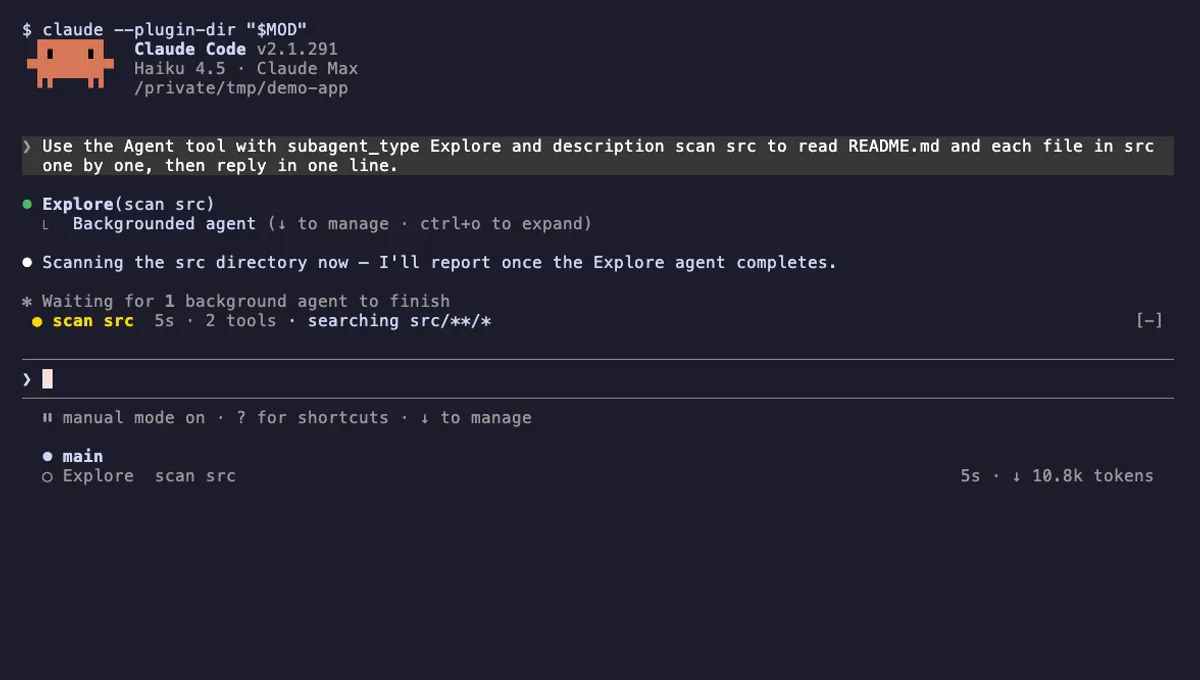
One live line above the prompt per running subagent: time, tool count and what it is doing now, plus a /radar pane.
- above-prompt
- pane
- toast
- Intercepts tool calls
- Reads your prompts
- Changes the UI
- Adds commands/tools
tested with v2.1.291
 Featured
Context Bar
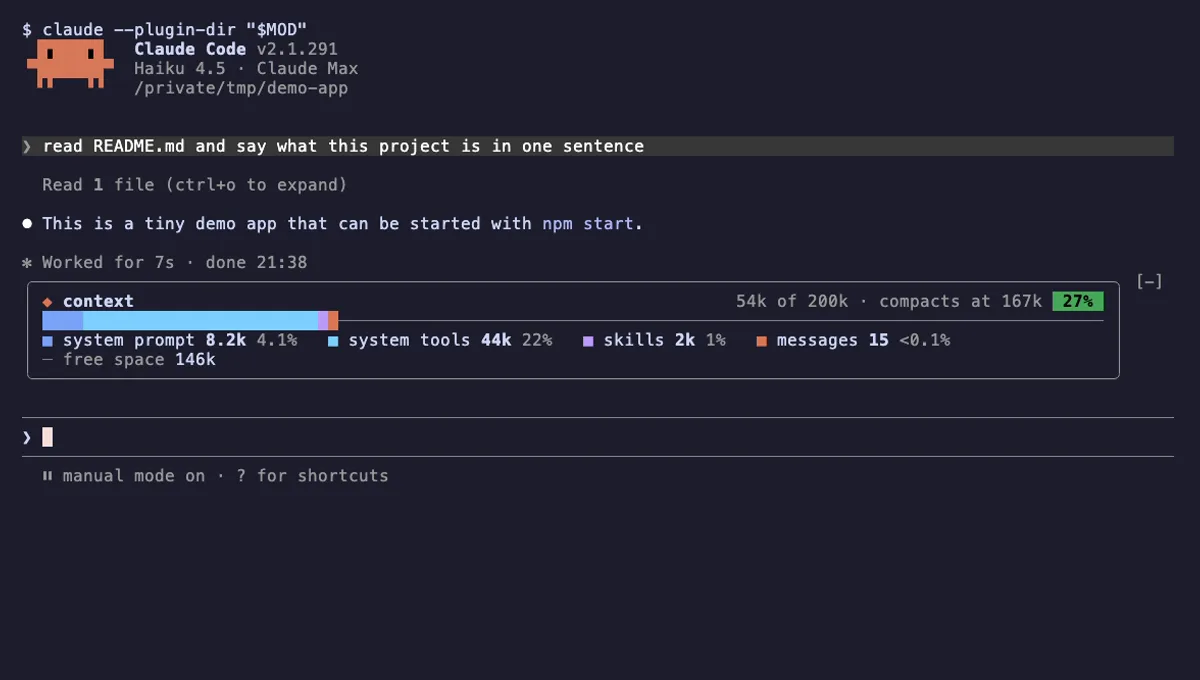
Your Claude Code context window as one stacked bar above the prompt, a color per category, with token counts.
- above-prompt
- Changes the UI
- Adds commands/tools
- Stores data
tested with v2.1.291
More in Timers, todos, standups, Git & GitHub.