Flightdeck Claude Code mod: a Claude Code agent dashboard for your terminal
A live pane for Claude Code: model and context, every permission check, subagent cards and a last-turn receipt.
#3 in Best Claude Code ModsPermissions
- Intercepts tool callsSees every tool call Claude makes (tool.call / tool.check) and could block or change it.
- Reads your promptsCan see what you type and the conversation transcript (prompt.* / session.append / session.messages).
- Changes the UIDraws into the Claude Code interface: bands, panes, status text, toasts (ui.render / $.ui.*).
- Adds commands/toolsRegisters new slash commands or tools that you or Claude can invoke ($.command.register / $.tool.register).
- tested with
- v2.1.303
- last tested
- requires
- Claude Code ≥ 2.1.287
- surfaces
- pane, above-prompt, status
Install inside Claude Code:
/plugin install flightdeck --marketplace scasella/claude-flightdeckWhat does this mod do?
Flightdeck is a community mod by Stephen Casella (scasella) that works as a Claude Code agent dashboard: one pane that shows what your session and its agents are doing right now. It gathers the model name and effort, a context gauge, session cost, rate-limit windows when your plan reports them, every permission check, subagent cards, and a receipt for the last turn.
The panes are: main (model, effort, mode, request count, context, cost, speed of the last request), architect (consults of an advisor-style agent or server tool, matched by a regular expression), gate (one cell per permission check: allowed, decided by the classifier or you, pending, or denied), agents (cards that become swimlanes past three agents), loops (model loops that match no card), receipt (duration, agents, edits, errors and cost of the turn) and a short log. Panels with nothing to show take no room. The author's README says every number comes from a real session event; the architect "moments" are inferred and are labelled that way.
Demo
The recording starts Claude Code with the mod loaded in the small demo project. The terminal is narrower than 144 columns, so we open the pane with /flightdeck. A bordered summary appears above the prompt with idle and $0.00. Then we ask Claude to read README.md and describe the project in one sentence. While the turn runs, the pane switches to working and a gate row appears with 1 allowed · 0 classifier · 0 denied. When the turn ends, it shows the context gauge (4%), the cost, and a receipt line: last turn 47s · 0 agents · 0 edits · 0 errors.
Install
Use any of the methods in the install block; they install straight from the author's own marketplace. Run /reload-plugins and then /flightdeck. The author notes that the installer may say config options are not set; the defaults work.
$ install flightdeck
Requires Claude Code ≥ 2.1.287
Installs from the author's own marketplace: scasella/claude-flightdeck
1.One line, inside Claude Code
/plugin install flightdeck --marketplace scasella/claude-flightdeckPaste into a running session (v2.1.275+). Claude Code asks to add the marketplace first.
2.From your shell
claude plugin marketplace add scasella/claude-flightdeck claude plugin install flightdeck@claude-flightdeckThen run /reload-plugins in any session that is already open.
3.Try it without installing
git clone https://github.com/scasella/claude-flightdeck claude --plugin-dir ./claude-flightdeckLoads the mod for one session only. Nothing is added to your settings.
How it works
Everything is kept in $.state atoms, and each hook updates them and passes the event on. A permission check is recorded like this, from hooks/register.tsx:
on('tool.check', async ($, e, next) => {
  const verdict = await next(e)
  if (e.tool_use_id) {
    const check: Check = {
      id: e.tool_use_id,
      tool: e.tool,
      bucket: bucketOf(e.tool),
      verdict: verdict.decision === 'allow' ? 'rule' : verdict.decision,
      detail: shorten(describeInput(e.tool, e.input), 90),
      // ...
    }
    await update($, gate, g => recordCheck(normalizeGate(g), check))
  }
  return verdict
})
The verdict is returned as it came. The pane itself is drawn on the Pane render site. Layout depends on where it sits: a summary of at most 8 rows inline above the prompt, one column when docked beside the transcript, and two columns from 110 columns. Two small client modules, rail.tsx and elapsed.tsx, draw the animated connectors and the running clocks on the surface's own frame clock so the pane does not redraw. Reducers and formatters are pure functions in hooks/core.ts.
Customize it
Options are in /config: panels (which panels show and in what order), layout (auto, compact, wide or mini), maxCards (1 to 6), motion (while-active or off), palette (theme or pastel), architectPattern, architectLabel, gateLabel, matchDescriptions, moments, openOnStart and statusLine. The /flightdeck command takes open, close, reset and layout auto|compact|wide|mini. Focus the pane with ctrl+x tab; keys 1 to 6 expand a card and f, s, o open the file, shell and other rows of the gate.
Permissions & safety
We read every file the plugin can execute before running anything: plugin.json, marketplace.json, hooks/hooks.json, hooks/register.tsx, hooks/core.ts, hooks/rail.tsx, hooks/elapsed.tsx, the type declarations and the tests. There is no package.json, install script, binary or bundled code. A search for network, process, eval, dynamic import and hidden Unicode found nothing.
- Network, processes, files, environment: none. The mod makes no requests, runs no commands, reads and writes no files and does not read environment variables or call the model.
- What it observes: every tool call's name and input, every permission verdict, subagent spawns, token usage and final answers, and the first 70 characters of each prompt for the log. It keeps short summaries in session state only, with credentials masked by a regular-expression filter. The filter is best effort, so treat the pane as showing your commands.
- Gating hooks:
tool.check,tool.call,agent.spawn,agent.offer,session.append,session.compactandclassic.UserPromptSubmitare all pass-through: they awaitnext(e)and return its result.claude plugin validatenotes they have no.catch; the two classic and compact hooks also do not run where an organization manages Claude Code. - Telemetry, daemons, other writes: none; nothing persists after the session.
- License: MIT, with a LICENSE file.
claude plugin validate reported no errors or warnings. The author's 28 tests passed on Claude Code 2.1.303.
- Intercepts tool calls
- Sees every tool call Claude makes (tool.call / tool.check) and could block or change it.
- Reads your prompts
- Can see what you type and the conversation transcript (prompt.* / session.append / session.messages).
- Changes the UI
- Draws into the Claude Code interface: bands, panes, status text, toasts (ui.render / $.ui.*).
- Adds commands/tools
- Registers new slash commands or tools that you or Claude can invoke ($.command.register / $.tool.register).
Compatibility & troubleshooting
Checked with Claude Code 2.1.303 on macOS (validate and tests); the author's README asks for 2.1.287 or later. If the pane does not show up:
- Run
/reload-plugins, then/flightdeck. Below 144 columns the pane does not open by itself. - Look in the transcript for a dim line starting
flightdeck:; it names a failed hook or the reason the pane was refused. - If colors look wrong, set
palettetopastel. If counters look stale after an update, run/flightdeck reset. - On VS Code and mobile the connectors and clocks are static.
FAQ
- Does Flightdeck send anything off my machine?
- No. We found no network calls, no process launches and no file reads or writes in the code. It only calls Claude Code's own APIs for the clock, usage, state and the pane. Its state lives in session state and ends with the session.
- Can it block or change my tool calls?
- No. It hooks tool.check, tool.call, agent.spawn and others, but each hook awaits the next handler and returns its result unchanged. It does not deny, rewrite or delay anything.
- Does it store my commands, including secrets?
- It keeps a one-line summary per permission check (tool name plus a path, command or pattern, cut to 90 characters) in session state. Common credential shapes such as bearer tokens, API keys and passwords are masked first. The summary is only shown in the pane and is not saved across sessions.
- The pane did not open when I started Claude Code. Why?
- openOnStart only opens the pane in terminals at least 144 columns wide. In a narrower terminal, run /flightdeck. Inline above the prompt it shows an 8-row summary.
- How is it different from Agent Radar?
- Agent Radar draws one live line per running subagent above the prompt. Flightdeck is a wider dashboard in one pane, with the model, context gauge, cost, a permission-check strip, subagent cards that turn into swimlanes, and a last-turn receipt.
# Related mods
 Featured
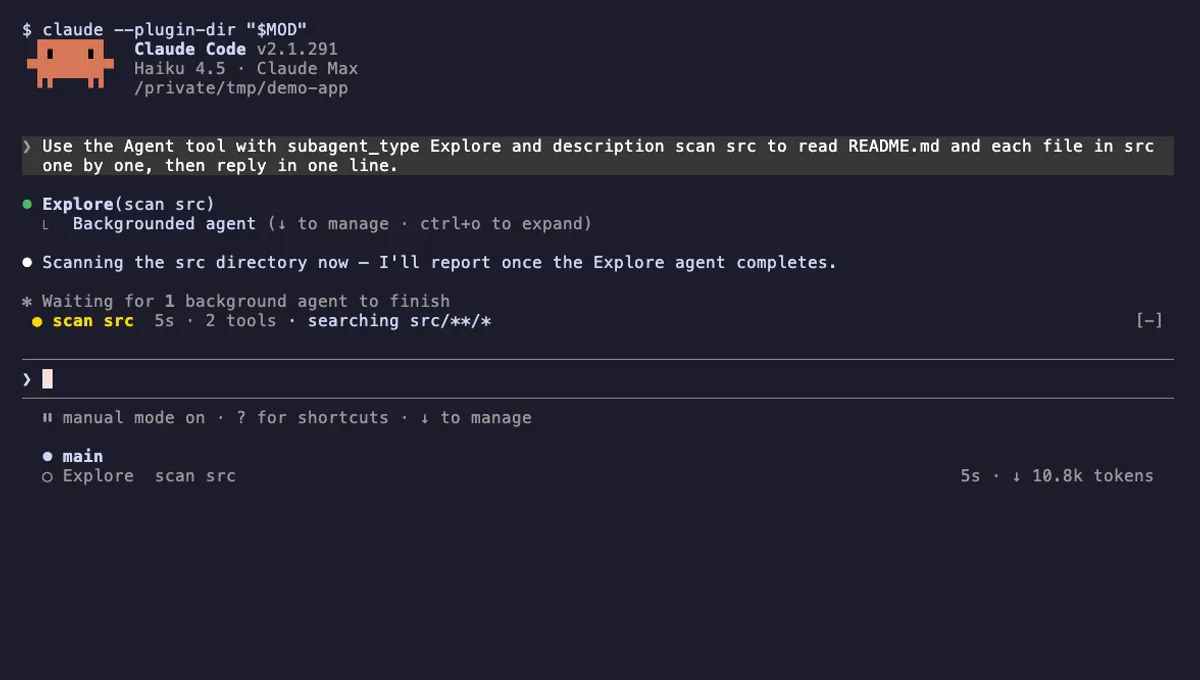
Agent Radar
One live line above the prompt per running subagent: time, tool count and what it is doing now, plus a /radar pane.
- above-prompt
- pane
- toast
- Intercepts tool calls
- Reads your prompts
- Changes the UI
- Adds commands/tools
tested with v2.1.291
 Featured
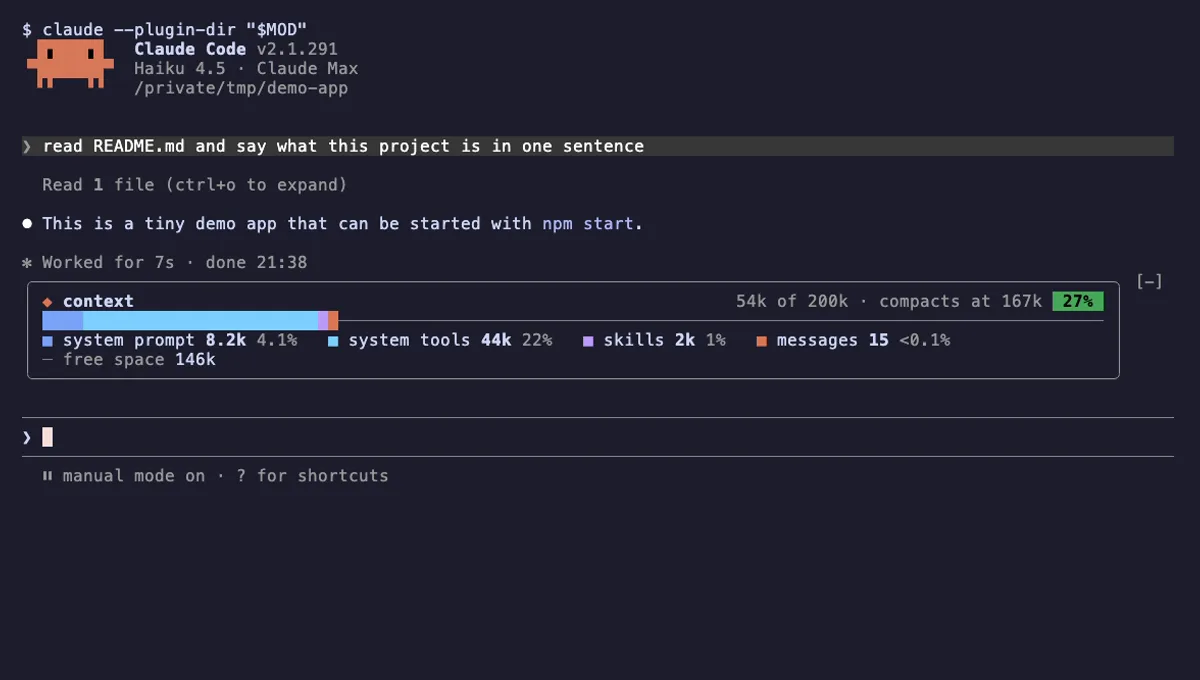
Context Bar
Your Claude Code context window as one stacked bar above the prompt, a color per category, with token counts.
- above-prompt
- Changes the UI
- Adds commands/tools
- Stores data
tested with v2.1.291
 Featured
Context Meter
Context-window fill, 5-hour and 7-day plan usage and session cost in the status line, plus a warning near the limit.
- status
- toast
- Changes the UI
tested with v2.1.310
More in Panes & dashboards, Timers, todos, standups.