Heatmap Claude Code mod: a Claude Code activity heatmap for your sessions
A GitHub-style grid of your Claude Code time in a /heatmap pane, with streaks, peak hours and top projects.
Permissions
- Reads filesCan read files and list directories on your machine ($.fs.read / list / stat / exists).
- Writes filesCan create or overwrite files on your machine ($.fs.write).
- Runs commandsCan run shell programs on your machine ($.process.run / spawn). Check the source for exactly which ones.
- Changes the UIDraws into the Claude Code interface: bands, panes, status text, toasts (ui.render / $.ui.*).
- Adds commands/toolsRegisters new slash commands or tools that you or Claude can invoke ($.command.register / $.tool.register).
- Stores dataKeeps data between sessions in the plugin's private store ($.store.*).
- tested with
- v2.1.307
- last tested
- requires
- Claude Code ≥ 2.1.287
- surfaces
- pane, toast
- source
- Hamza Zafar (hamzafer) (MIT)
Install inside Claude Code:
/plugin install heatmap --marketplace hamzafer/claude-code-modsWhat does this mod do?
Heatmap is a community mod by Hamza Zafar (hamzafer), part of his claude-code-mods collection. It gives you a Claude Code activity heatmap: a grid like the GitHub contribution graph, built from your own session history. Run /heatmap and a pane opens with one square per day, up to 52 weeks wide depending on the pane width, with the weeks running left to right and Monday to Sunday top to bottom. The darker or brighter the square, the more active minutes that day.
Under the grid it prints a current streak and your best streak, total active time and session count for the weeks shown, and a "peak" line with your busiest weekday and hour. In the all-projects view it also lists your top three projects with a share bar and their time. The p key switches the pane between all projects and the current repo, and q closes it. When a streak reaches 7, 30 or 100 days, a toast says so once.
Active time is a simple rule from the code: the gaps between messages in a session count, unless a gap is longer than five minutes. It is a rough measure of time at the keyboard, not billing or token data. The mod keeps its own daily ledger, so the grid does not shrink when Claude Code cleans up old logs.
Install
Use any of the methods in the install block; they install straight from the author's own marketplace. Restart Claude Code or run /reload-plugins, then run /heatmap. The first time, the pane says it is reading your session history, which takes a few seconds on a large history.
$ install heatmap
Requires Claude Code ≥ 2.1.287
Installs from the author's own marketplace: hamzafer/claude-code-mods
1.One line, inside Claude Code
/plugin install heatmap --marketplace hamzafer/claude-code-modsPaste into a running session (v2.1.275+). Claude Code asks to add the marketplace first.
2.From your shell
claude plugin marketplace add hamzafer/claude-code-mods claude plugin install heatmap@claude-code-modsThen run /reload-plugins in any session that is already open.
3.Try it without installing
git clone https://github.com/hamzafer/claude-code-mods claude --plugin-dir ./claude-code-mods/mods/heatmapLoads the mod for one session only. Nothing is added to your settings.
How it works
At session.start the mod registers /heatmap and refreshes its ledger in the background, and it refreshes again at session.end. The refresh, from hooks/register.tsx:
const dir = await configDir($)
const file = `${dir}/heatmap/days.jsonl`
const parsed = (await $.fs.exists(file)) ? parseLedger(await $.fs.read(file)) : []
const old = parsed.length > 0 ? parsed : null // an empty or broken ledger backfills again
...
const logs = await readLogs($, `${dir}/projects`, since)
const merged = mergeLedger(old ?? [], aggregate(logs, localOffset, fromDay), fromDay)
await $.fs.write(file, formatLedger(merged))
With no ledger it backfills every day the logs hold. After that it re-reads only logs touched since yesterday, so older days stay as they were. To read a log it runs grep -oE for the "timestamp" fields, and grep -m1 for the first "cwd", so message text is never loaded into the mod. The pure counting rules live in hooks/heat.ts, and the grid itself is a separate surface module, hooks/grid.tsx, drawn with an orange ramp chosen from your saved theme (dark, light, or one that reads on both).
Customize it
There are no options in /config. The only controls are the p and q keys in the pane and the arrow keys after you click the grid. The pane opens on the all-projects view, which lists your project names; press p to switch to the current repo first if you plan to share a screenshot. To change the look, edit GLYPHS and RAMPS in hooks/grid.tsx, or GAP_MS, MAX_WEEKS and MILESTONES in hooks/heat.ts.
Permissions & safety
We read every file the plugin can execute before running it: .claude-plugin/plugin.json, hooks/hooks.json, hooks/register.tsx, hooks/heat.ts, hooks/grid.tsx, the type declarations, tsconfig.json and the tests. There is no package.json, install script, bundled or minified code, or binary. Findings:
- Network: none. No
fetch, sockets or URLs in the code. - Processes (
$.process.run):greponly, with an argv array, on your session logs:-oEfor timestamps (register.tsx:251) and-m1 -oEfor the first working directory (:263). - File writes (
$.fs.write): one file,<config dir>/heatmap/days.jsonl(register.tsx:226), inside~/.claude(orCLAUDE_CONFIG_DIR). It writes nothing tosettings.json, shell files, LaunchAgents, cron or git hooks. The ledger holds, per day and project: the project folder name, its display name (the last part of its path), active minutes, sessions and minutes per hour. It does not hold message text. - Reads: every
*.jsonllog under<config dir>/projects, whichever project it belongs to (register.tsx:231-259), and.claude.jsonfor the saved theme only (:179-180). - Background work: it refreshes on every session start and session end without asking first. That is the mod's whole purpose and it stays on your machine, but you should know the ledger is written as soon as the mod is loaded. No daemons; nothing keeps running after Claude Code exits.
- Environment:
CLAUDE_CONFIG_DIRandHOME, used to find the config folder. They are not sent anywhere. - Telemetry: none.
- Model influence: none. It does not touch prompts or tool results and has no gating hooks.
- External requirements:
grepon the path. Nothing else. - Privacy note: the all-projects view shows names of your projects, drawn from your history. Keep that in mind when you screenshot the pane.
- License: MIT, with a
LICENSEfile in the repository root.
claude plugin validate reported no errors or warnings on the manifest. Its directory check listed one non-blocking warning, a missing plugin icon. The author's 28 tests (22 for the counting rules, 6 for the mod) passed with claude plugin test on Claude Code 2.1.307.
- Reads files
- Can read files and list directories on your machine ($.fs.read / list / stat / exists).
- Writes files
- Can create or overwrite files on your machine ($.fs.write).
- Runs commands
- Can run shell programs on your machine ($.process.run / spawn). Check the source for exactly which ones.
- Changes the UI
- Draws into the Claude Code interface: bands, panes, status text, toasts (ui.render / $.ui.*).
- Adds commands/tools
- Registers new slash commands or tools that you or Claude can invoke ($.command.register / $.tool.register).
- Stores data
- Keeps data between sessions in the plugin's private store ($.store.*).
Compatibility & troubleshooting
Checked with Claude Code 2.1.307 on macOS (validate and tests). The pane draws in the terminal or the desktop app. If something looks wrong:
- "Reading your session history…" stays on screen. Close and reopen the pane; if the read failed, the pane prints the reason.
- The grid is empty. The mod only counts logs under
<config dir>/projects. A new install has history only from the sessions Claude Code still keeps. - Keys do nothing. Click the grid once to give it the keyboard;
palso works as the hotkey of the scope button. - Not all weeks fit. The grid takes two columns per week, so a narrow pane shows fewer weeks. In our test terminal the pane was cut off after six grid rows, so the lines below the grid were out of view; we did not find out how to scroll them into view.
FAQ
- Does Heatmap send my session history anywhere?
- No. We found no network calls in the code. It reads your session logs and writes a small ledger file on your machine, and the pane is drawn from that file.
- How does it decide how much time I spent?
- It takes the time between consecutive messages in each session log and ignores any pause longer than 5 minutes. Time is split at local midnight and at each local hour, so the peak day and peak hour are in your own time zone.
- What happens to the grid when Claude Code deletes old logs?
- Heatmap keeps its own daily ledger in `heatmap/days.jsonl` inside your Claude config folder. Days before yesterday are not rewritten, so they stay on the grid even after their logs are gone.
- What do the keys do?
- The `p` key switches between all projects and the current repo, and `q` closes the pane. After you click the grid, the arrow keys move a cursor over the days and a detail line shows that day's time, sessions and top project.
- When does the streak toast appear?
- Once per streak, when it reaches 7, 30 or 100 days. The mod stores which streak it already announced, so reopening Claude Code the same day does not repeat it.
# Related mods
 Featured
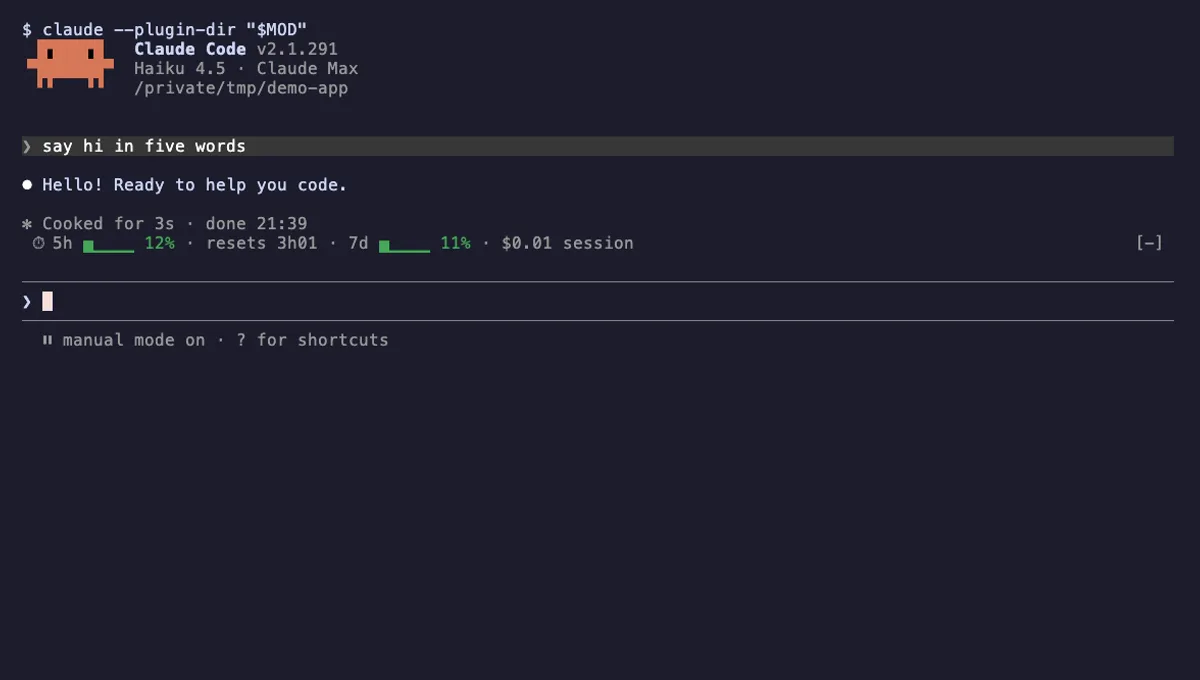
Usage Meter
Your plan's 5-hour and 7-day usage as small bars above the Claude Code prompt, with reset countdown and session cost.
- above-prompt
- toast
- Changes the UI
tested with v2.1.291
 Featured
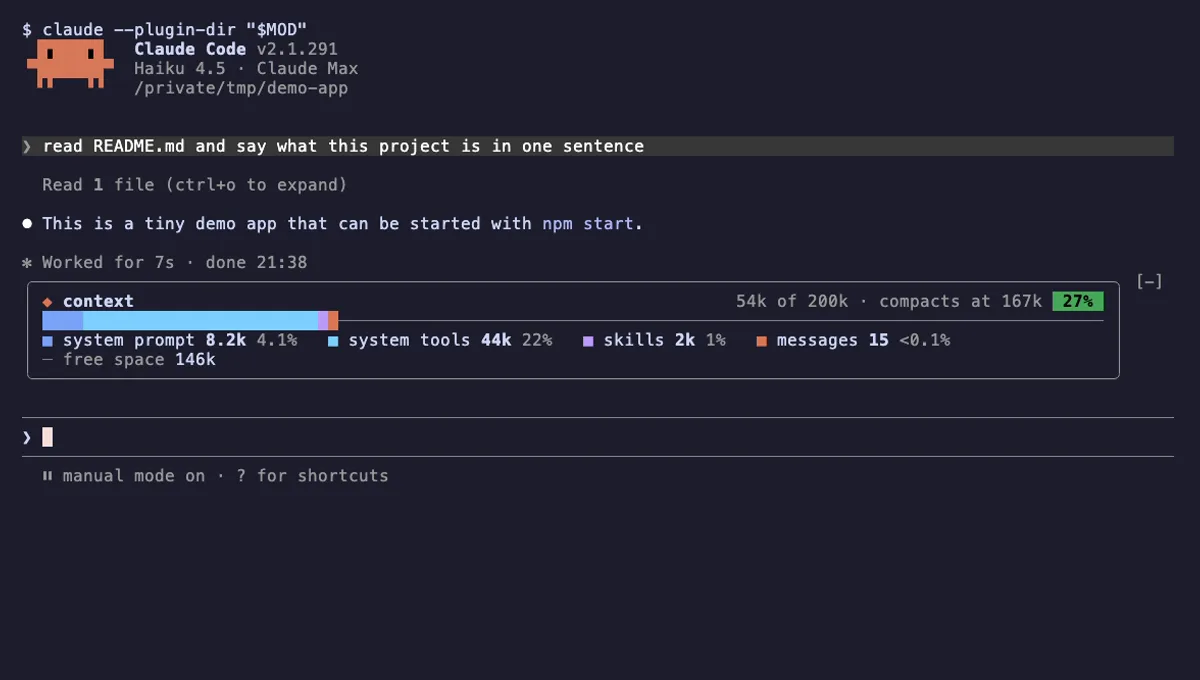
Context Bar
Your Claude Code context window as one stacked bar above the prompt, a color per category, with token counts.
- above-prompt
- Changes the UI
- Adds commands/tools
- Stores data
tested with v2.1.291
 Featured
Tool Call Counter
Counts Claude's tool calls per turn and session, shows the count by the spinner, and adds /tally for a breakdown.
- spinner
- transcript
- status
- Intercepts tool calls
- Changes the UI
- Adds commands/tools
tested with v2.1.310
More in Context, quota, cost, Timers, todos, standups.