Mission Control Claude Code mod: watch Claude Code subagents and tools live
A live pane of Claude Code's main agent, subagents and every tool call, plus a code map of the files they touch.
Permissions
- Reads filesCan read files and list directories on your machine ($.fs.read / list / stat / exists).
- Writes filesCan create or overwrite files on your machine ($.fs.write).
- Runs commandsCan run shell programs on your machine ($.process.run / spawn). Check the source for exactly which ones.
- Calls the model (uses your quota)Can send its own requests to Claude, which count against your plan's usage ($.model.* / $.agent.spawn).
- Intercepts tool callsSees every tool call Claude makes (tool.call / tool.check) and could block or change it.
- Changes the UIDraws into the Claude Code interface: bands, panes, status text, toasts (ui.render / $.ui.*).
- Adds commands/toolsRegisters new slash commands or tools that you or Claude can invoke ($.command.register / $.tool.register).
- tested with
- v2.1.296
- last tested
- requires
- Claude Code ≥ 2.1.287
- surfaces
- pane, above-prompt
- source
- Hamza Zafar (hamzafer) (MIT)
Install inside Claude Code:
/plugin install mission-control --marketplace hamzafer/claude-code-modsWhat does this mod do?
Mission Control is a community mod by Hamza Zafar (hamzafer), part of his claude-code-mods collection. It shows what Claude Code is doing in one place: the main agent, its subagents and every tool call they make. Run /mission and a pane opens next to the chat with a tree. The main loop is at the top, each Claude Code subagent hangs under it, and the tool calls sit under the agent that made them. Runs of the same tool are folded into one line, such as read: README.md → src/login.js ×2, and each line shows its duration.
While Claude works, and for 30 seconds after, a single line above the prompt sums it up: ◈ mission: 2 tools, with agent and changed-file counts when there are any. A second view, /mission code, draws a map of the files Claude read or edited, with arrows for the relative imports between them, a glow on the file being touched now, and a one-line note on each change. The author's README asks for Claude Code 2.1.287 or later for the collection; we tested it on 2.1.296.
Demo
The recording starts Claude Code with the mod loaded in the small demo project and asks Claude to read README.md and src/login.js and say in one sentence what they do. Claude reads both files, and while it works the band line above the prompt counts the tools. After the answer, the clip types /mission. The pane opens above the prompt with the Who, Code and Close buttons, the summary 0 agents (0 running) · 2 tool calls, the green main line with the prompt text, and the folded read: demo-app/README.md → src/login.js ×2 line under it. The code map is not shown in the clip.
Install
Use any of the methods in the install block; they install straight from the author's own marketplace. Then run /mission in a session. After installing into a session that is already open, run /reload-plugins first.
$ install mission-control
Requires Claude Code ≥ 2.1.287
Installs from the author's own marketplace: hamzafer/claude-code-mods
1.One line, inside Claude Code
/plugin install mission-control --marketplace hamzafer/claude-code-modsPaste into a running session (v2.1.275+). Claude Code asks to add the marketplace first.
2.From your shell
claude plugin marketplace add hamzafer/claude-code-mods claude plugin install mission-control@claude-code-modsThen run /reload-plugins in any session that is already open.
3.Try it without installing
git clone https://github.com/hamzafer/claude-code-mods claude --plugin-dir ./claude-code-mods/mods/mission-controlLoads the mod for one session only. Nothing is added to your settings.
How it works
The mod keeps its tree, file list and view in host-held $.state atoms, so a hot reload keeps the picture. Every tool call is wrapped in a tool.call hook that adds a node, lets the call run, then marks it done or failed. From hooks/register.tsx:
let failed = true
let r: Awaited<ReturnType<typeof next>>
try {
  r = await next(e)
  failed = r.deny !== undefined || r.isError === true
} finally {
  await update($, nodes, list => list.map(n => (n.id === id ? { ...n, status: failed ? 'failed' : 'done', end: Date.now() } : n)))
}
agent.spawn adds subagents, turn.start resets the tree, and turn.complete closes whatever is still marked running. Calls to Agent and Claude Code's own bookkeeping tools (ToolSearch, TaskCreate and similar) are left out. A one-second clock only updates the display while something is running; the tree is capped at 300 nodes. For the code map, hooks/map.ts builds an SVG: it reads each touched source file through $.fs.read, finds relative imports with a regex, and lays the files out in columns by import depth. The SVG is turned into a PNG by headless Chrome and shown with the pane's Image element.
Customize it
There are no options in /config. The only controls are /mission, /mission who and /mission code, and the pane buttons w, c and q. To change behavior, edit the constants at the top of register.tsx: MAX_NODES (tree size), MAX_FILES (files on the map), BAND_AFTER_MS (how long the band stays), INTERNAL (tools kept out of the tree) and CODE_FILE (file types that appear on the map).
Permissions & safety
We read every file the plugin can execute before running it: .claude-plugin/plugin.json, hooks/hooks.json, hooks/register.tsx, hooks/map.ts, hooks/tree.ts, the type declarations and the tests. There is no package.json, install script, binary or bundled code, and we found no hidden Unicode, eval or remote code.
- Network: none of its own. No
fetch, sockets or hosts. - Model call:
explain()inregister.tsxcalls$.model.completewithmodel: 'haiku'after a main turn that edited or wrote files. The prompt holds up to 300 characters of eachold_stringandnew_string(400 of a written file), and the reply becomes a note of at most 80 characters on the map. The reply is parsed as JSON, cut short and escaped before it enters the SVG. It uses your session's quota. - Processes: one
sh -cscript through$.process.runthat starts headless Chrome with a throwaway profile, waits for the screenshot, then kills that Chrome. File and folder names are passed as arguments, not spliced into the shell string. Chrome is only started while the pane is open on the code view. - File writes:
$TMPDIR/mission-control/only:map.svg, twomap-N.pngfiles and a Chrome profile folder. Nothing under~/.claude, settings, shell files or LaunchAgents. The mod reads the files Claude touches, to find imports, and keeps edit snippets in memory. - Daemons: none. The one-second clock stops with the session, and Chrome is killed after each screenshot.
- Secrets and environment: it reads
TMPDIRonly. - Telemetry: none.
- Prompt influence: it adds no
additionalContextand does not rewrite prompts or tool results. - Gating hooks:
tool.callandagent.spawnare wrapped, andclaude plugin validatelists them as gating hooks without.catch. They only observe;tool.callreturns the tool's result unchanged and does not change arguments. - External requirement: the code map needs Google Chrome at
/Applications/Google Chrome.app(macOS path); the Who view does not. - License: MIT, with a LICENSE file.
claude plugin validate reported no errors or warnings, and the author's 7 tests passed on Claude Code 2.1.296.
- Reads files
- Can read files and list directories on your machine ($.fs.read / list / stat / exists).
- Writes files
- Can create or overwrite files on your machine ($.fs.write).
- Runs commands
- Can run shell programs on your machine ($.process.run / spawn). Check the source for exactly which ones.
- Calls the model (uses your quota)
- Can send its own requests to Claude, which count against your plan's usage ($.model.* / $.agent.spawn).
- Intercepts tool calls
- Sees every tool call Claude makes (tool.call / tool.check) and could block or change it.
- Changes the UI
- Draws into the Claude Code interface: bands, panes, status text, toasts (ui.render / $.ui.*).
- Adds commands/tools
- Registers new slash commands or tools that you or Claude can invoke ($.command.register / $.tool.register).
Compatibility & troubleshooting
We checked it with Claude Code 2.1.296 on macOS (validate, tests and the recording). If something is off:
/missionis an unknown command. Check the plugin is loaded in/plugin, and run/reload-pluginsafter a fresh install.- The code map says it needs Google Chrome. Install Chrome at
/Applications/Google Chrome.app. The mod looks only at that path. - "Nothing yet". The tree fills as a turn runs. Start a task and the lines appear.
- No map outside the terminal. In other surfaces the pane says the code map draws in the terminal.
- Missing band line. It shows only while Claude works and for 30 seconds after, and not while a survey is open.
FAQ
- Does Mission Control change or block my tool calls?
- No. Its tool.call hook records the call, lets it run with next(e) and returns the result unchanged. It never denies, rewrites or delays a call beyond the bookkeeping.
- Does it call the model or the network?
- It makes no network requests of its own. After a turn that edited files it asks Claude Code to run one small haiku completion that writes a one-line note per changed file. The prompt contains up to a few hundred characters of each edit, so that text goes to the model provider you already use.
- Do I need Google Chrome?
- Only for the code map. The Who tree needs nothing extra. The code map renders an SVG with headless Chrome at /Applications/Google Chrome.app, and shows a message if Chrome is not there.
- How do I open and close it?
- Run /mission, or /mission code for the code map. Inside the pane, w shows the tree, c the code map and q closes it.
- How is it different from Agent Radar?
- Agent Radar is a separate community mod for watching agents. Mission Control also lists every tool call under its agent, folds runs of the same tool, and draws a map of touched files with the imports between them.
# Related mods
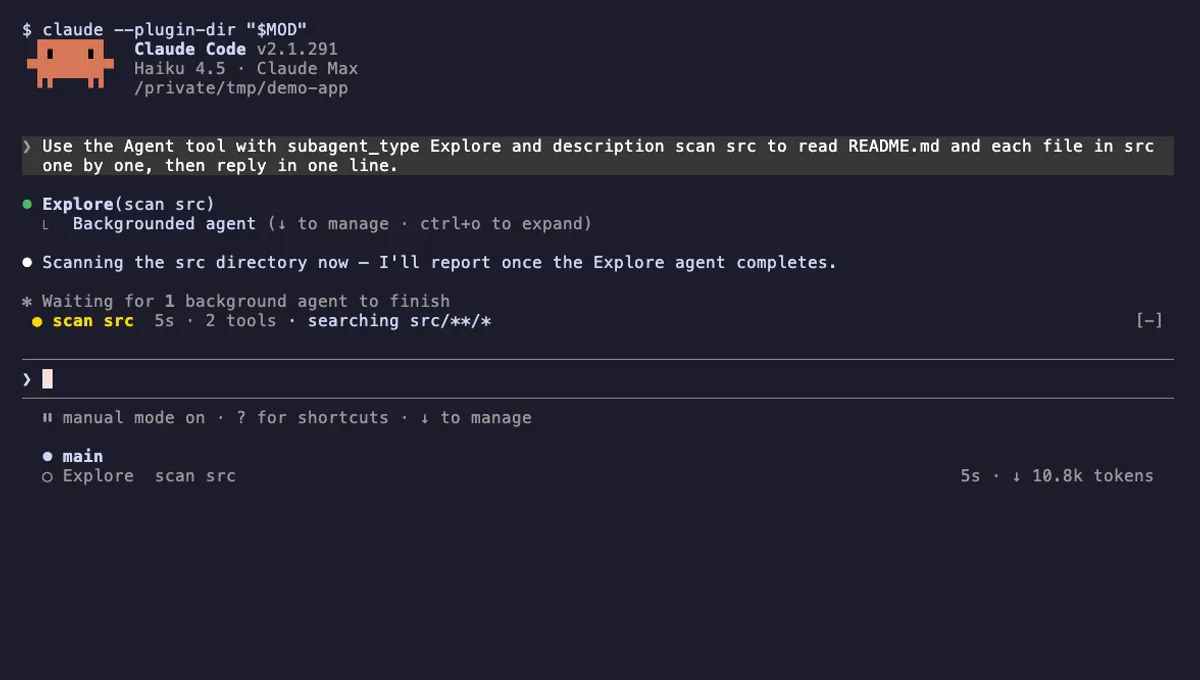 Featured
Agent Radar
One live line above the prompt per running subagent: time, tool count and what it is doing now, plus a /radar pane.
- above-prompt
- pane
- toast
- Intercepts tool calls
- Reads your prompts
- Changes the UI
- Adds commands/tools
tested with v2.1.291
Agent Flow Subagent Tree
A live tree of your Claude Code subagents beside the transcript: status, current tool, approval waits, time and tokens.
- pane
- status
- transcript
- Intercepts tool calls
- Changes the UI
- Adds commands/tools
- Stores data
tested with v2.1.291
 Featured
Tool Call Counter
Counts Claude's tool calls per turn and session, shows the count by the spinner, and adds /tally for a breakdown.
- spinner
- transcript
- status
- Intercepts tool calls
- Changes the UI
- Adds commands/tools
tested with v2.1.310
More in Panes & dashboards, Timers, todos, standups.