Next Steps Claude Code mod: Claude Code prompt suggestions after every turn
Two or three likely next prompts above the Claude Code input after each turn. Press 1, 2 or 3 to draft one.
#4 in Best Claude Code ModsPermissions
- Calls the model (uses your quota)Can send its own requests to Claude, which count against your plan's usage ($.model.* / $.agent.spawn).
- Reads your promptsCan see what you type and the conversation transcript (prompt.* / session.append / session.messages).
- Changes the UIDraws into the Claude Code interface: bands, panes, status text, toasts (ui.render / $.ui.*).
- tested with
- v2.1.291
- last tested
- requires
- Claude Code ≥ 2.1.287
- surfaces
- above-prompt
- source
- Hamza Zafar (hamzafer) (MIT)
Install inside Claude Code:
/plugin install next-steps --marketplace hamzafer/claude-code-modsWhat does this mod do?
Next Steps is a community mod by Hamza Zafar (hamzafer), part of his claude-code-mods collection. It adds Claude Code prompt suggestions: when a turn ends, it shows two or three short prompts you are likely to type next, in a band above the input. For example, after Claude explains a file it might offer Write a test for the login function.
While the input is empty, pressing 1, 2 or 3 puts that suggestion into the box as a draft, and 0 dismisses the list. Nothing is sent on its own: you edit the draft or press Enter. On a wide terminal the suggestions share one row (next: 1 ... · 2 ... · 0 dismiss). When they do not fit on one row, each gets its own row, unless the band has too few rows free, in which case the single row is cut at its end.
The suggestions come from one call to the haiku model after the turn. The band stays hidden while Claude is working or a survey is open, when the reply is under 20 characters, and when background agents are still running. Subagent turns are ignored. The author's where-am-i mod reads a shared flag so it can drop its own "next" part while this list shows.
Demo
The recording starts Claude Code with the mod loaded in the small demo project and asks Claude to read src/login.js and explain it in two sentences. When the turn ends, a next: band appears above the input with three numbered suggestions, such as Add error handling for empty strings and Write a test for the login function, and a 0 dismiss hint. The video holds on that screen, then 1 is pressed in the empty prompt and the first suggestion appears in the input as an unsent draft. The clip is sped up, so the pauses are shorter than they look.
Install
Use any of the methods in the install block; they install straight from the author's own marketplace. The band appears after the next completed turn.
$ install next-steps
Requires Claude Code ≥ 2.1.287
Installs from the author's own marketplace: hamzafer/claude-code-mods
1.One line, inside Claude Code
/plugin install next-steps --marketplace hamzafer/claude-code-modsPaste into a running session (v2.1.275+). Claude Code asks to add the marketplace first.
2.From your shell
claude plugin marketplace add hamzafer/claude-code-mods claude plugin install next-steps@claude-code-modsThen run /reload-plugins in any session that is already open.
3.Try it without installing
git clone https://github.com/hamzafer/claude-code-mods claude --plugin-dir ./claude-code-mods/mods/next-stepsLoads the mod for one session only. Nothing is added to your settings.
How it works
The mod keeps the current list in a host-held $.state atom and draws it on the AbovePrompt render site, below other mods' bands. The key handling, from hooks/register.tsx:
on('prompt.edit', async ($, e, next) => {
  if (hasSurvey || !e.key || e.key.ctrl || e.key.meta || e.text !== '' || e.start !== 0 || e.end !== 0 || !/^[0-9]$/.test(e.inputText)) return next(e)
  const s = await read($, steps)
  if (!s) return next(e)
  if (e.inputText === '0') {
    await setSteps($, () => null)
    return { text: '', cursor: 0 } // consumed: the box stays empty
  }
  const pick = s.items[Number(e.inputText) - 1]
  if (!pick) return next(e)
  return next({ ...e, inputText: pick }) // a draft: the person edits it or presses Enter
})
On turn.complete (main agent only), suggest calls $.model.complete with maxTokens: 200 and a 20-second timeout. The model is asked for 2 or 3 imperative prompts under 60 characters, one per line, or NONE. parseSteps then strips fences, bullets, numbering, quotes and em dashes, drops preambles and lines over 120 characters (dropped, never cut), removes duplicates and keeps at most three. The result is written only if no new prompt or turn has started in the meantime, so a late answer never replaces a newer state. prompt.submit and turn.start clear the list.
Customize it
There are no options in /config. To change the behavior, edit the constants at the top of register.tsx: MODEL (default haiku), MAX_ITEMS (3), MAX_CHARS (60, what the model is asked for), MAX_KEPT (120, the longest line kept) and MIN_ANSWER (20, the shortest reply that triggers a call). The wording of the request to the model is in the system and prompt strings of suggest.
Permissions & safety
We read every file the plugin can execute before running anything: .claude-plugin/plugin.json, hooks/hooks.json, hooks/register.tsx (the only module), the type declarations and the tests. There is no package.json, install script, binary, bundled or minified code, and nothing is loaded from outside the plugin folder.
- Model call.
suggestsends up to the last 6 session messages (each cut to 800 characters) and the latest reply (cut to 2,000 characters) to the haiku model through$.model.complete, after every completed main-agent turn. That uses your Claude Code account like any other model call, and the mod opens no other network connection. The text is session content, so it can include whatever you and Claude discussed. - Prompt text. The mod's own instructions to the model are plain, readable strings. It injects nothing into your prompts or Claude's context: model output only ever lands in the input box as a draft that you must send yourself. Because the suggestions are written from the transcript, text inside a file Claude read could still influence what is suggested, and you would see it before sending.
- Key and prompt hooks.
prompt.editreplaces a digit typed into an empty prompt with the suggestion text, or swallows0.prompt.submitonly clears the list and passes the prompt on unchanged.claude plugin validatenotes thatprompt.submitis a gating hook without.catch, but it never blocks or rewrites a prompt. - Nothing else. It runs no commands, reads and writes no files, touches no settings, shell files or daemons, reads no environment variables, and has no telemetry. State is held in memory by the host. The licence is MIT, with a LICENSE file in the repository.
claude plugin validate reported no errors or warnings, and the author's 16 tests passed on Claude Code 2.1.291.
- Calls the model (uses your quota)
- Can send its own requests to Claude, which count against your plan's usage ($.model.* / $.agent.spawn).
- Reads your prompts
- Can see what you type and the conversation transcript (prompt.* / session.append / session.messages).
- Changes the UI
- Draws into the Claude Code interface: bands, panes, status text, toasts (ui.render / $.ui.*).
Compatibility & troubleshooting
Checked with Claude Code 2.1.291 on macOS (validate, tests and the demo recording). If no suggestions appear:
- The last reply was very short (under 20 characters) or the model had nothing sensible to add.
- Background agents are still running; the call waits until the main agent picks up again.
- Claude is still working, or a survey is open above the prompt. The band shows after the turn ends.
- You pressed a digit with text already in the box, or pasted it. Digits only act in an empty prompt.
- You sent a prompt or started a new turn, which clears the list until the turn finishes.
FAQ
- Does Next Steps send my prompts for me?
- No. A digit only puts the suggestion in the input box as a draft. You can edit it or press Enter. Nothing is sent until you do.
- Does it cost tokens?
- Yes, a little. After each turn it makes one call to the haiku model through Claude Code's own model API, with up to 6 recent messages and the latest reply as input. It skips the call for replies under 20 characters and while background agents are still running.
- How do I type a prompt that starts with a digit while the list is showing?
- Press 0 first. It dismisses the list and leaves the box empty, so the next digit lands as text. Digits typed after other text, and pasted digits, always land as text.
- When does the list disappear?
- When you send a prompt, including a slash command, when a new turn starts, when you press 0, and while Claude is working or a survey is open above the prompt.
- Can I change the model or the number of suggestions?
- There are no settings, but the constants at the top of hooks/register.tsx control them: MODEL, MAX_ITEMS, MAX_CHARS, MAX_KEPT and MIN_ANSWER. The model prompt is in the suggest function in the same file.
# Related mods
 Featured
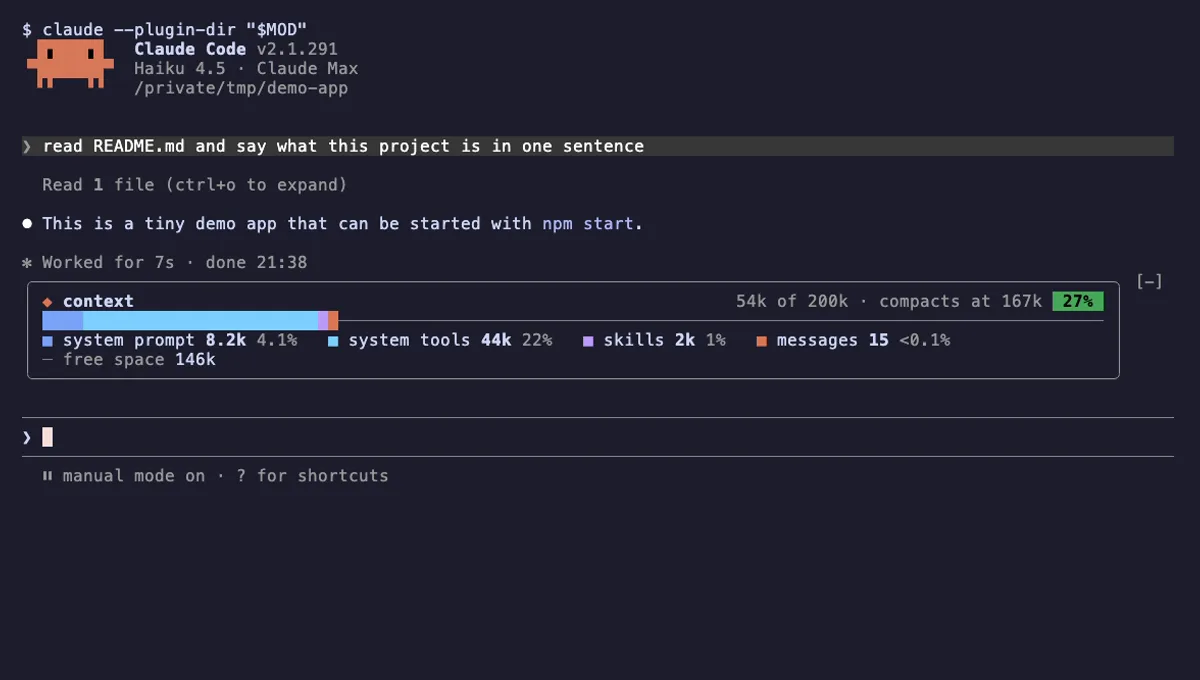
Context Bar
Your Claude Code context window as one stacked bar above the prompt, a color per category, with token counts.
- above-prompt
- Changes the UI
- Adds commands/tools
- Stores data
tested with v2.1.291
 Featured
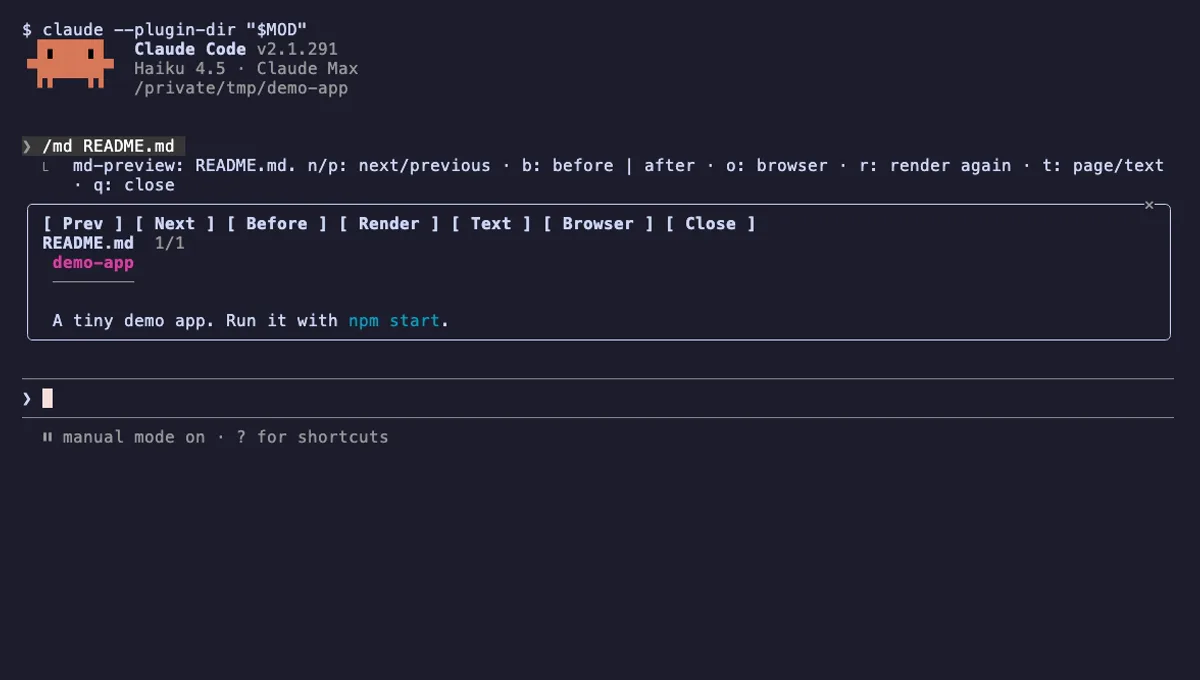
md-preview
The Markdown files Claude edits, rendered like GitHub in a pane next to the chat, with a before and after view.
- pane
- toast
- Reads files
- Writes files
- Runs commands
- Intercepts tool calls
- Changes the UI
- Adds commands/tools
tested with v2.1.291
More in Timers, todos, standups.