md-preview Claude Code mod: Claude Code Markdown preview in a side pane
The Markdown files Claude edits, rendered like GitHub in a pane next to the chat, with a before and after view.
Permissions
- Reads filesCan read files and list directories on your machine ($.fs.read / list / stat / exists).
- Writes filesCan create or overwrite files on your machine ($.fs.write).
- Runs commandsCan run shell programs on your machine ($.process.run / spawn). Check the source for exactly which ones.
- Intercepts tool callsSees every tool call Claude makes (tool.call / tool.check) and could block or change it.
- Changes the UIDraws into the Claude Code interface: bands, panes, status text, toasts (ui.render / $.ui.*).
- Adds commands/toolsRegisters new slash commands or tools that you or Claude can invoke ($.command.register / $.tool.register).
- tested with
- v2.1.291
- last tested
- requires
- Claude Code ≥ 2.1.287
- surfaces
- pane, toast
- source
- Hamza Zafar (hamzafer) (MIT)
Install inside Claude Code:
/plugin install md-preview --marketplace hamzafer/claude-code-modsWhat does this mod do?
md-preview is a community mod by Hamza Zafar (hamzafer), part of his claude-code-mods collection. It gives Claude Code a Markdown preview: when Claude writes or edits a .md, .mdx or .markdown file, a toast says README.md changed · /md to preview, and /md opens a pane next to the chat that shows the file rendered the way GitHub shows it.
The pane has buttons for Prev, Next, Before, Render, Text, Browser and Close, each with a hotkey (p, n, b, r, t, o, q). The n and p keys step through the Markdown files changed this session. b shows the file as it was before the turn's first edit next to its current text, and the blocks the last edit changed get a green bar. /md compare <a> <b> puts two files side by side, and o or /md open opens the same page in your own browser.
How the page is drawn depends on your setup. In an image terminal (Ghostty, iTerm2, WezTerm or kitty, not through tmux) with Chrome or a Chromium installed, the page is drawn to PNG and shown in the pane. Otherwise the pane shows a text view with headings, lists, tables and code blocks styled with terminal colors. The manifest names no minimum Claude Code version.
Demo
The recording starts Claude Code with the mod loaded in the small demo project and runs /md README.md. The command replies with the key hints (n/p: next/previous · b: before | after · o: browser · r: render again · t: page/text · q: close), and a bordered pane opens above the prompt. Its first row holds the buttons, the second row reads README.md 1/1, and below it the project's README appears in the text view: the heading demo-app and the line "A tiny demo app. Run it with npm start." with the code span in color. The demo terminal cannot display images, so it shows the text view rather than the rendered page.
Install
Use any of the methods in the install block; they install straight from the author's own marketplace. After installing, run /reload-plugins or start a new session, then use /md.
$ install md-preview
Requires Claude Code ≥ 2.1.287
Installs from the author's own marketplace: hamzafer/claude-code-mods
1.One line, inside Claude Code
/plugin install md-preview --marketplace hamzafer/claude-code-modsPaste into a running session (v2.1.275+). Claude Code asks to add the marketplace first.
2.From your shell
claude plugin marketplace add hamzafer/claude-code-mods claude plugin install md-preview@claude-code-modsThen run /reload-plugins in any session that is already open.
3.Try it without installing
git clone https://github.com/hamzafer/claude-code-mods claude --plugin-dir ./claude-code-mods/mods/md-previewLoads the mod for one session only. Nothing is added to your settings.
How it works
The mod is one function-hooks module, hooks/register.tsx, plus a small Markdown parser (hooks/md.ts) and an HTML page builder (hooks/page.ts). A tool.call hook reads the file before a Write, Edit or MultiEdit call on a Markdown path, lets the call run, and returns its result unchanged. The GitHub renderer, from hooks/register.tsx:
const repo = await repoOf($, dir)
if (!repo) return null // not in a GitHub repo: the Markdown stays on this machine
const r = await $.process
  .run(['gh', 'api', '-X', 'POST', '/markdown', '--input', '-'], { stdin: JSON.stringify({ text: md, mode: 'markdown', context: repo }), timeoutMs: GH_TIMEOUT_MS })
  .catch(() => null)
repoOf asks git remote -v for a GitHub remote. If gh fails, GitHub rendering is paused for a minute and the built-in renderer is used. The HTML is written to $TMPDIR/md-preview/ and drawn with headless Chrome through a short sh script, one drawing at a time, with the drawings cached by content. Files Claude edited are drawn in the background once the turn ends, so /md usually opens on a page that is already drawn.
Customize it
There are no options in /config. Everything is done with the command and the pane keys: /md opens the latest file, /md <path> opens any Markdown file, /md compare <a> <b> compares two, /md open opens the browser. If another command takes the name /md, the mod registers /mdview instead. To change limits such as the list of Chrome paths (CHROMES), the number of files kept (MAX_FILES) or the cache size (CACHE_SIZE), edit the constants at the top of register.tsx.
Permissions & safety
We read every file the plugin can execute before running it: plugin.json, hooks/hooks.json, hooks/register.tsx, hooks/md.ts, hooks/page.ts, the type declarations and the tests. There is no package.json, install script, binary or bundled code, and we found no hidden or zero-width characters.
- Network: no direct requests. With a GitHub remote and a signed-in
gh, the Markdown text is posted to GitHub's/markdownAPI throughgh api(register.tsx:592-594), with no extra opt-in. Files over about 390 KB are rendered locally. The rendered page is loaded by headless Chrome with a Content-Security-Policy that allows images from any host (page.ts:97), so remote images in a Markdown file are fetched when the page is drawn. Scripts in the Markdown cannot run. - Processes:
git ls-filesandgit remote -v(register.tsx:386,607),gh api(593),sh -cwith a fixed script that starts headless Chrome and stops only the Chrome it started (49-67,675), andopenorxdg-openfor the browser button (788). - File writes: only
$TMPDIR/md-preview/(page HTML, PNG parts and a throwaway Chrome profile). Nothing under~/.claude, settings, shell files, LaunchAgents or git hooks. - File reads: Markdown files Claude edits, files you name, and, before a turn's first shell command, up to 200 Markdown files of the repo from
git ls-files. - Environment:
HOME,TMPDIR,TMUX,TERM_PROGRAMandTERM. They are not sent anywhere. - Daemons, telemetry, prompt injection: none. It adds no text to prompts or tool results.
- Gating: the
tool.callhook is an observer. It waits for the call and returns the result unchanged.validatenotes it as a gating hook without.catch; the first shell call of a turn waits for the Markdown snapshot, which reads files only. - External requirements: Chrome, Chromium, Edge or Brave for the rendered view, an image-capable terminal, and optionally
gh. All are optional; a text view is the fallback. - License: MIT, with a LICENSE file at the repository root.
claude plugin validate reported no errors or warnings, and the author's 26 tests passed on Claude Code 2.1.291.
- Reads files
- Can read files and list directories on your machine ($.fs.read / list / stat / exists).
- Writes files
- Can create or overwrite files on your machine ($.fs.write).
- Runs commands
- Can run shell programs on your machine ($.process.run / spawn). Check the source for exactly which ones.
- Intercepts tool calls
- Sees every tool call Claude makes (tool.call / tool.check) and could block or change it.
- Changes the UI
- Draws into the Claude Code interface: bands, panes, status text, toasts (ui.render / $.ui.*).
- Adds commands/tools
- Registers new slash commands or tools that you or Claude can invoke ($.command.register / $.tool.register).
Compatibility & troubleshooting
Checked with Claude Code 2.1.291 on macOS (validate, tests and the recording). If the pane is not what you expect:
/mdis unknown: check/pluginshows md-preview loaded, or try/mdview.- You see text instead of a page: your terminal cannot show images, you are inside tmux, or no Chrome was found. Press
rafter fixing it, ortto switch views. - "Chrome could not draw the page": press
rto try again. The mod does not retry on its own. - A change to a file does not show a toast: only Markdown paths are tracked, and shell writes are seen only in a git repository.
- The pane says
built-ininstead ofGitHub: the file is not in a GitHub repo,ghis signed out, or it is larger than about 390 KB.
FAQ
- Does md-preview send my Markdown anywhere?
- Only in one case. When the file sits in a folder whose git remote is on GitHub and the GitHub CLI (gh) is signed in, the mod posts the Markdown text to GitHub's /markdown API through your gh to render it. Outside a GitHub repo, or when gh fails, a built-in renderer is used and nothing leaves your machine from the mod's own code.
- Do I need Chrome?
- Only for the rendered page view. The mod looks for Google Chrome, Chromium, Edge or Brave at fixed paths and uses it headless, with its own throwaway profile, to draw the page to PNG. Without a browser, or in a terminal that cannot show images, it shows a text view instead.
- How do I preview a file Claude did not edit?
- Run /md followed by a path, for example /md docs/guide.md. The file must end in .md, .mdx or .markdown. /md compare a.md b.md shows two files side by side, and /md open opens the page in your browser.
- Does it notice Markdown written by a shell command?
- Yes, in a git repository. Before the first Bash or PowerShell call of a turn it snapshots the repo's Markdown files (up to 200), and at the end of the turn it compares them, so a change such as cat > README.md still gets a toast.
- Why does the demo show a text view?
- The demo terminal cannot display images, so the mod falls back to its text view. In an image-capable terminal such as Ghostty, iTerm2, WezTerm or kitty (not through tmux) it shows the rendered page instead.
# Related mods
 Featured
Context Bar
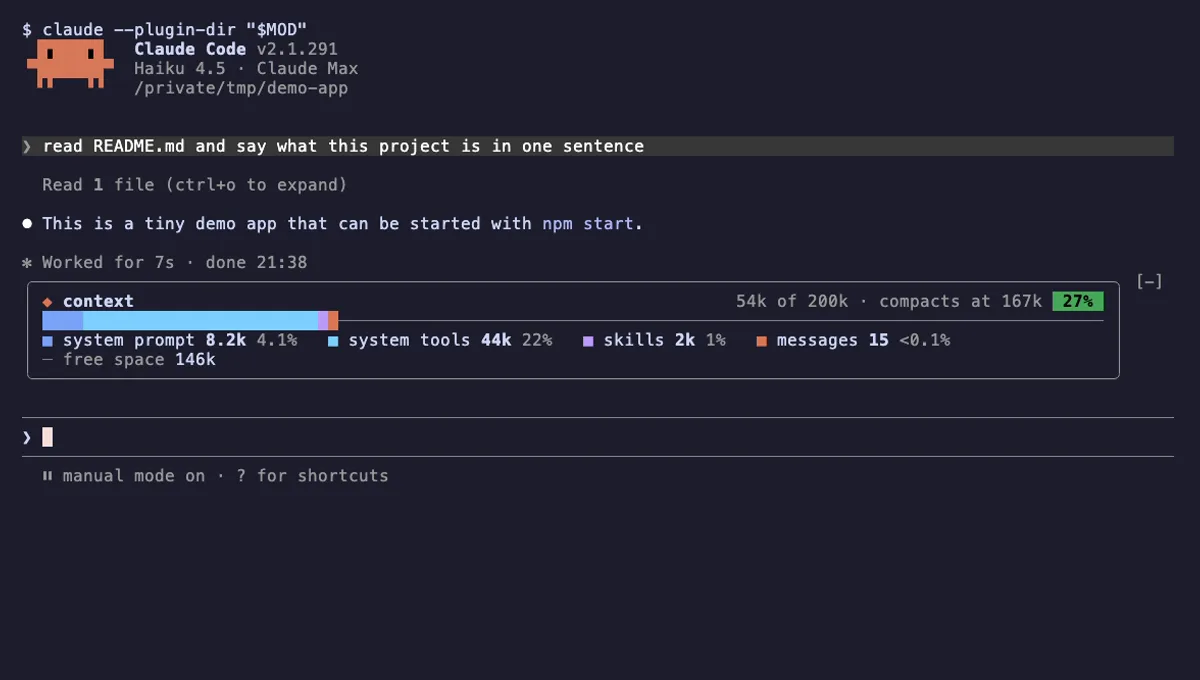
Your Claude Code context window as one stacked bar above the prompt, a color per category, with token counts.
- above-prompt
- Changes the UI
- Adds commands/tools
- Stores data
tested with v2.1.291
 Featured
Tool Call Counter
Counts Claude's tool calls per turn and session, shows the count by the spinner, and adds /tally for a breakdown.
- spinner
- transcript
- status
- Intercepts tool calls
- Changes the UI
- Adds commands/tools
tested with v2.1.310
More in Panes & dashboards, Timers, todos, standups.