Skins Claude Code mod: 15 Claude Code skins for tool rows, diffs and charts
Fifteen themes that redraw Claude Code tool rows, diffs, tables, code and Mermaid charts, plus a usage band.
Permissions
- Reads filesCan read files and list directories on your machine ($.fs.read / list / stat / exists).
- Runs commandsCan run shell programs on your machine ($.process.run / spawn). Check the source for exactly which ones.
- NetworkCan make HTTP requests or talk to MCP servers ($.http.fetch / $.mcp.*).
- Intercepts tool callsSees every tool call Claude makes (tool.call / tool.check) and could block or change it.
- Reads your promptsCan see what you type and the conversation transcript (prompt.* / session.append / session.messages).
- Changes the UIDraws into the Claude Code interface: bands, panes, status text, toasts (ui.render / $.ui.*).
- Adds commands/toolsRegisters new slash commands or tools that you or Claude can invoke ($.command.register / $.tool.register).
- Stores dataKeeps data between sessions in the plugin's private store ($.store.*).
- tested with
- v2.1.307
- last tested
- requires
- Claude Code ≥ 2.1.287
- surfaces
- above-prompt, spinner, transcript, pane
- source
- hellosverre (MIT)
Install inside Claude Code:
/plugin install skins --marketplace hellosverre/claude-skinsWhat does this mod do?
Skins is a community mod by hellosverre (hellosverre), published in the claude-skins repository. It adds fifteen Claude Code skins (themes) and redraws what the transcript shows. The built-in skins are noir (the default), tokyo-night, dracula, catppuccin, rose-pine, nord, gruvbox, kanagawa, everforest, one-dark, solarized, night-owl, ayu, github and mono. Each one has a light and a dark variant and follows Claude Code's own theme.
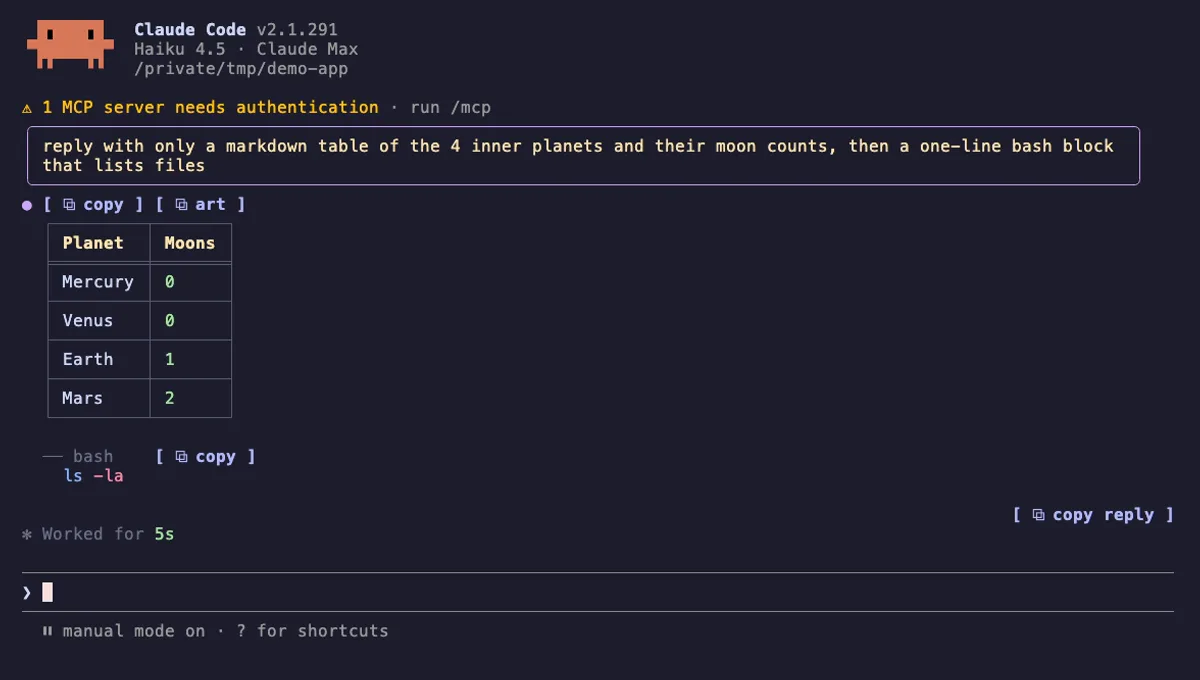
Besides colours, the mod changes how things are drawn. According to the author's README:
- Tool rows get an icon, a timing and a rail. A
▸opens the row to show the call's full input and its answer. - Edits, shell output, tables, code blocks and links become cards or highlighted blocks, with copy buttons and folding for long blocks.
- Mermaid fences are drawn as charts: seventeen kinds, such as flowchart, xy, pie, gantt, sankey and radar. Math fences are typeset.
- The spinner and the turn footer use the skin's words, with a band of light across the spinner word.
- Above the prompt, a usage band shows context and 5-hour and 7-day plan limits, with a Compact button that suggests compacting from 70% context.
Only the drawing changes: the stored conversation is untouched. Agents, plan mode and the permission prompt keep Claude Code's own drawing. For a similar mod with a narrower scope, see Prismantis.
Install
The install block above adds the author's own marketplace, hellosverre-mods, and installs skins from it. Restart Claude Code afterwards. The noir skin is on from the first session, and /skin changes it. The README asks for Claude Code 2.1.287 or later.
To try it without installing, clone the repository and start Claude Code with claude --plugin-dir . from the clone.
$ install skins
Requires Claude Code ≥ 2.1.287
Installs from the author's own marketplace: hellosverre/claude-skins
1.One line, inside Claude Code
/plugin install skins --marketplace hellosverre/claude-skinsPaste into a running session (v2.1.275+). Claude Code asks to add the marketplace first.
2.From your shell
claude plugin marketplace add hellosverre/claude-skins claude plugin install skins@hellosverre-modsThen run /reload-plugins in any session that is already open.
3.Try it without installing
git clone https://github.com/hellosverre/claude-skins claude --plugin-dir ./claude-skinsLoads the mod for one session only. Nothing is added to your settings.
How it works
The plugin is one hooks module, hooks/register.tsx, that listens for ui.render events for the tool rows, assistant messages, the spinner and the area above the prompt, and returns its own trees. Charts, tables, code and diffs are drawn by separate files in hooks/. Terminal diagrams use a bundled copy of beautiful-mermaid (MIT), kept in hooks/vendor/mermaid-ascii.js.
The one place it talks to the model is prompt.compose. While charts and hints are on, it appends a short section to the prompt, from register.tsx:
on('prompt.compose', async ($, e, next) => {
  const result = await next(e)
  const active = await activeSkin($)
  const isHeadless = e.surfaces.length === 0 || e.traits.includes('bare') || e.traits.includes('print')

  if (active === null || !active.prefs.charts || !active.prefs.hints || isHeadless) {
    return result
  }

  return { sections: [...result.sections, { id: 'skins:charts', text: CHART_HINT, scope: 'session' as const }] }
})
The text, CHART_HINT in hooks/mermaid.ts, lists the Mermaid kinds that draw and tells Claude to use a chart when it reads better than prose. The tool.call hook times every call, notes which files were created or edited, and passes the call on unchanged.
Customize it
/skin with no argument opens a settings pane with a live preview, where you pick a skin, switch parts on and off and repaint any colour. /skin help lists every command. Some useful ones:
/skin <name>switches skin;/skin offand/skin ontoggle the whole mod./skin <part> on|offforrail,shimmer,band,countdown,compact,clip,markdown,quiet,charts,math,commands,shell,highlight,hints,links,copy,foldandexpand./skin calmremoves motion, folds read-only output and keeps failures whole;/skin calm offrestores what you had./skin pingives the current folder its own look;/skin sharemakes it the default./skin prompt left|right|plain,/skin tables on|text|offand/skin icons unicode|asciiadjust smaller details.SKINS_THEME=lightorSKINS_THEME=darkforces the light or dark variant.
You can also ask Claude to design a skin. The plugin ships a skin-designer skill and registers the mcp__skins__design tool, which saves and applies a skin.
Permissions & safety
We read the manifest, hooks/hooks.json, the skin-designer skill, the update checker (hooks/updates.ts), the points in hooks/register.tsx that call into Claude Code, and the type declarations. For the rest of the 70 or so source files in hooks/ we searched every file for network, process, file, environment and dynamic-code calls rather than reading each line. The bundle hooks/vendor/mermaid-ascii.js (about 84 KB) is generated code with its licence in the header; we searched it for network, process and eval use and found none, but did not read it through. There is no root package.json and no install script. scripts/vendor/package.json only builds that bundle and is never run by the plugin. There are no binaries.
What we found:
- Network: one
$.http.fetchper day, tohttps://raw.githubusercontent.com/hellosverre/claude-skins/main/.claude-plugin/plugin.json(hooks/updates.ts:3,hooks/register.tsx:553), with nothing sent. It shows a toast when a newer version exists. The author's README describes it as the one network call. - Processes:
$.process.run(hooks/register.tsx:164) runsdefaults read -g AppleInterfaceStyle,reg query … AppsUseLightThemeorgsettings get org.gnome.desktop.interface color-scheme, as argument arrays with a 2-second timeout. It happens only when the theme isautoand nothing else decides. - Files: it reads its own
plugin.jsonand writes nothing outside the plugin store ($.store). We found no write under~/.claude,settings.json, shell rc files or LaunchAgents. - Background work: timers inside the session only (a re-check of the system appearance every few seconds on
auto). No daemon. - Environment: it reads
SKINS_THEME,COLORFGBG,FORCE_HYPERLINK,TERM_PROGRAM,TERM_PROGRAM_VERSION,TERM,WT_SESSION,VTE_VERSION,KONSOLE_VERSION,TMUXandCI, to pick colours and hyperlink support. No credentials, and none of it leaves the machine. - Telemetry: none. Notices: a one-time toast after about three days asking for a GitHub star (
hooks/updates.ts:49) and the update toast. - Model influence: the
prompt.composesection above, 458 characters, session scope, skipped for headless runs and removable with/skin hints off. Theskin-designerskill and the design tool can change only skin settings. We found no hidden or zero-width characters and no instructions aimed at the model beyond those two. - Gating hooks:
tool.call,session.append,config.setand others pass events through unchanged.validatenotes that they have no.catch. The one tool the mod answers itself ismcp__skins__design. - Requirements: none beyond Claude Code. The README says it was checked by hand on Windows and run on Linux; macOS was not looked at by hand.
- Licence: MIT, with a LICENSE file. The bundled
beautiful-mermaidis MIT as well.
claude plugin validate reported no errors. Its only finding was a non-blocking ICON_MISSING note for the plugin directory listing, and it listed seven hooks without a .catch. The author's tests passed on Claude Code 2.1.307: 248 tests in 8 files, 0 failures.
- Reads files
- Can read files and list directories on your machine ($.fs.read / list / stat / exists).
- Runs commands
- Can run shell programs on your machine ($.process.run / spawn). Check the source for exactly which ones.
- Network
- Can make HTTP requests or talk to MCP servers ($.http.fetch / $.mcp.*).
- Intercepts tool calls
- Sees every tool call Claude makes (tool.call / tool.check) and could block or change it.
- Reads your prompts
- Can see what you type and the conversation transcript (prompt.* / session.append / session.messages).
- Changes the UI
- Draws into the Claude Code interface: bands, panes, status text, toasts (ui.render / $.ui.*).
- Adds commands/tools
- Registers new slash commands or tools that you or Claude can invoke ($.command.register / $.tool.register).
- Stores data
- Keeps data between sessions in the plugin's private store ($.store.*).
Compatibility & troubleshooting
Tested with Claude Code 2.1.307 on macOS (validate and the author's tests, which do not draw a real terminal). If the skin does not appear:
- Restart Claude Code after installing, and check that
claude --versionis 2.1.287 or later. - Run
/skin listto see whether the mod is on;/skin onturns it back on after/skin off. - If the colours look wrong for a light terminal, set
SKINS_THEME=light. - If the icons are boxes, run
/skin icons ascii. Icons draw on the desktop app only; the terminal shows the rail. - Links are clickable only in terminals that support OSC 8.
FORCE_HYPERLINK=1or0overrides the check. - Sequence, state, class and ER diagrams draw only in the terminal. On the desktop they stay as a code card.
FAQ
- How do I switch between the Claude Code themes in Skins?
- Type /skin to open the settings pane with a live preview, or /skin followed by a name such as nord, dracula, gruvbox or tokyo-night. /skin list shows every skin and setting, and /skin off goes back to Claude Code's own drawing. The choice is saved in the plugin's store and survives restarts.
- Does Skins change what the model reads or what is stored in the conversation?
- The README says only the drawing changes, and the conversation on disk is untouched. There is one exception on the model side, which you can switch off. While charts are drawn, the mod adds a short note to the system prompt saying that Mermaid fences draw as pictures. /skin hints off removes it and keeps the charts.
- Does Skins send data anywhere?
- One request, once a day. It does a GET of the repository's own plugin.json on raw.githubusercontent.com to see whether a newer version exists, and sends nothing in it. There is no other network call and no telemetry in the code we read.
- Why does Skins run defaults, reg or gsettings?
- Only when your theme is auto and nothing else decides light or dark. It then asks the operating system for its appearance, with defaults read -g AppleInterfaceStyle on macOS, reg query on Windows or gsettings get on GNOME. Set SKINS_THEME=light or SKINS_THEME=dark, or pick a fixed Claude Code theme, and the system is not asked.
- Can I make my own skin?
- Yes. Repaint any colour in the /skin settings pane, which saves it as your own my-<skin>, or ask Claude for a mood such as a sunset. The mod registers a design tool, mcp__skins__design, that saves and applies a skin while you watch.
# Related mods
 Featured
Prismantis Colorful Replies
Themeable Claude Code replies: boxed tables, highlighted code, mermaid diagrams and charts, compact tool rows.
- transcript
- toast
- Reads your prompts
- Changes the UI
- Adds commands/tools
tested with v2.1.291
 Featured
Context Meter
Context-window fill, 5-hour and 7-day plan usage and session cost in the status line, plus a warning near the limit.
- status
- toast
- Changes the UI
tested with v2.1.310
More in Timers, todos, standups, Context, quota, cost.