Use Haiku Claude Code mod: send one Claude Code prompt on Haiku
Start a Claude Code prompt with _ and that one turn runs on Haiku, with a visible hint at every step.
Permissions
- Reads your promptsCan see what you type and the conversation transcript (prompt.* / session.append / session.messages).
- Changes the UIDraws into the Claude Code interface: bands, panes, status text, toasts (ui.render / $.ui.*).
- tested with
- v2.1.303
- last tested
- requires
- Claude Code ≥ 2.1.287
- surfaces
- spinner, transcript, status
Install inside Claude Code:
/plugin install use-haiku --marketplace midudev/better-claudeWhat does this mod do?
Use Haiku is a community mod by Miguel Ángel Durán (midudev), part of his better-claude collection. It lets you send a Claude Code prompt on Haiku without changing the session's model: start the prompt with _ and that one turn runs on claude-haiku-5-5. Claude receives the text without the _, and every model request of the turn goes to Haiku, including those of the subagents the turn starts. The next prompt goes back to the session's model.
The mod makes the switch visible in three places. While you type, the _ is drawn in bold in the prompt box and a line under it reads ⚡ this prompt runs on Haiku. While the turn runs, the spinner word gets an on Haiku suffix. When the turn ends, a line under the answer names the model the API reports, for example ⚡ Answered by claude-haiku-5-5, or a warning if another model answered. The prompt also carries a note, unseen by you, telling the model it is Haiku, so "which model are you?" gets the right answer. This suits quick questions and small lookups where a smaller model is enough.
Only your own prompts count: typed, sent from a phone, claude -p "_…", a scheduled /loop, or a plugin sending them for you, such as After. The author's README needs a Claude Code version with mods (2.1.289 or newer).
Demo
The recording starts Claude Code with the mod loaded in the small demo project and types _what is the name of this project? answer in one short sentence. While the text is typed, the line under the box shows ⚡ this prompt runs on Haiku. After Enter, the spinner reads Haiku…. When the turn ends, Claude answers that the project is called demo-app, and a line under the answer reads ⚡ Answered by claude-haiku-5-5. The demo session already uses Haiku, so the model does not change in this clip; what you see is the mod's feedback in each place.
Install
Use any of the methods in the install block; they install straight from the author's own marketplace, better-claude. The mod is active from the next session start. There is nothing to configure: type _ before a prompt.
$ install use-haiku
Requires Claude Code ≥ 2.1.287
Installs from the author's own marketplace: midudev/better-claude
1.One line, inside Claude Code
/plugin install use-haiku --marketplace midudev/better-claudePaste into a running session (v2.1.275+). Claude Code asks to add the marketplace first.
2.From your shell
claude plugin marketplace add midudev/better-claude claude plugin install use-haiku@better-claudeThen run /reload-plugins in any session that is already open.
3.Try it without installing
git clone https://github.com/midudev/better-claude claude --plugin-dir ./better-claude/plugins/use-haikuLoads the mod for one session only. Nothing is added to your settings.
How it works
The mod is one hooks module, hooks/register.tsx. On prompt.submit an idle prompt that starts with a single _ loses the mark, gets the note for the model and claims the next turn. Then turn.step rewrites the model of each request of that turn:
// Every request of a Haiku turn goes to Haiku: the main loop's and those of the subagents it started.
on('turn.step', async function* ($, e, next) {
  const isHaiku = e.agentId === undefined
    ? e.turnId === (await read($, haikuTurn))
    : (await read($, haikuAgents)).includes(e.agentId)
  return yield* next(isHaiku ? { ...e, model: HAIKU } : e)
})
The Haiku turn id and the ids of its subagents live in $.state, so a reload mid-turn keeps them. agent.spawn starts a subagent of a Haiku turn on Haiku and remembers its id. turn.complete ends the Haiku turn and adds the line under the answer, only in an interactive session, so claude -p output stays clean. Two ui.render hooks draw the spinner suffix and the hint under the prompt.
Customize it
There are no options. The model name (HAIKU), the mark (MARK) and the highlight color are constants at the top of register.tsx; to change them, edit your own copy and load it with claude --plugin-dir.
Permissions & safety
We read every file the plugin can execute before running it: hooks/hooks.json, hooks/register.tsx, the type declarations, the manifest and the tests, plus the repository's package.json, marketplace.json and LICENSE. There is no install script, dependency, bundled code or binary, and we found no hidden Unicode characters.
Gating hooks: prompt.submit and agent.spawn rewrite what is submitted and which model a subagent gets. This is what the README describes: the _ is stripped, a note is added to the prompt context, and the model of the Haiku turn is set. The note says: "The person sent this prompt to Haiku: you are claude-haiku-5-5 while you answer it". Validate flags both hooks as having no .catch. Changes the UI covers the prompt hint, the spinner label, the bold _ and the line under the answer. A toast appears if you send a _ prompt mid-turn.
The mod uses $.state and $.ui only. It does not use the network, run processes, write files, read environment variables or run a daemon, and it has no telemetry. claude plugin validate reported no errors or warnings, and the author's 10 tests passed on Claude Code 2.1.303. The license is MIT (LICENSE file present), so the page can mirror it.
- Reads your prompts
- Can see what you type and the conversation transcript (prompt.* / session.append / session.messages).
- Changes the UI
- Draws into the Claude Code interface: bands, panes, status text, toasts (ui.render / $.ui.*).
Compatibility & troubleshooting
Checked with Claude Code 2.1.303 on macOS (validate, tests and the recording). If a prompt does not run on Haiku:
- The first character is a single
_, and there is text after it. - Claude is idle. A prompt sent mid-turn keeps the current model, as the hint says.
- The prompt came from you, not from a channel, another session or a background task.
- You loaded the plugin (
/pluginlists it) and started a new session after installing. - If the line under the answer warns that another model answered, the API did not honor the request; the warning shows the model name.
FAQ
- Does the mod change my session model?
- No. Only the turn that starts with _ is sent to claude-haiku-5-5. The next prompt goes back to whatever model the session uses, with no setting changed.
- What if I type a _ prompt while Claude is still working?
- The text is folded into the running turn or queued behind it, so it keeps the current model. The line under the prompt warns you before you send it, and a toast tells you after.
- Do subagents also run on Haiku?
- Yes, the subagents a Haiku turn starts are spawned on Haiku and stay on it, even after that turn ends. Forks and workflow agents are caught at each request instead, and teammates keep their own model.
- Why does a line say Asked for Haiku, but another model answered?
- After an interactive Haiku turn the mod reads the model name from the usage the API returned. If it does not contain "haiku", it shows a warning with the name instead of the usual "Answered by" line.
- Can I still write a file name like __init__.py?
- Yes. A double underscore at the start is not a mark, and neither is a lone _, so prompts such as __init__.py fails to import are sent unchanged.
# Related mods
 Featured
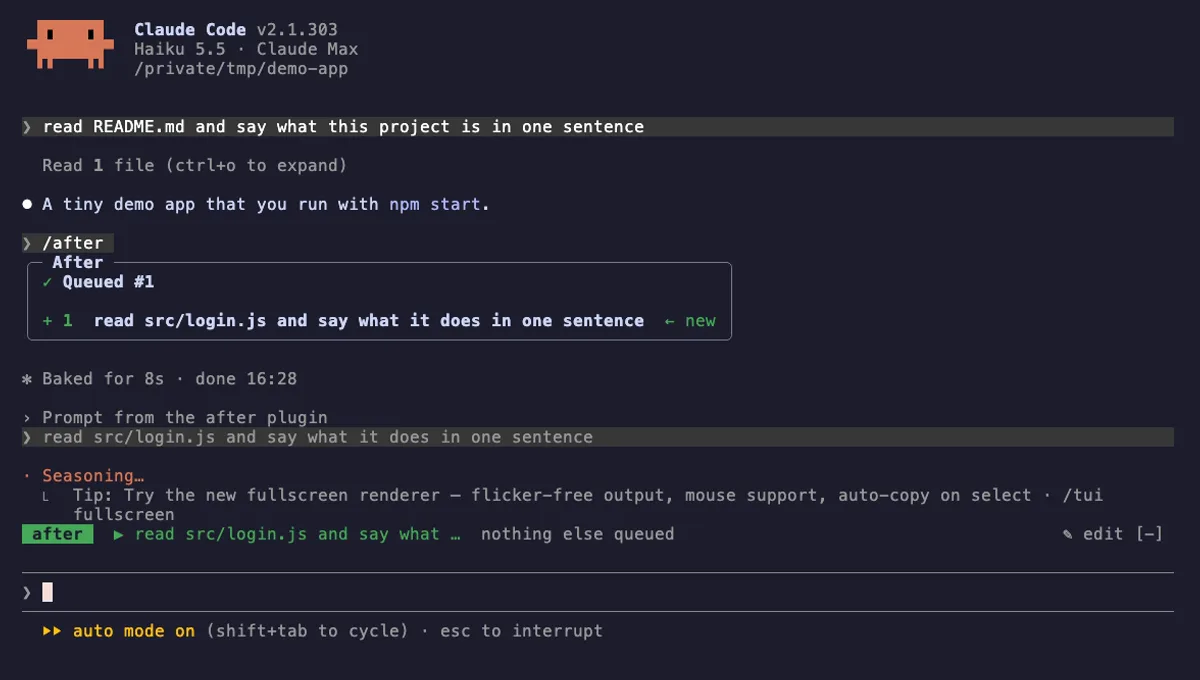
After
A prompt queue for Claude Code: /after runs your next task when the current one ends, without steering it.
- above-prompt
- pane
- toast
- status
- Calls the model (uses your quota)
- Reads your prompts
- Changes the UI
- Adds commands/tools
- Stores data
tested with v2.1.303
 Featured
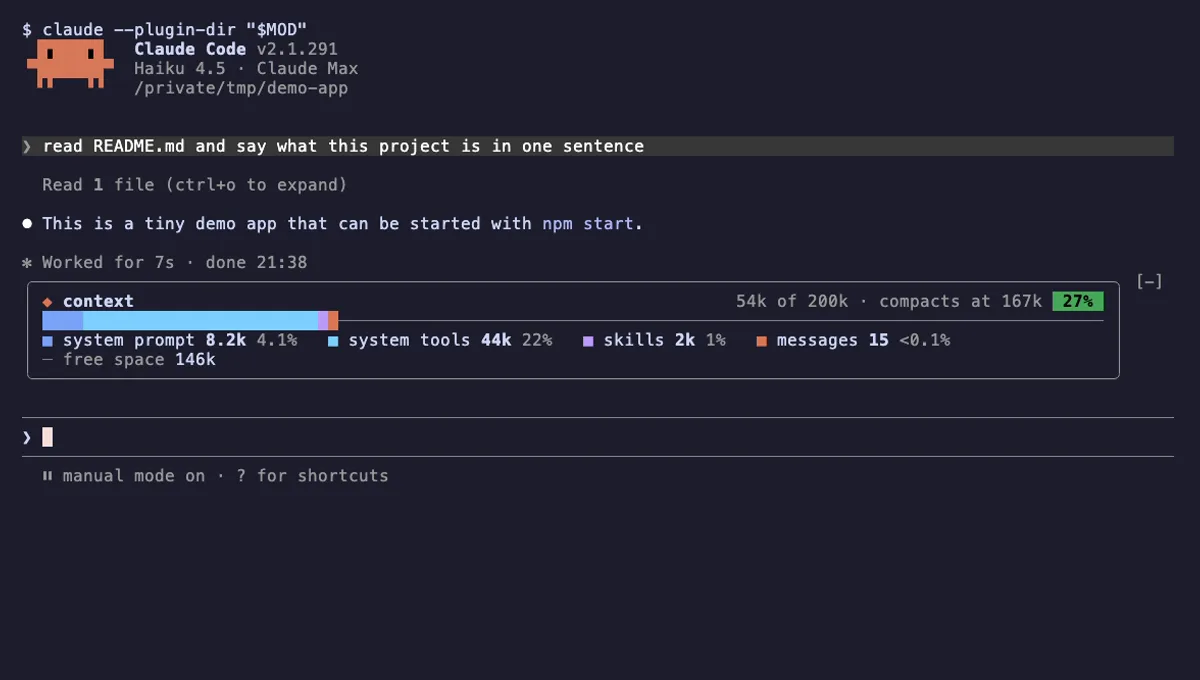
Context Bar
Your Claude Code context window as one stacked bar above the prompt, a color per category, with token counts.
- above-prompt
- Changes the UI
- Adds commands/tools
- Stores data
tested with v2.1.291
More in Timers, todos, standups, Context, quota, cost.