ccpii: a Claude Code PII filter that masks personal data with placeholders
Masks emails, names and phones with placeholders before Claude reads them, using a local privacy-filter model.
Permissions
- Reads filesCan read files and list directories on your machine ($.fs.read / list / stat / exists).
- Writes filesCan create or overwrite files on your machine ($.fs.write).
- Runs commandsCan run shell programs on your machine ($.process.run / spawn). Check the source for exactly which ones.
- NetworkCan make HTTP requests or talk to MCP servers ($.http.fetch / $.mcp.*).
- Intercepts tool callsSees every tool call Claude makes (tool.call / tool.check) and could block or change it.
- Reads your promptsCan see what you type and the conversation transcript (prompt.* / session.append / session.messages).
- Changes the UIDraws into the Claude Code interface: bands, panes, status text, toasts (ui.render / $.ui.*).
- Adds commands/toolsRegisters new slash commands or tools that you or Claude can invoke ($.command.register / $.tool.register).
- Stores dataKeeps data between sessions in the plugin's private store ($.store.*).
- tested with
- v2.1.310
- last tested
- requires
- Claude Code ≥ 2.1.287
- surfaces
- status, toast, transcript
- source
- xchacha20-poly1305 (MIT)
Install inside Claude Code:
git clone https://github.com/xchacha20-poly1305/ccpii
claude --plugin-dir ./ccpiiWhat does this mod do?
ccpii is a community Claude Code PII filter by xchacha20-poly1305 (xchacha20-poly1305 on GitHub). Before the model reads a prompt or a tool result, the mod runs openai/privacy-filter over the text locally. Each detected span is replaced with a numbered placeholder of its kind, such as ⟦EMAIL_0⟧, ⟦PERSON_1⟧ or ⟦PHONE_0⟧. The same value always gets the same placeholder for the whole session.
According to the README:
- The kinds are
ACCOUNT,ADDRESS,DATE,EMAIL,PERSON,PHONE,URLandSECRET. - A section added to the system prompt tells the model what the placeholders are and to write them verbatim.
- When the model calls a tool, placeholders in the arguments are swapped back to the real values just before the tool runs.
- The transcript you see shows the real values; the stored conversation keeps the placeholders.
- If the filter cannot check something, the prompt is not sent and the tool output is withheld from the model.
The mod registers one command, /ccpii, with status, install, restart, pause and resume.
Install
The install block above adds the author's own marketplace and installs the plugin from it. Then do the one-time setup:
- Install uv so that
uvis on yourPATH. - In a session, run
/ccpii install. It downloads the model's int8 ONNX export (about 1.6 GB, per the README) to~/.cache/ccpii/privacy-filter.
Until the model is installed everything is withheld, so run /ccpii install first and check /ccpii status.
$ install ccpii
Requires Claude Code ≥ 2.1.287
Installs from the author's own marketplace: xchacha20-poly1305/ccpii
1.Try it without installing
git clone https://github.com/xchacha20-poly1305/ccpii claude --plugin-dir ./ccpiiLoads the mod for one session only. Nothing is added to your settings.
How it works
The plugin is one function-hooks module, hooks/register.ts, plus a placeholder table (vault.ts), a span policy (policy.ts) and a sidecar runner (filter.ts). On session.start it spawns a Python sidecar, server/pii_server.py, through uv run --script. The sidecar serves POST /detect on a Unix socket under /tmp/ccpii.<random>/, and the hooks post the text to it. Every row the model will read goes through session.append:
on('session.append', async ($, e, next) => {
  if (isPaused || !isReadByModel(e) || isOwnNote($, e)) return next(e)
  let content: Blocks
  let isChanged: boolean
  try {
    ;({ content, isChanged } = await maskBlocks($, policy, e.message.content))
  } catch (error) {
    content = withheld(e.message.content, reasonOf(error))
    isChanged = true
  }
  const stored = await next({ ...e, message: { ...e.message, content } })
A tool.call hook restores placeholders in the arguments, and ui.render hooks restore them for display in user messages, assistant messages and tool rows. Long texts are cut into overlapping pieces of at most 16,384 UTF-16 code units per request, one request at a time, because Claude Code gives each request 30 seconds. The placeholder table is saved to ~/.claude/ccpii/v2/<session-id>.json, in a directory created with mode 700, so a resumed session can restore its placeholders.
Customize it
The plugin has three options under /config › ccpii:
- Detection endpoint: the URL of your own service that answers ccpii's small HTTP protocol (
POST {"texts"}returns{"spans"}). When set, no bundled sidecar runs. The repo'sBACKENDS.mddescribes the protocol and ships two example servers, one for a Hugging Face token-classification model and one for Microsoft Presidio. - Kinds left unmasked: placeholder kinds that are never masked, for example
PERSON, URL. - Words left unmasked: words such as your login name; any detected span containing one is left as it is.
The README also describes an optional Intel GPU path using an OpenVINO model you put in place yourself (GPU.md). We did not test it.
Permissions & safety
We read every file the plugin can execute: hooks/register.ts, filter.ts, vault.ts, policy.ts, server/pii_server.py, server/gpu_worker.py, the two example servers, plugin.json and hooks.json. There is no bundled or minified code and no binary. Findings:
- Network: the TypeScript calls
$.http.fetchonly against the local Unix socket, or against the Detection endpoint if you set one; in that case all prompt and tool-result text is posted there. The Python side downloads the model from Hugging Face (openai/privacy-filter) only on/ccpii install. The sidecar'suv run --scriptheader liststorch,onnxruntime,numpy,huggingface_hubandopfpinned to a commit ofgithub.com/openai/privacy-filter, plus a PyTorch CPU index. Because that header is resolved whenever the sidecar starts, we expectuvto fetch those packages into its cache at the first session start, before/ccpii install. That is an inference from reading the script, not something we observed. - Processes:
uv run --scriptfor the sidecar and the install,mkdir -p -m 700for the save directory, andrm -rfof a leftover/tmp/ccpii.*directory (the path is checked before deleting). With a GPU model present, the sidecar startsgpu_worker.pyas a child. - File writes:
~/.claude/ccpii/v2/<session-id>.jsonholds the placeholder table, which means the real values, as plain JSON (directory mode 700). The model goes to~/.cache/ccpii/. No writes tosettings.json, shell files, LaunchAgents or git hooks. - Daemons: the sidecar lives as long as the session and removes its socket directory on SIGTERM or SIGINT. A hard kill leaves an empty
/tmp/ccpii.*directory, which the next start cleans up. - Secrets and environment:
$.env.getreadsHOMEonly. Python setsTIKTOKEN_CACHE_DIRandHF_HUB_DISABLE_XET. - Telemetry: none found.
- Model influence: the mod adds a system-prompt section (or, in a conversation that already started, a one-time note) explaining the placeholders and telling Claude to use them as they are. We found no hidden Unicode or instructions beyond that.
- Gating hooks:
prompt.submit,session.appendandtool.callrewrite or block content, each with a.catch. That matches the README: prompts are dropped and tool results are withheld when the filter fails, and a tool call is denied if placeholders cannot be restored. - External requirements:
uv, a Python environment it builds, about 1.6 GB of model download and about 2.2 GB of memory. No account or API key. - Obfuscation: none.
- License: MIT, with a
LICENSEfile.
claude plugin validate passed with one warning (no icon). claude plugin test passed: 36 tests, 0 failures. The tests use a stand-in for the sidecar; we did not run the real model.
- Reads files
- Can read files and list directories on your machine ($.fs.read / list / stat / exists).
- Writes files
- Can create or overwrite files on your machine ($.fs.write).
- Runs commands
- Can run shell programs on your machine ($.process.run / spawn). Check the source for exactly which ones.
- Network
- Can make HTTP requests or talk to MCP servers ($.http.fetch / $.mcp.*).
- Intercepts tool calls
- Sees every tool call Claude makes (tool.call / tool.check) and could block or change it.
- Reads your prompts
- Can see what you type and the conversation transcript (prompt.* / session.append / session.messages).
- Changes the UI
- Draws into the Claude Code interface: bands, panes, status text, toasts (ui.render / $.ui.*).
- Adds commands/tools
- Registers new slash commands or tools that you or Claude can invoke ($.command.register / $.tool.register).
- Stores data
- Keeps data between sessions in the plugin's private store ($.store.*).
Compatibility & troubleshooting
We validated and ran the author's tests on Claude Code 2.1.310. The hooks use function hooks, so a recent build is needed.
- Everything is withheld: run
/ccpii status. If the model is missing, run/ccpii install. - The filter process died before it was ready:
/ccpii restartstarts it again. One that dies after being ready is restarted by the next request. - A name or product keeps being masked wrongly: add it under Words left unmasked, or its kind under Kinds left unmasked.
/ccpii pauseis the way out if the filter blocks you; remember it lets content through unfiltered until/ccpii resumeor a reload.
To check it works, send a prompt containing a made-up email address, then ask Claude to repeat it. The status line shows the placeholder count.
FAQ
- Does ccpii send my text to a server?
- Not with the default setup. The detection runs in a Python process on your machine, reached over a Unix socket in a private /tmp directory. Text only leaves the machine if you set the Detection endpoint option to a URL of your own, and then every prompt and tool result is posted to that URL. The one download is the model itself, fetched from Hugging Face when you run /ccpii install.
- What happens before the model is installed?
- The filter fails closed. Prompts are dropped and tool results are withheld, with the reason shown, until you run /ccpii install. /ccpii pause lets content through unfiltered in the meantime, and /ccpii resume turns filtering back on. A reload of the mod also resets the pause.
- Can Claude still edit files that contain my email address?
- Yes. When the model calls a tool, ccpii replaces the placeholders in the arguments with the real values just before the tool runs, and filters the output again. Permission prompts, however, show the arguments with placeholders.
- How much does it need in disk and memory?
- The README gives about 1.6 GB of model download, about 2.2 GB of memory while the filter runs, and roughly one second per 4 KB of text. It also needs uv on your PATH. We did not measure these figures ourselves.
- Is it a guarantee that no personal data reaches the model?
- No. The README calls it a data-minimisation aid, not an anonymisation guarantee. The model can miss spans or over-detect, and a real value the model writes on its own is not filtered, only what it reads.
# Related mods
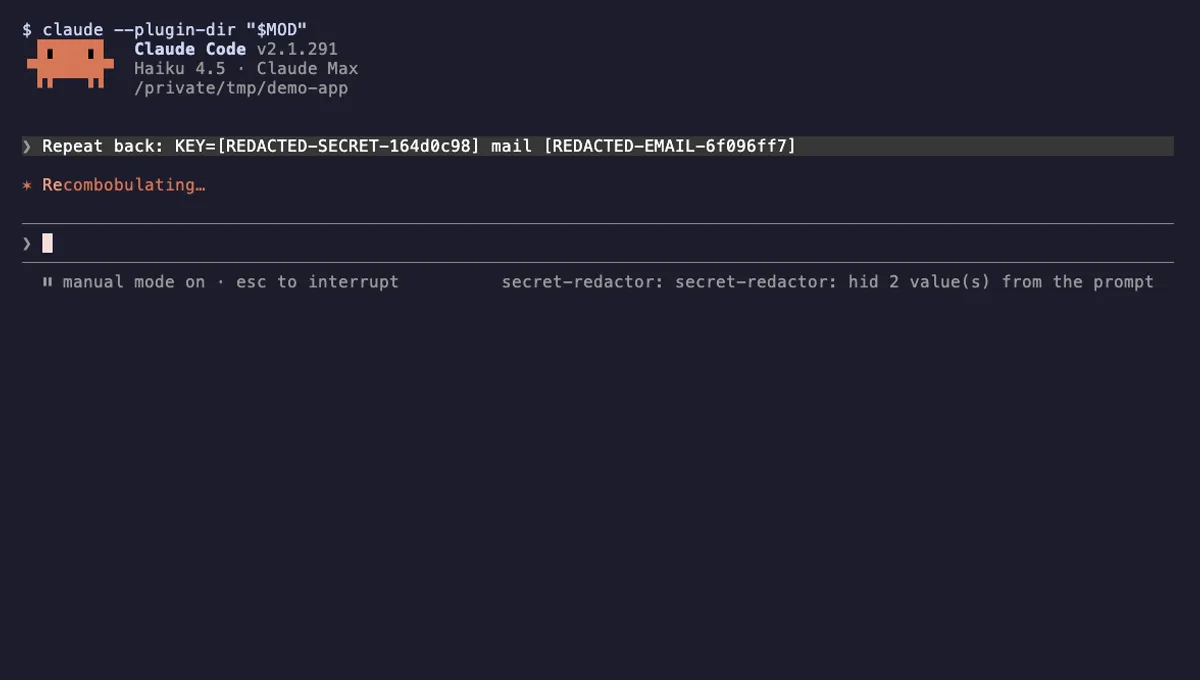 Featured
Secret Redactor
Swaps API keys, emails and public IPs for placeholders before Claude sees them, and restores them when a tool runs.
- toast
- Intercepts tool calls
- Reads your prompts
- Changes the UI
tested with v2.1.291
PII Guard
Replaces Taiwanese personal data with placeholders before Claude sees it and restores real values when Claude writes.
- none
- Reads files
- Runs commands
- Network
- Intercepts tool calls
- Reads your prompts
tested with v2.1.291
Transcript Redactor
Swaps API keys and passwords for stable placeholders before Claude reads them, and restores them for local tools.
- toast
- transcript
- Reads files
- Intercepts tool calls
- Reads your prompts
- Changes the UI
tested with v2.1.307
More in Safety guards, Tools you add to Claude.