Decision Tree Claude Code mod: a Claude Code decision tree of options
When Claude ends a reply with a question, a side pane lays out the options and lets you try each in a fork.
Permissions
- Reads filesCan read files and list directories on your machine ($.fs.read / list / stat / exists).
- Runs commandsCan run shell programs on your machine ($.process.run / spawn). Check the source for exactly which ones.
- Calls the model (uses your quota)Can send its own requests to Claude, which count against your plan's usage ($.model.* / $.agent.spawn).
- Changes the UIDraws into the Claude Code interface: bands, panes, status text, toasts (ui.render / $.ui.*).
- Adds commands/toolsRegisters new slash commands or tools that you or Claude can invoke ($.command.register / $.tool.register).
- tested with
- v2.1.307
- last tested
- requires
- Claude Code ≥ 2.1.287
- surfaces
- pane
- source
- Ray Amjad (ray-amjad) (MIT)
Install inside Claude Code:
/plugin install decision-tree --marketplace ray-amjad/claude-code-modsWhat does this mod do?
Decision Tree is a community mod by Ray Amjad (ray-amjad), part of his claude-code-mods collection. When Claude ends a reply by asking you to choose something, the mod builds a Claude Code decision tree in a side pane. The pane shows the question in one plain line, what you need to know to decide, and one box per option with what it means, what it leads to, and short pros and cons. The recommended option is drawn in green with a one-sentence reason.
The last box is "Other": type your own answer and it joins the options. Each box has an Explore button. Explore forks the real session at the message that asked the question, tells the fork you picked that option, and shows what it would do, in up to four steps, and the next decision it would need from you. You can go deeper from there, see the whole tree with /explain map, or open a branch as a live session.
Install
The install block above adds the author's own marketplace and installs the plugin from it. Restart Claude Code or run /reload-plugins, then keep working as normal. The pane appears after a reply that ends in a real question.
$ install decision-tree
Requires Claude Code ≥ 2.1.287
Installs from the author's own marketplace: ray-amjad/claude-code-mods
1.One line, inside Claude Code
/plugin install decision-tree --marketplace ray-amjad/claude-code-modsPaste into a running session (v2.1.275+). Claude Code asks to add the marketplace first.
2.From your shell
claude plugin marketplace add ray-amjad/claude-code-mods claude plugin install decision-tree@claude-code-modsThen run /reload-plugins in any session that is already open.
3.Try it without installing
git clone https://github.com/ray-amjad/claude-code-mods claude --plugin-dir ./claude-code-mods/plugins/decision-treeLoads the mod for one session only. Nothing is added to your settings.
How it works
After each of the main agent's replies the mod runs a regex on the end of the reply: a question mark in the last paragraph, or two or more numbered or lettered options. Most turns stop there. If it matches, a small model confirms that you have to decide something, and then $.model.fork explains the choice as JSON for the pane. The gate, from hooks/register.jsx:
const r = await $.model.complete({
  model,
  system: 'You read the end of an AI coding assistant reply. Answer YES if it ends by asking ' +
    'the user to decide, choose, or supply something before work can go on. ...',
  prompt: answer.trim().slice(-2000),
  maxTokens: 5,
  timeoutMs: 20000,
})
return r.isAnswered && /^\s*yes/i.test(r.text)
Exploring an option runs claude -p <what-if prompt> --resume <session> --fork-session --resume-session-at <message id> --output-format json through $.process.run, with a 5-minute timeout. To find the message id, the mod reads the session transcript under ~/.claude/projects and looks for the assistant message that ends with the question. If it cannot, it forks from the latest point and logs that. The tree lives in the mod's memory, so a new question, a restart or a reload clears it.
Customize it
There is one option, gateModel (default haiku), the model that answers YES or NO. Commands: /explain opens the pane for the latest question, /explain b explores option B (A to H), /explain other <answer> explores your own answer, /explain map shows the whole tree, /explain back and /explain top move up, and /explain continue opens the current branch as a live session. For anything else, edit hooks/register.jsx, for example the regex in looksLikeQuestion or the JSON shape in SHAPE.
Permissions & safety
We read every file the plugin can execute before running it: plugin.json, hooks/hooks.json, hooks/register.jsx (about 430 lines, readable source) and the test file. There is no package.json, install script, bundled code or binary; the two PNGs are README images. We found:
- Model calls:
$.model.completesends the last 2,000 characters of a reply to the gate model, and$.model.forkreplays the whole conversation to write the explanation. Both go through Claude Code's own model access, with your tokens and no other host. - Runs processes (
$.process.run):claude -p ... --resume ... --fork-sessionfor each explored option, with--allowedTools=Read,Grep,Globand--disallowedTools=Bash,Edit,Write,NotebookEdit. WhenHERDR_ENV=1it also runsherdr pane splitandherdr pane runfor Continue branch. All are argv arrays, no shell. - Files: reads the session transcript
.jsonl($.fs.read, limited to 4 MiB). It writes no files itself, but each branch run leaves its own session file in your project history. - Environment: reads
HOME,USERPROFILE,HERDR_ENV,DECISION_TREE_WAITandDECISION_TREE_CHILD. The last one is passed to branch runs so they do not explain their own replies. Nothing is sent anywhere. - Hooks:
classic.Stoponly records the transcript path and passes the event on.turn.completenever changes the result. Nothing blocks or rewrites a tool call or prompt. - Clipboard and prompt text:
$.ui.copyputs aclaude --resume <id> --fork-sessioncommand on the clipboard. The fork prompts are written by the mod and aimed at the model only to produce JSON; we found no hidden Unicode or instructions aimed at a reader. - No network, no telemetry, no daemons, no changes to settings or shell files.
claude plugin validate reported no errors and no warnings from the plugin, only a non-blocking "no icon" note for the plugin directory. The author's 2 tests (the /explain command is registered in interactive sessions and not in headless ones) passed on Claude Code 2.1.307. The tests do not exercise the fork or the pane. It is MIT licensed, with a LICENSE file in the repository.
- Reads files
- Can read files and list directories on your machine ($.fs.read / list / stat / exists).
- Runs commands
- Can run shell programs on your machine ($.process.run / spawn). Check the source for exactly which ones.
- Calls the model (uses your quota)
- Can send its own requests to Claude, which count against your plan's usage ($.model.* / $.agent.spawn).
- Changes the UI
- Draws into the Claude Code interface: bands, panes, status text, toasts (ui.render / $.ui.*).
- Adds commands/tools
- Registers new slash commands or tools that you or Claude can invoke ($.command.register / $.tool.register).
Compatibility & troubleshooting
Checked with Claude Code 2.1.307 on macOS (validate and tests only; we did not record a session). The branch feature relies on --resume-session-at, which the author calls an undocumented Claude Code flag, tested on 2.1.296. If nothing happens:
- The reply must end with a question the gate model judges to need a decision; "anything else?" does not count.
- In a terminal narrower than about 144 columns, run
/explainto open the pane. - In
claude -por SDK sessions the mod does nothing unlessDECISION_TREE_WAIT=1is set. - A failed branch shows the error in the pane; try the Explore button again.
- Branches take roughly 20 to 60 seconds and cost a full turn each.
FAQ
- Does the Claude Code decision tree send my answer back to Claude?
- No. The pane is for thinking only. You still answer Claude in the prompt as usual. Each explored option runs in its own forked session file, so the main conversation never sees it.
- Does it cost tokens?
- Yes. A cheap regex looks at every reply first. When it matches, a small model (haiku by default) is asked YES or NO, and on YES a model fork writes the explanation. Each Explore click then runs a full claude -p turn. The author's README says each branch costs a turn.
- Can the explored branches change my files?
- The branch run is started with Read, Grep and Glob allowed and Bash, Edit, Write and NotebookEdit disallowed, and the prompt tells it to change nothing. The branch session file stays in your project's history.
- Why does it not show up in a narrow terminal?
- Claude Code only opens an unrequested pane on a wide terminal; the author says at least 144 columns. Below that you get a toast, and /explain opens the pane above the prompt.
- How do I continue a branch for real?
- Press Continue branch or run /explain continue. Inside a Herdr terminal it opens a new pane running claude --resume with the branch id and --fork-session. Otherwise it copies that command to the clipboard.
# Related mods
 Featured
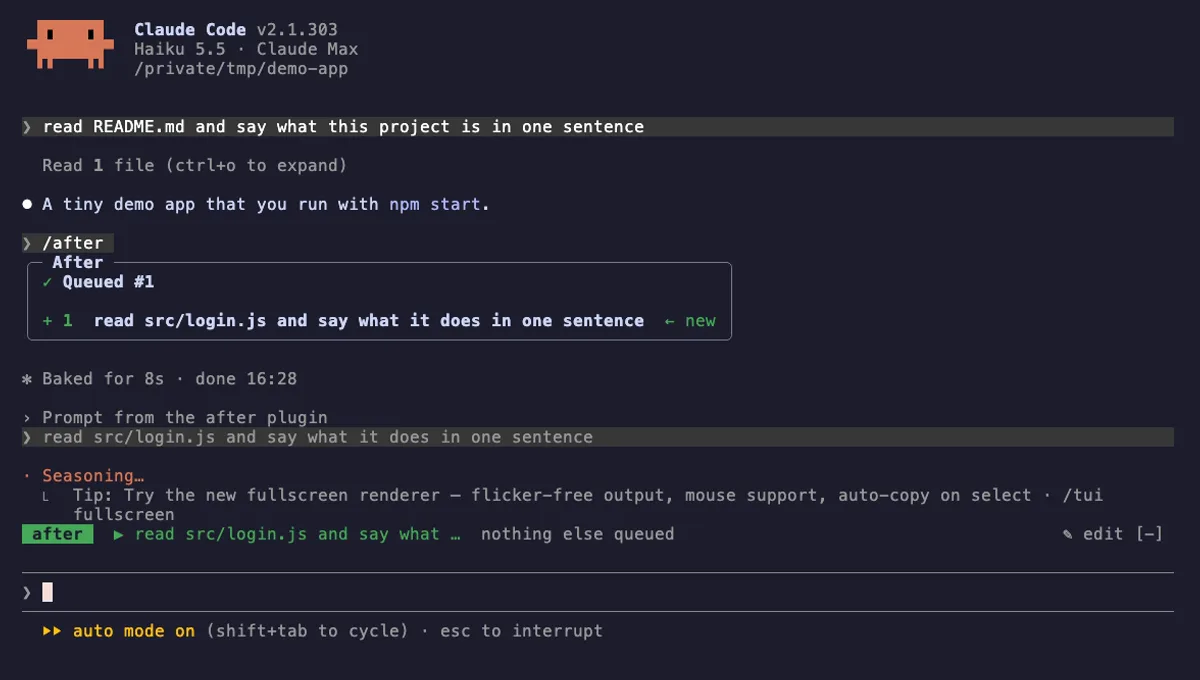
After
A prompt queue for Claude Code: /after runs your next task when the current one ends, without steering it.
- above-prompt
- pane
- toast
- status
- Calls the model (uses your quota)
- Reads your prompts
- Changes the UI
- Adds commands/tools
- Stores data
tested with v2.1.303
 Featured
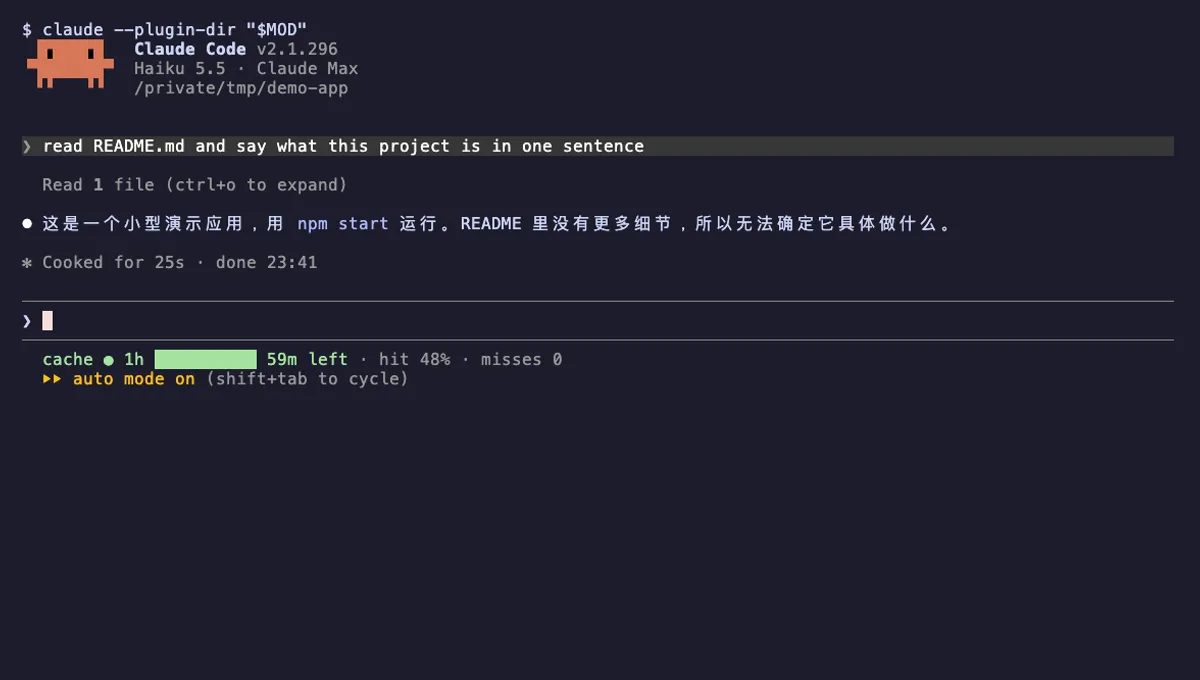
Cache Clock
A prompt-cache line under your Claude Code status line: time left while warm, hit rate, and tokens re-cached once cold.
- status
- Reads files
- Writes files
- Runs commands
- Adds commands/tools
tested with v2.1.296
More in Timers, todos, standups, Panes & dashboards.