Paste View, a Claude Code paste preview mod: see pasted images and text before you send
Image thumbnails and long-text previews above the prompt, instead of bare [Image #1] and [Pasted text #2] tags.
Permissions
- Reads filesCan read files and list directories on your machine ($.fs.read / list / stat / exists).
- Runs commandsCan run shell programs on your machine ($.process.run / spawn). Check the source for exactly which ones.
- Changes the UIDraws into the Claude Code interface: bands, panes, status text, toasts (ui.render / $.ui.*).
- tested with
- v2.1.310
- last tested
- requires
- Claude Code ≥ 2.1.287
- surfaces
- above-prompt, pane
- source
- Clément Décou (Amorfx) (MIT)
Install inside Claude Code:
/plugin install paste-view --marketplace Amorfx/claude-paste-viewWhat does this mod do?
Paste View is a community mod by Clément Décou (Amorfx), published at Amorfx/claude-paste-view. It is a Claude Code paste preview: when you paste an image or a long block of text, Claude Code shows only a tag such as [Image #1] or [Pasted text #2 +41 lines]. This mod draws what the tag stands for above the prompt.
- Images appear as thumbnails that keep their proportions and shrink to the space available. In a terminal that cannot draw pictures, each image is a line such as
#1 · image 1630×632 — open, which opens it in your system's image viewer. Non-PNG images (JPEG, WebP) are always shown as a line. - Long text appears as one line: its line count, its size and its first line.
- See it whole: click a line, or press
ctrl+x taband then its number. Text opens in a pane (arrow keys to scroll, Esc to close). - Clears on send: once the prompt is sent or a tag is deleted, its preview goes away.
Install
The install block above adds the author's own marketplace, claude-paste-view, and installs the plugin from it. Run /reload-plugins or start a new session, then paste a screenshot or a long block of text into the prompt. On Linux, text previews need wl-clipboard or xclip, which many distributions do not install by default.
$ install paste-view
Requires Claude Code ≥ 2.1.287
Installs from the author's own marketplace: Amorfx/claude-paste-view
1.One line, inside Claude Code
/plugin install paste-view --marketplace Amorfx/claude-paste-viewPaste into a running session (v2.1.275+). Claude Code asks to add the marketplace first.
2.From your shell
claude plugin marketplace add Amorfx/claude-paste-view claude plugin install paste-view@claude-paste-viewThen run /reload-plugins in any session that is already open.
3.Try it without installing
git clone https://github.com/Amorfx/claude-paste-view claude --plugin-dir ./claude-paste-viewLoads the mod for one session only. Nothing is added to your settings.
How it works
The plugin is one function-hooks module, hooks/register.tsx, plus two small helpers. Pasting raises no edit event, so every 200 ms the mod reads the prompt box and looks for tags. This is the pattern from tags.ts:
const TAG = /\[(?:Image #(\d+)|Pasted text #(\d+)(?: \+(\d+) lines?)?)\]/gFor an image tag, the mod looks for the file Claude Code already cached at <tmp>/<project>/<session>/images/<n>.png (or .jpg, .webp), reads its first bytes to get the size from the PNG header, and draws it with Claude Code's Image element. For a text tag, Claude Code writes no file before you send, so the mod reads the clipboard once when the tag first appears. It keeps that text in memory only if the number of lines matches the tag. Several tags appearing together, for example a draft restored from history, get no text preview, because one clipboard cannot stand for several pastes.
Customize it
There are no settings. Two environment variables change behavior. CLAUDE_CODE_FORCE_TERMINAL_IMAGES=1 makes the mod draw thumbnails where it would otherwise list lines, for example in iTerm2 (the README reports it working in 3.7.3) or through tmux, if your terminal speaks the kitty protocol. Set it only for terminals that can draw pictures, since in others you would see neither a thumbnail nor the open line. CLAUDE_CODE_TMPDIR is read to locate the image cache. To change the poll interval or thumbnail size caps, edit POLL_MS in register.tsx or the constants at the top of thumbnails.ts in a local copy loaded with --plugin-dir.
Permissions & safety
We read every file the plugin can execute: hooks/hooks.json, hooks/register.tsx, hooks/tags.ts, hooks/thumbnails.ts, the manifest, the marketplace file and the test file. There is no package.json, install script, binary or bundled code, and we found no zero-width or hidden characters. What we found:
- Runs processes (
$.process.run): the clipboard tool (pbpaste, thenwl-paste --no-newline, thenxclip -selection clipboard -o, with a 1 second timeout),id -uonce ifCLAUDE_CODE_TMPDIRis not set, andunamefollowed byopenorxdg-openonly when you click an image line. All are argument arrays, with no shell. - Reads your clipboard: once per new text tag. The text stays in memory and in the mod's own state, and is dropped when the tag leaves the prompt. Anything else you copy in the same moment may be read, which is why a mismatching line count shows "no preview".
- Reads files: lists Claude Code's temp folder to find the session's image cache and reads the first bytes of each pasted image. It reads the environment variables
TERM,TERM_PROGRAM,KITTY_WINDOW_ID,TMUX,STY,CLAUDE_CODE_SESSION_KIND,CLAUDE_CODE_FORCE_TERMINAL_IMAGESandCLAUDE_CODE_TMPDIR. - Writes: no file writes. It stores three state values (images, texts, viewing) through the mod state API, and the pasted text is part of that state.
- Gating hooks: none block or rewrite a prompt or tool call.
claude plugin validatenotes that theui.close{id=paste-view}hook has no.catch; it only resets the mod's own state. - No network, no telemetry, no daemons. The only background activity is a timer that stops with the session. No text is injected into the model's context.
- License: MIT, with a LICENSE file at the repository root.
claude plugin validate reported no errors or warnings for the plugin itself. Its plugin-directory check noted a missing icon, which does not affect loading. claude plugin test on Claude Code 2.1.310 passed 17 tests with 0 failures.
- Reads files
- Can read files and list directories on your machine ($.fs.read / list / stat / exists).
- Runs commands
- Can run shell programs on your machine ($.process.run / spawn). Check the source for exactly which ones.
- Changes the UI
- Draws into the Claude Code interface: bands, panes, status text, toasts (ui.render / $.ui.*).
Compatibility & troubleshooting
Checked on Claude Code 2.1.310 on macOS. The author lists macOS, or Linux with a clipboard tool, and Claude Code 2.1.287 or later. If something looks wrong:
- Run
/reload-pluginsor start a new session if no preview band appears. - "no preview (clipboard changed)" means the clipboard no longer matched the pasted text. Paste again without copying anything else first.
- "couldn't read the clipboard: install wl-clipboard or xclip" appears on Linux when neither tool is found.
- Images listed as lines, not thumbnails, mean your terminal is not recognised as kitty-protocol capable, or you are in tmux, screen or a background session. See Customize it.
- Pastes from a tmux buffer or over SSH may not match the local clipboard and show no preview.
To check it after installing, take a screenshot to the clipboard, paste it into the prompt, and look for the band above the input.
FAQ
- Why does Claude Code show only [Image
- Claude Code collapses a paste into a tag in the prompt box and keeps the content to itself until you send. Paste View adds a preview band above the prompt so you can see what the tag stands for.
- Do I need a special terminal to see thumbnails?
- Thumbnails need a terminal that speaks the kitty graphics protocol, such as Ghostty or kitty. Elsewhere each image appears as a line like "#1 · image 1630×632 — open" that opens it in your system viewer. Inside tmux or screen the mod lists lines instead, unless CLAUDE_CODE_FORCE_TERMINAL_IMAGES is set.
- Where does the text preview come from?
- From the clipboard. When a new text tag appears, the mod reads the clipboard once with pbpaste on macOS, or wl-paste or xclip on Linux, and keeps the text only if its line count matches the tag. If it does not match, the line says "no preview" instead of guessing.
- Does it change my draft or send anything?
- No. It reads the prompt box and shows a preview above it. Clicking a line opens a pane or your image viewer, and the draft is left as it is. We found no network code.
- Which Claude Code version do I need?
- The author lists 2.1.287 or later. We loaded it and ran its tests on 2.1.310. The tag formats and the image cache path are Claude Code internals, so a future version could break the previews.
# Related mods
Image Preview
Hover a pasted [Image #N] in Claude Code to see the picture, in a window by the pointer or drawn in the terminal.
- above-prompt
- transcript
- Reads files
- Runs commands
- Reads your prompts
- Changes the UI
tested with v2.1.303
 Featured
md-preview
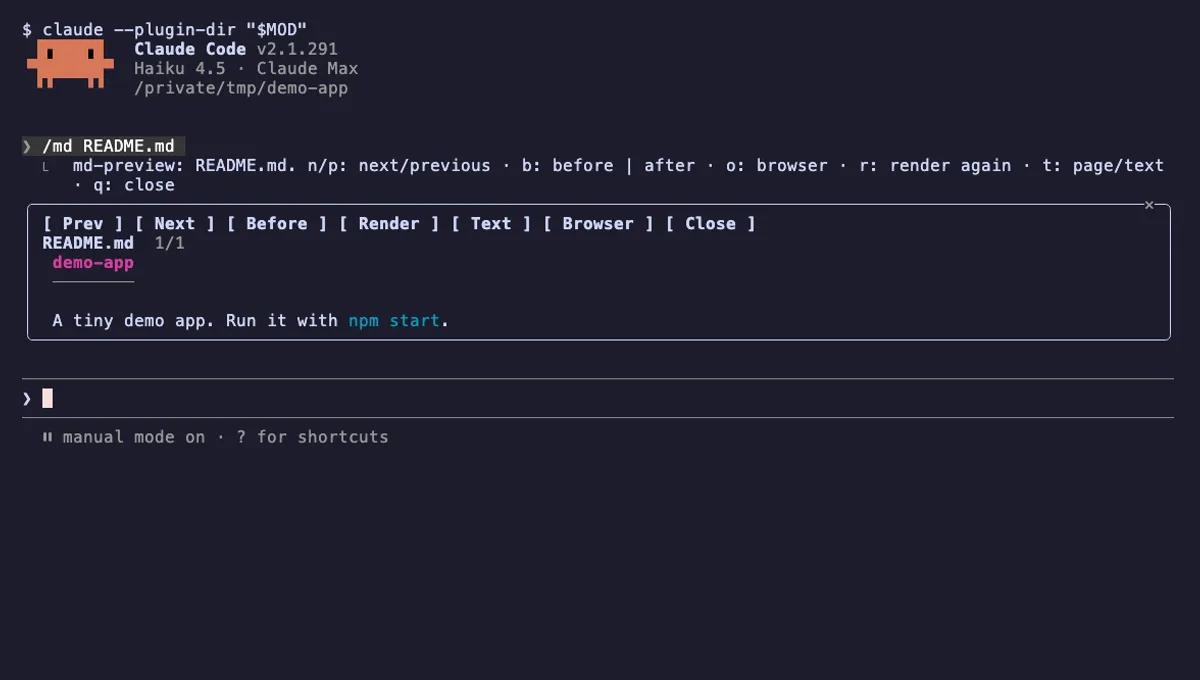
The Markdown files Claude edits, rendered like GitHub in a pane next to the chat, with a before and after view.
- pane
- toast
- Reads files
- Writes files
- Runs commands
- Intercepts tool calls
- Changes the UI
- Adds commands/tools
tested with v2.1.291
More in Timers, todos, standups.