Prompt Bouncer Claude Code mod: a Claude Code prompt guard for vague asks
Drops vague prompts like “fix the thing” before Claude sees them, and can suggest your project's own term.
Permissions
- Reads filesCan read files and list directories on your machine ($.fs.read / list / stat / exists).
- Calls the model (uses your quota)Can send its own requests to Claude, which count against your plan's usage ($.model.* / $.agent.spawn).
- Reads your promptsCan see what you type and the conversation transcript (prompt.* / session.append / session.messages).
- Changes the UIDraws into the Claude Code interface: bands, panes, status text, toasts (ui.render / $.ui.*).
- Adds commands/toolsRegisters new slash commands or tools that you or Claude can invoke ($.command.register / $.tool.register).
- tested with
- v2.1.307
- last tested
- requires
- Claude Code ≥ 2.1.287
- surfaces
- status, toast
- source
- Ray Amjad (ray-amjad) (MIT)
Install inside Claude Code:
/plugin install prompt-bouncer --marketplace ray-amjad/claude-code-modsWhat does this mod do?
Prompt Bouncer is a community Claude Code prompt guard by Ray Amjad (ray-amjad), published in his claude-code-mods repository. It checks each prompt at the moment you press Enter. If the prompt is vague, it never reaches Claude: you get a toast explaining why, and the text comes back into the prompt box to fix.
The idea, from the README, is that a vague prompt costs a whole turn of Claude guessing, and a wrong guess stays in the context and sometimes in your files. A bounced prompt costs no tokens. The mod has two modes:
- Quick mode (the default) uses no model. A short prompt (15 words or fewer) that leans on phrases such as "the thing", "that bug" or "stuff", or a bare "it" in the first prompt of a session, and names no file, path, code in backticks, quoted name,
CamelCaseorsnake_caseword, is bounced. - Project mode reads your project docs (
CLAUDE.md, a glossary, decision records, specs) and asks Haiku whether the prompt is specific and uses your project's words. If not, the toast can suggest the project's own term.
/force <prompt> sends anything past the bouncer, and slash commands always pass. A status line under the prompt shows the current mode.
Install
The install block above adds the author's marketplace and installs the plugin from it. After installing, restart Claude Code or run /reload-plugins. Quick mode is on by default; switch to project mode with /plugin configure prompt-bouncer@claude-code-mods or, for one session, /bouncer project.
$ install prompt-bouncer
Requires Claude Code ≥ 2.1.287
Installs from the author's own marketplace: ray-amjad/claude-code-mods
1.One line, inside Claude Code
/plugin install prompt-bouncer --marketplace ray-amjad/claude-code-modsPaste into a running session (v2.1.275+). Claude Code asks to add the marketplace first.
2.From your shell
claude plugin marketplace add ray-amjad/claude-code-mods claude plugin install prompt-bouncer@claude-code-modsThen run /reload-plugins in any session that is already open.
3.Try it without installing
git clone https://github.com/ray-amjad/claude-code-mods claude --plugin-dir ./claude-code-mods/plugins/prompt-bouncerLoads the mod for one session only. Nothing is added to your settings.
How it works
The plugin is one function-hooks module, hooks/register.js, listed in hooks/hooks.json. The gate is a hook on prompt.submit that returns { drop } to stop a prompt or next(e) to let it in. This is from register.js:
const verdict = m === 'project'
  ? await projectGate($, text, isFirst, await loadDocs($, options))
  : quickRules(text, isFirst)
if (verdict.pass) return next(e)

bounces += 1
if (!headless) $.ui.toast('Bounced. ' + (verdict.suggestion || verdict.reason), { timeoutMs: 8000 })
return { drop: 'prompt-bouncer: ' + verdict.reason + (verdict.suggestion ? ' Try: ' + verdict.suggestion : '') + ' (Send it anyway: /force <prompt>)' }
Only prompts typed by a person are judged: the hook passes anything whose origin is not the composer, the SDK or the bridge. In project mode the docs are read fresh on every prompt, and one $.model.complete call to Haiku (300 max tokens, 20 second timeout) receives the docs as a cached prefix, then the prompt. /force cannot submit from inside its own command, so it stores the text and a 50 ms timer submits it with $.prompt.submit({ asUser: true }).
Customize it
The plugin has three options, set with /plugin configure prompt-bouncer@claude-code-mods:
mode:quickorproject.docs: the comma-separated files project mode reads, relative to the project root. A*matches file names inside one folder;**is not supported.maxDocChars: docs past this size are cut (default 20000).
The environment variable PROMPT_BOUNCER_MODE overrides mode for one session. Inside a session, /bouncer shows the mode, the bounce count and the docs it found, and /bouncer quick|project|off switches it until the mod reloads. The repository includes an example/ folder, a small invoicing app with a glossary, for trying project mode.
Permissions & safety
We read every file the plugin can execute or load: plugin.json, hooks/hooks.json and hooks/register.js (169 lines, readable source, no imports, no bundled or minified code, no binaries). The tests and the example/ folder are not loaded by the mod. We found:
- Network: none in the plugin code. In project mode,
$.model.completesends your project docs and the prompt to the Haiku model through Claude Code, the same model path as your session. Quick mode makes no model call. - Reads files: in project mode only, via
$.fs.exists,$.fs.listand$.fs.read, under the session's working directory and only the paths in thedocsoption. Note that the default list coversCLAUDE.mdand your docs folders, and that text is sent to Haiku on every prompt. - Writes files and runs processes: none. No shell, no
child_process, no settings changes, no daemons. - Environment: reads only
PROMPT_BOUNCER_MODE. No secrets, no telemetry. - Gating: it is a gating hook. It can drop your prompt, and that is exactly what the README says. It has a
.catchthat passes the prompt through, and project mode fails open. It cannot block tool calls and does not rewrite prompts, except removing a leading!. It injects no text into Claude's context. - Commands: registers
/bouncerand/force./forcere-submits your own text with$.prompt.submit. - License: MIT, with a LICENSE file in the repository.
claude plugin validate passed on Claude Code 2.1.307 with no errors. It reported one non-blocking directory warning, no plugin icon, which does not affect use. claude plugin test ran 9 tests (2 files) on 2.1.307 and all passed.
- Reads files
- Can read files and list directories on your machine ($.fs.read / list / stat / exists).
- Calls the model (uses your quota)
- Can send its own requests to Claude, which count against your plan's usage ($.model.* / $.agent.spawn).
- Reads your prompts
- Can see what you type and the conversation transcript (prompt.* / session.append / session.messages).
- Changes the UI
- Draws into the Claude Code interface: bands, panes, status text, toasts (ui.render / $.ui.*).
- Adds commands/tools
- Registers new slash commands or tools that you or Claude can invoke ($.command.register / $.tool.register).
Compatibility & troubleshooting
We tested commit 6db48a3 on Claude Code 2.1.307; the author's README says it was tested with 2.1.296. The mod needs function hooks. In claude -p and SDK sessions the drop still applies, but no status line or toast is drawn.
- A prompt was bounced that you wanted to send: run
/force <prompt>. Quick mode's word lists are short and English only, and in project mode Haiku sometimes misjudges. - Project mode does nothing useful: run
/bouncerand check "Project docs". If it says none found, the files indocsdo not exist relative to the folder where Claude Code is running. - Project mode is slow: it adds one Haiku call (a few seconds) to each prompt. Switch to
/bouncer quickor lowermaxDocChars. - The mode resets:
/bounceroverrides last only for the session and reset when the mod reloads. Use themodeoption for a permanent choice.
To check it works, type fix the thing as the first prompt of a session. It should be dropped with a toast.
FAQ
- Does Prompt Bouncer send my prompt to Claude when it bounces it?
- No. A bounced prompt is dropped at prompt.submit, so it never enters the session and costs no tokens. The reason and the suggestion are shown to you only, and Claude Code puts the prompt back in the input box.
- How do I send a prompt past the bouncer?
- Run /force followed by the prompt. Slash commands always pass. In claude -p, a prompt that starts with ! also passes, with the ! removed. In the interactive box ! means shell mode, so use /force there.
- What is the difference between quick mode and project mode?
- Quick mode uses a few regular expressions and no model, so it adds no delay. Project mode reads your docs and makes one Haiku call per prompt, so it adds a few seconds, but it can catch loose words that your glossary defines precisely.
- What happens if the bouncer breaks or Haiku is unavailable?
- The prompt goes through. The prompt.submit hook has a .catch that passes the prompt on, and project mode lets a prompt in if the Haiku call is not answered or the reply is not valid JSON.
- Which files does project mode read?
- By default CLAUDE.md, docs/glossary.md, docs/decisions/*.md, specs/*.md and docs/specs/*.md, taken from the folder Claude Code runs in. You can change the list with the docs option, and maxDocChars (default 20000) cuts the text that is sent.
# Related mods
 Featured
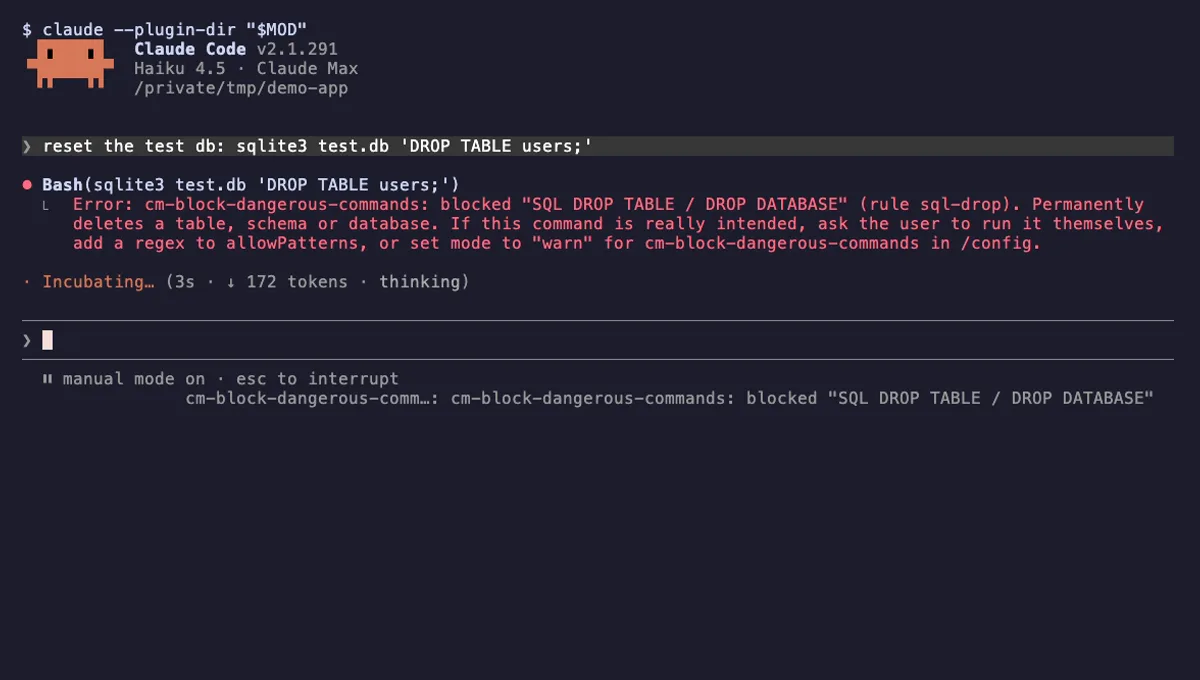
Block Dangerous Commands
Refuses rm -rf /, force-push to main, DROP TABLE, curl | sh and other destructive Bash commands before they run.
- toast
- Intercepts tool calls
- Changes the UI
tested with v2.1.310
 Featured
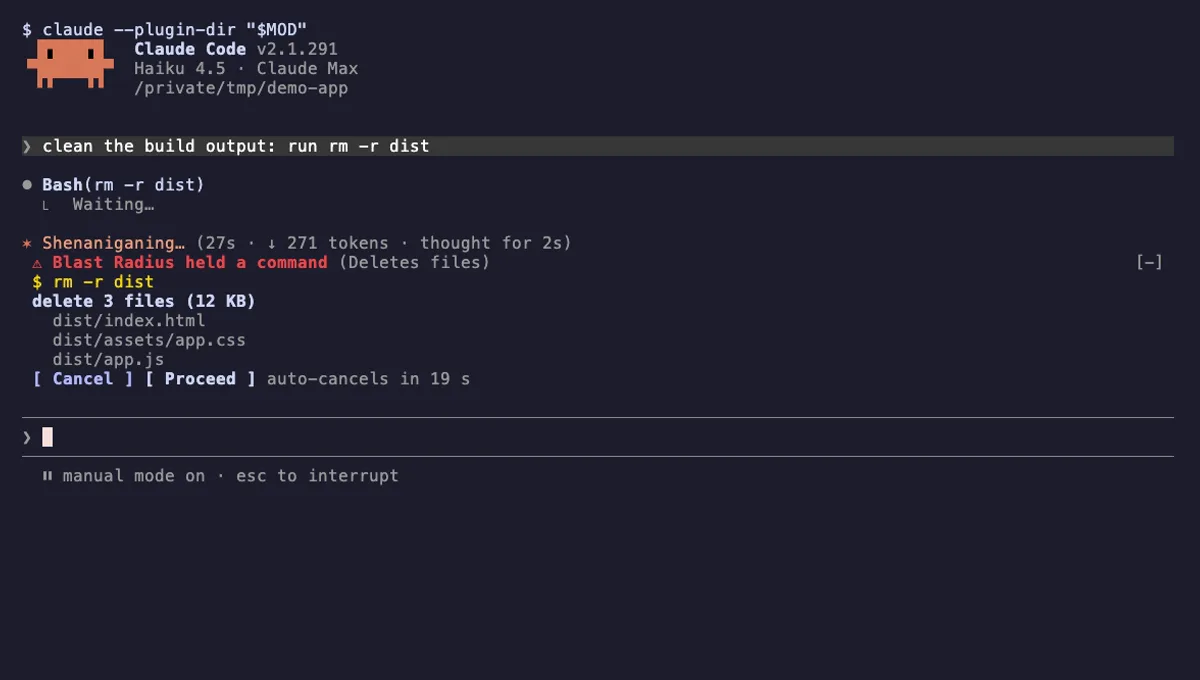
Blast Radius
Holds rm -r, force pushes and database migrations in Claude Code and shows what they would change before they run.
- pane
- above-prompt
- Runs commands
- Intercepts tool calls
- Changes the UI
tested with v2.1.291
More in Safety guards, Timers, todos, standups.