Scope Guard, a Claude Code scope guard mod: see which changed files are outside your scope
Declare which paths Claude may change with /scope, then list changed files as in scope, outside scope or pre-existing.
Permissions
- Runs commandsCan run shell programs on your machine ($.process.run / spawn). Check the source for exactly which ones.
- Intercepts tool callsSees every tool call Claude makes (tool.call / tool.check) and could block or change it.
- Changes the UIDraws into the Claude Code interface: bands, panes, status text, toasts (ui.render / $.ui.*).
- Adds commands/toolsRegisters new slash commands or tools that you or Claude can invoke ($.command.register / $.tool.register).
- Stores dataKeeps data between sessions in the plugin's private store ($.store.*).
- tested with
- v2.1.310
- last tested
- requires
- Claude Code ≥ 2.1.287
- surfaces
- none
- source
- YeonwooSung (Apache-2.0)
Install inside Claude Code:
/plugin install scope-guard --marketplace YeonwooSung/my-claude-code-modsWhat does this mod do?
Scope Guard is a community mod by YeonwooSung (GitHub), one plugin in the my-claude-code-mods collection. It is a Claude Code scope guard: you tell it which parts of the project a task may touch, and later it tells you which changed files fall outside that.
You work with one slash command. /scope allow src/auth adds a path, /scope list prints the report, /scope reset clears the mod's records, and /scope help shows the syntax. The report starts with the allowed paths and then gives each changed file one label:
IN-SCOPE: the path is inside an allowed path.OUTSIDE: the path is not.PRE-EXISTING: git already showed the file as changed when you added your first scope entry, and Claude has not written to it since.BASELINE-UNKNOWN: the baseline was cut off at 200 paths, so the file cannot be classed.
Renames list both sides. Everything is a warning: the mod never blocks an edit. The author's README says the same, and we checked that in the code.
Install
Use any of the methods in the install block; they install from the author's own marketplace, my-claude-code-mods, which lists this plugin along with the author's others. Run /reload-plugins or start a new session, then type /scope help.
$ install scope-guard
Requires Claude Code ≥ 2.1.287
Installs from the author's own marketplace: YeonwooSung/my-claude-code-mods
1.One line, inside Claude Code
/plugin install scope-guard --marketplace YeonwooSung/my-claude-code-modsPaste into a running session (v2.1.275+). Claude Code asks to add the marketplace first.
2.From your shell
claude plugin marketplace add YeonwooSung/my-claude-code-mods claude plugin install scope-guard@my-claude-code-modsThen run /reload-plugins in any session that is already open.
3.Try it without installing
git clone https://github.com/YeonwooSung/my-claude-code-mods claude --plugin-dir ./my-claude-code-mods/scope-guardLoads the mod for one session only. Nothing is added to your settings.
How it works
On session.start the mod registers the /scope command. Each command.run for scope loads the saved state for the current working directory and session id, runs the verb, and saves the state back. A tool.call hook watches file-writing tools: it lets the call run, then records the target path if the call did not fail. The report logic is in hooks/core/feature.ts:
const allowed = this.data.allowed.some(a => a === '.'
  ? relativePath(io.cwd, path) !== undefined
  : path === a || path.startsWith(a + '/'))
return `${this.data.baseline.includes(path) && !this.data.writes.includes(path) ? 'PRE-EXISTING'
  : allowed ? 'IN-SCOPE' : /* ... */ 'OUTSIDE'} ${safeText(path)}`
The changed-file list comes from git status --porcelain=v1 -z --untracked-files=all, merged with the recorded write targets. The -z format keeps names with spaces intact. The process.run bridge in register.ts throws unless the program is git, and passes an argument array with a 10 second timeout, so no shell is involved. Stored text is cleaned of terminal escape codes and, on a best-effort basis, of obvious secrets by redact.ts.
Customize it
There are no settings in /config. The scope is whatever you add with /scope allow <path>. Paths are relative to the project, literal, and matched on directory boundaries; . allows the whole project. Lists and baselines are capped at 200 entries. Because the state is keyed by working directory and session id, a resumed session gets its scope back and a new project starts empty. To change the 200-entry cap or the labels, edit feature.ts and runtime.ts in a local copy loaded with --plugin-dir.
Permissions & safety
We read every file the plugin can execute before running it: hooks/hooks.json, hooks/register.ts, hooks/core/feature.ts, hooks/core/runtime.ts, hooks/core/redact.ts, the manifest and the two test files. There is no package.json, install script, binary or bundled code, and we found no zero-width or hidden characters. What we found:
- Runs a process: only
git, withstatus --porcelain=v1 -z --untracked-files=allin your project directory. Git runs with your own git configuration, so any hooks or filters your config enables apply as for anygit status. - Gating hooks:
command.runanswers only/scope.tool.callawaits the original call and returns its result unchanged; it never denies or rewrites a call.claude plugin validatenotes both hooks have no.catch. Intool.call, errors while recording are swallowed and shown as a toast ("observation not saved"), and errors from the tool itself pass through. - Writes: only to the plugin's own store through
$.store, capped at 256 KiB. It does not touch~/.claude, settings, shell files or your project files. - Stored data: allowed paths, the baseline and the paths of files written by Claude's tools, not file contents.
- No network, no telemetry, no daemons, no environment variable or credential reads, and no text injected into the model's context. The
/scopeoutput goes to you as command text. - Secrets masking is best effort, as the README says.
- License: Apache-2.0, with a LICENSE file at the repository root.
claude plugin validate reported no errors or warnings. claude plugin test on Claude Code 2.1.310 passed 8 tests with 0 failures.
- Runs commands
- Can run shell programs on your machine ($.process.run / spawn). Check the source for exactly which ones.
- Intercepts tool calls
- Sees every tool call Claude makes (tool.call / tool.check) and could block or change it.
- Changes the UI
- Draws into the Claude Code interface: bands, panes, status text, toasts (ui.render / $.ui.*).
- Adds commands/tools
- Registers new slash commands or tools that you or Claude can invoke ($.command.register / $.tool.register).
- Stores data
- Keeps data between sessions in the plugin's private store ($.store.*).
Compatibility & troubleshooting
Checked with Claude Code 2.1.310 on macOS. The author's README reports testing on 2.1.302 and says the terminal and Desktop appearance was not checked; the output is plain text. If /scope is not found, run /reload-plugins. Things to check:
- The project is a git repository. Without git, the report fails with a short error.
- Run it from the repository root, as the README advises, so paths line up.
- Everything shows
OUTSIDE: you may have added a path relative to a different directory. Use/scope resetand add the paths again. - Nothing is listed: no scope is set yet, or git sees no changes.
To check it after installing, run /scope allow src, ask Claude to edit a file outside src, then run /scope list.
FAQ
- Does Scope Guard stop Claude from editing files outside the scope?
- No. It only warns. The author's README says no tool is blocked, and the hooks code confirms it, because the tool.call hook returns the original result unchanged. You run /scope list to see what is outside.
- How does it know which files changed?
- Two ways. It runs git status in your project (porcelain format, untracked files included), and it records the target path of every successful Write, Edit, MultiEdit or NotebookEdit call. Files changed by other means show up through git status.
- What does PRE-EXISTING mean in the report?
- When you add the first allowed path, the mod takes a baseline of the files git already reports as changed. Those files are labelled PRE-EXISTING unless Claude writes to them afterwards. If the baseline has more than 200 paths, the report says it is incomplete.
- Can I use glob patterns in /scope allow?
- No. Entries are literal files or directories, matched on path boundaries, so src/auth allows src/auth/login.ts but not src/auth-old. Use . to allow the whole project. Paths with .. are rejected.
- Does it send anything over the network?
- No. We found no network code. The only process it starts is git, with a 10 second timeout. Its records stay in the plugin's own store, keyed by working directory and session id.
# Related mods
 Featured
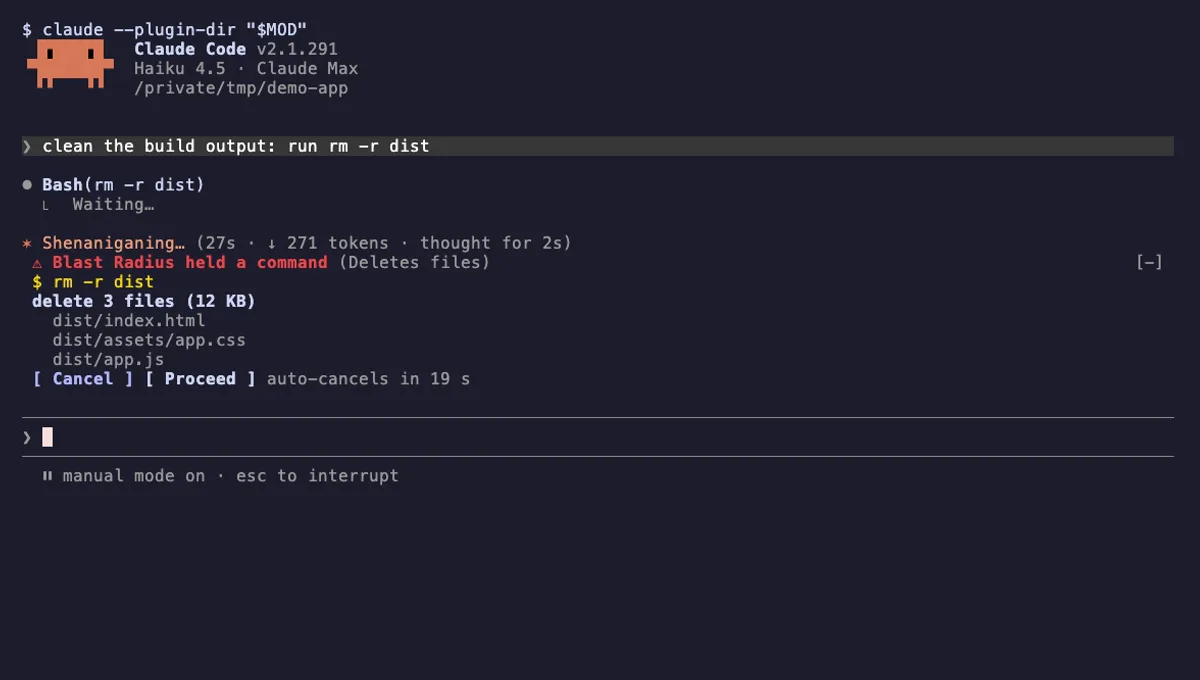
Blast Radius
Holds rm -r, force pushes and database migrations in Claude Code and shows what they would change before they run.
- pane
- above-prompt
- Runs commands
- Intercepts tool calls
- Changes the UI
tested with v2.1.291
 Featured
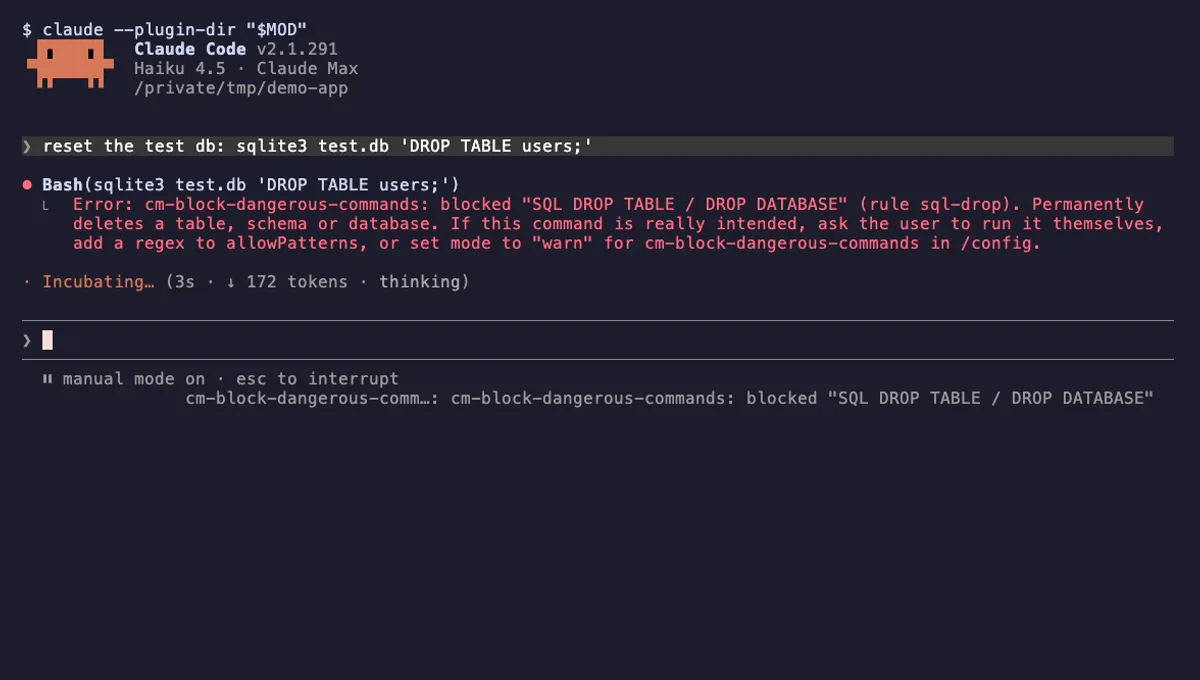
Block Dangerous Commands
Refuses rm -rf /, force-push to main, DROP TABLE, curl | sh and other destructive Bash commands before they run.
- toast
- Intercepts tool calls
- Changes the UI
tested with v2.1.310
More in Safety guards, Git & GitHub.