Time Machine: Claude Code undo changes turn by turn with git snapshots
Every turn that changes files becomes a git snapshot; /timeline puts the working tree back as it was before any turn.
Permissions
- Reads filesCan read files and list directories on your machine ($.fs.read / list / stat / exists).
- Runs commandsCan run shell programs on your machine ($.process.run / spawn). Check the source for exactly which ones.
- Intercepts tool callsSees every tool call Claude makes (tool.call / tool.check) and could block or change it.
- Reads your promptsCan see what you type and the conversation transcript (prompt.* / session.append / session.messages).
- Changes the UIDraws into the Claude Code interface: bands, panes, status text, toasts (ui.render / $.ui.*).
- Adds commands/toolsRegisters new slash commands or tools that you or Claude can invoke ($.command.register / $.tool.register).
- Stores dataKeeps data between sessions in the plugin's private store ($.store.*).
- tested with
- v2.1.310
- last tested
- requires
- Claude Code ≥ 2.1.287
- surfaces
- pane, toast
- source
- DiegoMarty (MIT)
Install inside Claude Code:
/plugin install time-machine --marketplace midudev/better-claudeWhat does this mod do?
Time Machine is a community mod from the better-claude collection by Miguel Ángel Durán (midudev); the plugin's manifest credits DiegoMarty as its author. It adds Claude Code undo changes support at the level of a whole turn. Every turn that changes files is saved as a git snapshot, and /timeline opens a pane that lists those states and moves the working tree to any of them and back.
The history works like an editor's undo tree. The states are the start of the session, the end of each turn that changed files, and any changes you made by hand between turns. A cursor marks which state the files are in. Going to another state moves the cursor and the files and adds no row, so branches are kept: go back, let Claude try another way, and the old way stays one Enter away, dimmed.
From the prompt you can also run /timeline <n> to go to state n, /timeline undo and /timeline redo. While a turn runs, its row shows at the top with a spinner and the files filling in. After one or more jumps, the mod adds one note to your next prompt telling Claude which files differ from how it left them.
Install
Use any of the methods in the install block; they install straight from the author's own marketplace. The /timeline command is registered when the next session starts, and it only works inside a git repository.
$ install time-machine-midudev
Requires Claude Code ≥ 2.1.287
Installs from the author's own marketplace: midudev/better-claude
1.One line, inside Claude Code
/plugin install time-machine --marketplace midudev/better-claudePaste into a running session (v2.1.275+). Claude Code asks to add the marketplace first.
2.From your shell
claude plugin marketplace add midudev/better-claude claude plugin install time-machine@better-claudeThen run /reload-plugins in any session that is already open.
3.Try it without installing
git clone https://github.com/midudev/better-claude claude --plugin-dir ./better-claude/plugins/time-machineLoads the mod for one session only. Nothing is added to your settings.
How it works
The mod is one hooks module, hooks/register.tsx, over plain modules in src/. Before the first tool call of a turn that may write, it stages the whole working tree into a private index and writes a tree object. At the end of the turn it does the same again, and if the tree differs, the turn becomes a state. From src/git.js:
export async function keep (run, repo, { tree, head }, ref, message) {
  const parent = head ? ['-p', head] : []
  const commit = await git(run, ['commit-tree', tree, ...parent, '-m', message], { cwd: repo.top, env: IDENTITY })
  await git(run, ['update-ref', ref, commit], { cwd: repo.top })
  return commit
}
A jump saves unsaved changes as a state, then runs git read-tree -m -u <now> <target>: files the target lacks are removed and the rest are written. It refuses when the move would overwrite an ignored file that no snapshot holds. src/tools.js and src/bash.js decide which calls may write: Read, Grep, Glob and similar tools do not, MCP tools named like get_ or list_ do not, and a Bash command is read-only only if every segment is a known looking command with no redirection or substitution.
Customize it
There is one option, Keep snapshots for (days), default 7, set from the plugin's configuration. Snapshots older than that are dropped when a session starts and git's next gc frees the space. To hide the snapshot commits from graph views, the README suggests git log --exclude='refs/time-machine/*' --all.
Permissions & safety
We read every file the plugin can execute before running anything: plugin.json, hooks/hooks.json, hooks/register.tsx, the four modules in src/ and the type declarations. There is no install script, no dependency, no bundled or minified code and no binary. Here is what we found:
- Runs commands (
$.process.run):git(rev-parse,add -A,write-tree,read-tree,commit-tree,update-ref,diff,check-ignore,ls-files,cat-file,rm --cached,for-each-ref), pluscp -nto seed its private index from the repository's, andrm -ffor its own index files. Each call is an argv array with no shell and a 120 second timeout. - Writes files: inside the repository's
.gitdirectory, the per-session index.git/time-machine-<session>.indexand the refs and objects of the snapshots. A jump rewrites tracked and untracked working-tree files, which is the feature. It does not touch~/.claude, settings, shell files, LaunchAgents or git hooks. Session state is kept in the plugin's$.store. - Network, telemetry, environment: none. The code has no fetch, sockets or
process.env, and reads no tokens. - Secrets in snapshots: a snapshot stores every file that
.gitignoredoes not match, untracked ones included. A secrets file that is not ignored stays in.gituntil its snapshot is pruned.git push --mirrorwould publish the snapshot refs, and so would anything else that pushes all refs. - Gating hooks:
tool.callruns a snapshot before a writing tool, then lets the tool through unchanged; if git fails, the tool still runs and a toast says the turn has no way back.prompt.submitappends one note to the prompt's context after a jump, a fixed text naming the differing files (at most 50).command.runhandles/timeline. All three have a.catchthat falls back to normal behavior. - Prompt injection: the only text added for the model is that note. We found no hidden Unicode and no instructions aimed at the model beyond "read a file again before editing it".
- No daemons: nothing runs after Claude Code exits; the session index is removed at
session.end, and leftovers of crashed sessions are cleaned up later. - License: MIT, with a LICENSE file in the repository root.
claude plugin validate passed with no errors or warnings in the plugin itself, and the directory check only noted a missing icon. ui.focus and ui.close hooks have no .catch, which the validator lists as a note. The author's 54 tests passed with claude plugin test on Claude Code 2.1.310.
- Reads files
- Can read files and list directories on your machine ($.fs.read / list / stat / exists).
- Runs commands
- Can run shell programs on your machine ($.process.run / spawn). Check the source for exactly which ones.
- Intercepts tool calls
- Sees every tool call Claude makes (tool.call / tool.check) and could block or change it.
- Reads your prompts
- Can see what you type and the conversation transcript (prompt.* / session.append / session.messages).
- Changes the UI
- Draws into the Claude Code interface: bands, panes, status text, toasts (ui.render / $.ui.*).
- Adds commands/tools
- Registers new slash commands or tools that you or Claude can invoke ($.command.register / $.tool.register).
- Stores data
- Keeps data between sessions in the plugin's private store ($.store.*).
Compatibility & troubleshooting
Checked with Claude Code 2.1.310 on macOS (validate and tests). If /timeline shows nothing:
- You are inside a git repository; elsewhere it says "this folder is not a git repository" and snapshots nothing.
- A turn has already changed files. A turn that only reads, or whose tools leave the files as they were, adds no state.
- A jump says "a turn is running" or "a tool is still changing files": wait for it to end.
- A jump says it would write over ignored files: move those files away and try again.
- HEAD moved since the state (a commit or checkout): the files go back, HEAD and the branch do not, and
git statusshows the difference. - A large untracked file that is not ignored makes
.gitgrow until its snapshot is dropped.
FAQ
- Does Time Machine change my git history, branches or staging area?
- No. Snapshots are commits that no branch points at, kept under refs/time-machine/<session>/<n>, and they are built in an index of their own at .git/time-machine-<session>.index. A jump moves files only, never HEAD. The one visible effect is that git log --all and graph tools show the snapshot commits.
- Can it undo what Bash did, such as a formatter or rm?
- Yes, that is the point of snapshotting the whole working tree. Edit, Write, NotebookEdit and any Bash command that is not clearly read-only take a snapshot before they run. A command like ls, grep or git status takes none, and when the mod is unsure it snapshots.
- What happens to files I changed by hand before a jump?
- They are saved as their own state first ("your changes, kept before a jump"), so a jump needs no confirmation and you can come back to them with undo or redo. A jump also waits for the running turn to end and refuses while a tool is still writing.
- Are secrets in my project copied into the snapshots?
- Files that .gitignore matches are neither saved nor restored. A secrets file that is not ignored, such as .env.local, is saved in .git like any other untracked file until its snapshot is pruned, so add it to .gitignore before the session starts.
- How is it different from Claude Code's own rewind?
- Claude Code's checkpoints rewind the edits made by its file tools. Time Machine snapshots the whole working tree with git, so it also covers Bash changes, and its snapshots survive across sessions for seven days by default. The two work side by side.
# Related mods
 Featured
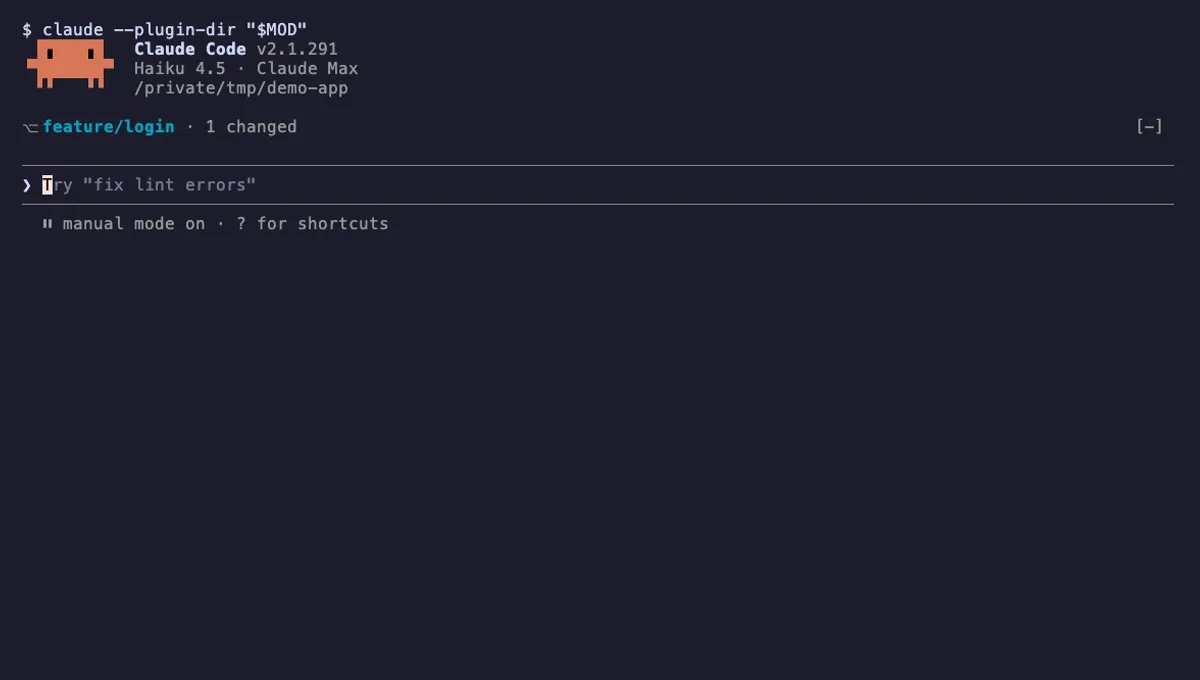
Git Branch Above Prompt
Shows your git branch, changed-file count and ahead/behind status in a one-line band above the Claude Code prompt.
- above-prompt
- Runs commands
- Intercepts tool calls
- Changes the UI
tested with v2.1.310
 Featured
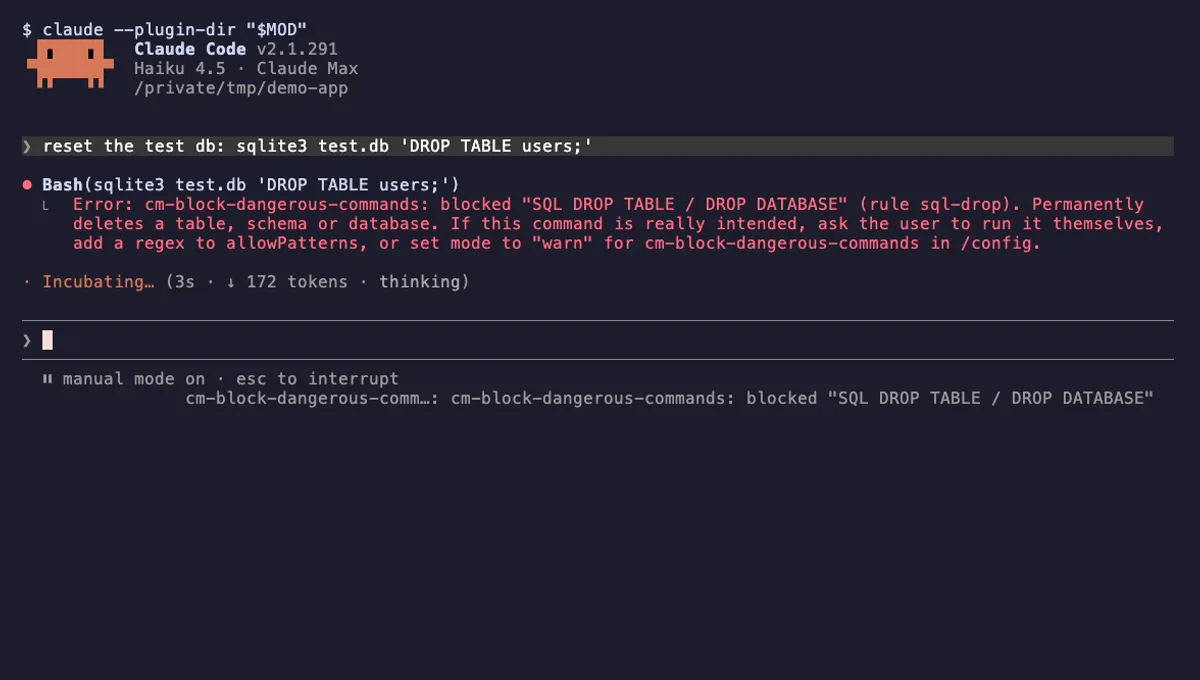
Block Dangerous Commands
Refuses rm -rf /, force-push to main, DROP TABLE, curl | sh and other destructive Bash commands before they run.
- toast
- Intercepts tool calls
- Changes the UI
tested with v2.1.310
More in Safety guards, Git & GitHub, Slash commands.