Dependency Lens Claude Code mod: a Claude Code dependency lens for npm changes
Compare package.json and package-lock.json with a Git ref and see direct, transitive and install-script changes.
Permissions
- Reads filesCan read files and list directories on your machine ($.fs.read / list / stat / exists).
- Runs commandsCan run shell programs on your machine ($.process.run / spawn). Check the source for exactly which ones.
- Intercepts tool callsSees every tool call Claude makes (tool.call / tool.check) and could block or change it.
- Changes the UIDraws into the Claude Code interface: bands, panes, status text, toasts (ui.render / $.ui.*).
- Adds commands/toolsRegisters new slash commands or tools that you or Claude can invoke ($.command.register / $.tool.register).
- Stores dataKeeps data between sessions in the plugin's private store ($.store.*).
- tested with
- v2.1.310
- last tested
- requires
- Claude Code ≥ 2.1.287
- surfaces
- none
- source
- YeonwooSung (Apache-2.0)
Install inside Claude Code:
/plugin install dependency-lens --marketplace YeonwooSung/my-claude-code-modsWhat does this mod do?
Dependency Lens is a community mod by YeonwooSung (YeonwooSung), one of the plugins in the my-claude-code-mods collection. It is a Claude Code dependency lens for npm projects: after a session, or before a commit, you run one command and see which dependencies changed since a Git revision, without leaving Claude Code and without installing anything.
Everything goes through the /deps command:
/depscompares the workingpackage.jsonandpackage-lock.jsonwith the same files atHEAD./deps base <git-ref>picks another revision, for example/deps base HEAD~1or/deps base main. The ref is remembered for the folder and session./deps listprints the report again with the current base, and/deps resetreturns the base toHEAD./deps helpprints the usage line.
The report is plain text returned to you as the command's answer, so it also works in headless sessions. The mod draws nothing on screen. According to the code, the lines look like this:
DIRECT <section> <name>: old -> newfor changes independencies,devDependencies,peerDependenciesandoptionalDependencies.LIFECYCLE <name>: added | removed | changedwhen the project's ownpreinstall,installorpostinstallscript changes.DIRECT-LOCKandTRANSITIVElines withADDED,REMOVEDorCHANGEDfor each lockfile package, plus aLock delta: +N -N ~Nsummary on top.INSTALL-SCRIPT <path>after any lockfile entry that hashasInstallScript: true.
Install
Use any of the methods in the install block; they install straight from the author's own marketplace. Reload plugins or restart Claude Code, then run /deps help. Run /deps from the repository root, because the files are read from the session's working directory.
$ install dependency-lens
Requires Claude Code ≥ 2.1.287
Installs from the author's own marketplace: YeonwooSung/my-claude-code-mods
1.One line, inside Claude Code
/plugin install dependency-lens --marketplace YeonwooSung/my-claude-code-modsPaste into a running session (v2.1.275+). Claude Code asks to add the marketplace first.
2.From your shell
claude plugin marketplace add YeonwooSung/my-claude-code-mods claude plugin install dependency-lens@my-claude-code-modsThen run /reload-plugins in any session that is already open.
3.Try it without installing
git clone https://github.com/YeonwooSung/my-claude-code-mods claude --plugin-dir ./my-claude-code-mods/dependency-lensLoads the mod for one session only. Nothing is added to your settings.
How it works
The logic is a small Feature class in hooks/core/feature.ts, and hooks/register.ts connects it to the /deps command and saves the chosen base with $.store. For each side, the mod asks Git for the file at the base ref (git ls-tree, then git show <ref>:<file>) and reads the working copy through $.fs.read. The part that flags the project's own install scripts is, from feature.ts:
const aScripts = object(before.scripts), bScripts = object(after.scripts)
for (const name of ['preinstall', 'install', 'postinstall']) if (aScripts[name] !== bScripts[name]) lines.push(`LIFECYCLE ${name}: ${aScripts[name] === undefined ? 'added' : bScripts[name] === undefined ? 'removed' : 'changed'}`)
Lockfile entries are compared after their keys are sorted, so a change in key order alone produces no delta. A path that matches a name in node_modules/<name> from the manifest sections is reported as DIRECT-LOCK; everything else is TRANSITIVE. Commands run through a queue, so two never write at once. The storage key combines the working directory and the session ID, and if either changed while a command was running, the command is dropped with "Session changed; operation not applied".
Failures are reported instead of hidden. A bad ref, a Git error, malformed JSON, a file that cannot be read or output over 2 MiB produces an INCOMPLETE: line rather than an empty, clean-looking report.
Customize it
There are no options in /config. The one setting is the base ref, set with /deps base <git-ref>; the ref must match [A-Za-z0-9_][A-Za-z0-9_./~^{}@-]{0,199}. The limits (2 MiB per file, 200 report lines, the 10-second Git timeout) are constants in hooks/core/feature.ts, hooks/core/runtime.ts and hooks/register.ts if you want to edit a local copy.
Permissions & safety
We read every file the plugin can execute before running it: plugin.json, hooks/hooks.json, hooks/register.ts, the three files in hooks/core/, the tests, and the README. There is no package.json inside the plugin, no install script and no bundled or minified code. The plugin folder is about a dozen small files, all readable.
- Network: none. We found no
fetch, HTTP or socket code, and the README says there are no HTTP requests. No telemetry. - Processes:
$.process.runis wrapped inregister.ts(lines 19 to 22) so that onlygitis accepted; any other program throws. The calls aregit rev-parse --verify <ref>^{commit},git ls-tree -z --name-only <ref> -- <file>andgit show <ref>:<file>, as an argument array with no shell and a 10-second timeout. All three are read-only. - Files read:
package.jsonandpackage-lock.jsonin the working directory, plus a directory listing of that folder when a read fails, to tell a missing file from an unreadable one. Each is limited to 2 MiB. - Stores data: the chosen base ref goes to the plugin's
$.store, keyed by folder and session. The mod writes no files, and it does not touch~/.claude,settings.json, shell files, LaunchAgents or any daemon. - Tool-call hook:
claude plugin validatereports thetool.callandcommand.runhooks as gating hooks without a.catch. The tool hook only observes when theFeatureclass has anobservemethod (register.ts:9). This one has none, so the hook returnsnext(e)untouched and never blocks or rewrites a call. Thecommand.runhook answers only/deps, and wraps its work in atry/catchthat returns the error text. - Model influence: the mod does not add anything to prompts or tool results, and we found no hidden or zero-width characters. Its output goes to you as command text. If you paste a report back to Claude, Claude will read it, including any package names in it.
- Secrets: it reads no environment variables or credential files. Report text is cleaned by
safeText, which strips terminal escape codes and masks obvious secrets on a best-effort basis (core/redact.ts). A package name or version is not a secret, so this mostly matters for odd manifest values. - External requirements: a
gitexecutable and a Git repository with the base ref. The comparison is npm-only. - License: Apache-2.0, with a
LICENSEfile at the repository root (Copyright 2026 Yeonwoo Sung), so the mod is redistributable. The plugin folder has none of its own.
claude plugin validate reported no errors or warnings for the manifest and the hooks, and its directory check only noted that hooks modules follow rules it does not apply. The author's 9 tests (2 for the adapter, 7 for the comparison) passed on Claude Code 2.1.310. The README says live terminal and Desktop displays have not been checked.
- Reads files
- Can read files and list directories on your machine ($.fs.read / list / stat / exists).
- Runs commands
- Can run shell programs on your machine ($.process.run / spawn). Check the source for exactly which ones.
- Intercepts tool calls
- Sees every tool call Claude makes (tool.call / tool.check) and could block or change it.
- Changes the UI
- Draws into the Claude Code interface: bands, panes, status text, toasts (ui.render / $.ui.*).
- Adds commands/tools
- Registers new slash commands or tools that you or Claude can invoke ($.command.register / $.tool.register).
- Stores data
- Keeps data between sessions in the plugin's private store ($.store.*).
Compatibility & troubleshooting
We ran the validator and the tests on Claude Code 2.1.310 on macOS. The author says their own tests ran on 2.1.302. If /deps does not respond or looks wrong:
- Run
/reload-pluginsor restart Claude Code after installing; the command is registered at session start. INCOMPLETE: npm package-lock v2/v3 required on both sides; manifest comparison onlymeans a lockfile is missing, on either side, or is not an npm v2 or v3 file. Only the manifest sections and install-script entries are compared then.Invalid Git base refmeans the ref has characters outside the allowed pattern;INCOMPLETE: Git evidence unavailable or incompleteusually means the ref does not exist or the folder is not a repository.package.json unavailable on both sidesmeans you are not in the project root.- Install-script markers are metadata. A flagged package is not necessarily harmful, and an unflagged one is not proven safe.
To check that it works, change a version in package.json of a Git project, run npm install --package-lock-only yourself, then run /deps. You should see a DIRECT line for the package and a Lock delta summary.
FAQ
- Does /deps install packages or contact the npm registry?
- No. The command text says it never installs packages, and the README lists no HTTP requests. The only program it launches is git, and only to read local history. It also reads package.json and package-lock.json from your working directory.
- Which lockfiles does it understand?
- Only npm package-lock.json with lockfileVersion 2 or 3. If either side is missing or uses another format, the report says "INCOMPLETE" and falls back to comparing package.json alone. Yarn, pnpm and Bun lockfiles are not read.
- What does an INSTALL-SCRIPT line mean?
- It marks a lockfile entry whose hasInstallScript flag is true, meaning that package declares a preinstall, install or postinstall script. The report itself says these markers are metadata, not a security verdict, so you still have to look at the package.
- Which Git revision does it compare against?
- HEAD by default. Run /deps base followed by a ref, such as HEAD~1 or a branch name, to compare against that instead. The ref is checked against a strict pattern first, and the choice is remembered for the folder and session.
- How long can a report be?
- A list is cut at 200 lines and ends with a note that the report was limited to 200 entries. Each JSON file and each Git output must stay under 2 MiB, otherwise the report is marked incomplete rather than presented as a clean comparison.
# Related mods
Assumption Tracker
Log claims with /assume, then confirm or refute each one with written evidence; the history is kept per session.
- none
- Reads files
- Runs commands
- Intercepts tool calls
- Changes the UI
- Adds commands/tools
- Stores data
tested with v2.1.307
 Featured
Blast Radius
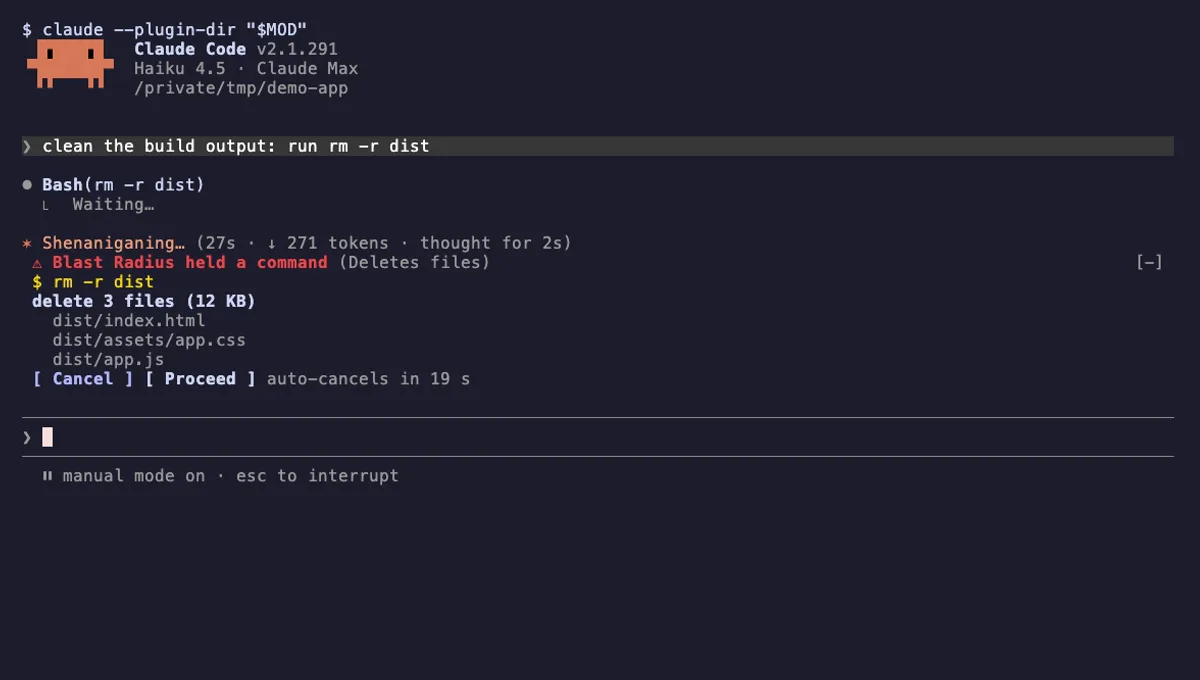
Holds rm -r, force pushes and database migrations in Claude Code and shows what they would change before they run.
- pane
- above-prompt
- Runs commands
- Intercepts tool calls
- Changes the UI
tested with v2.1.291
 Featured
Time Machine
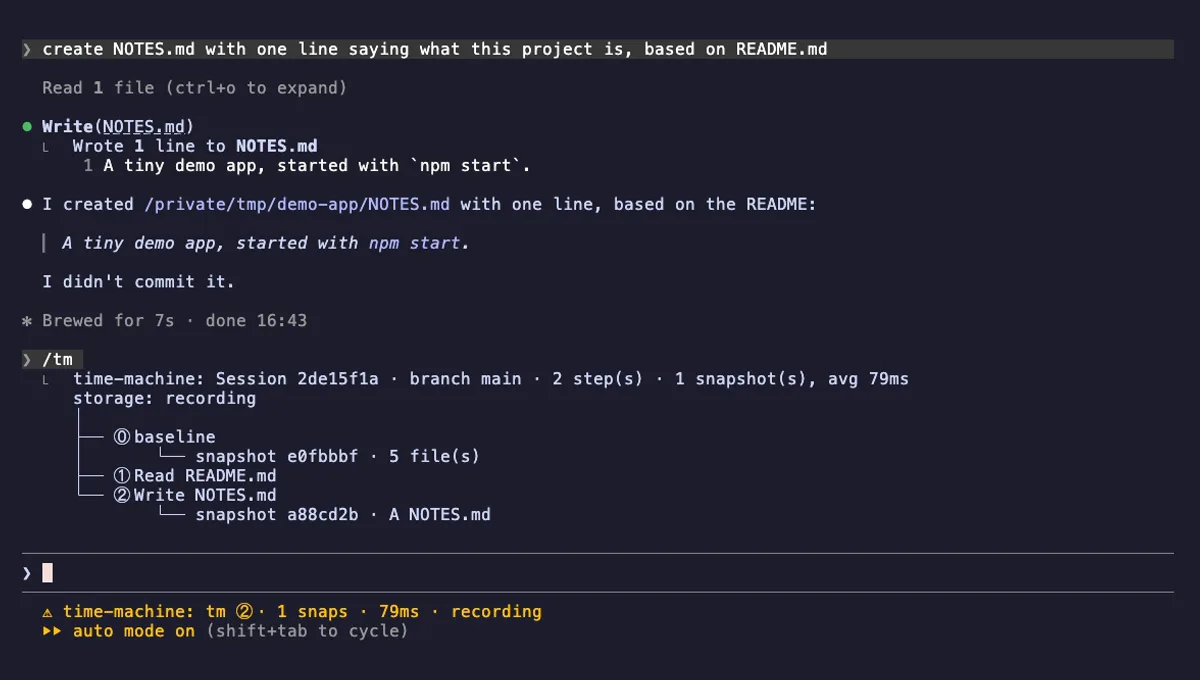
A branching timeline of every tool call, with shadow-git snapshots you can diff, restore, branch and rerun.
- status
- pane
- Reads files
- Writes files
- Runs commands
- Intercepts tool calls
- Reads your prompts
- Changes the UI
- Adds commands/tools
- Stores data
tested with v2.1.303
More in Slash commands, Timers, todos, standups.